







Question: Please help! b) The macro code should LOOP through the range N4:N8, examine the current number (column N), determine the number's relation to zero (IF
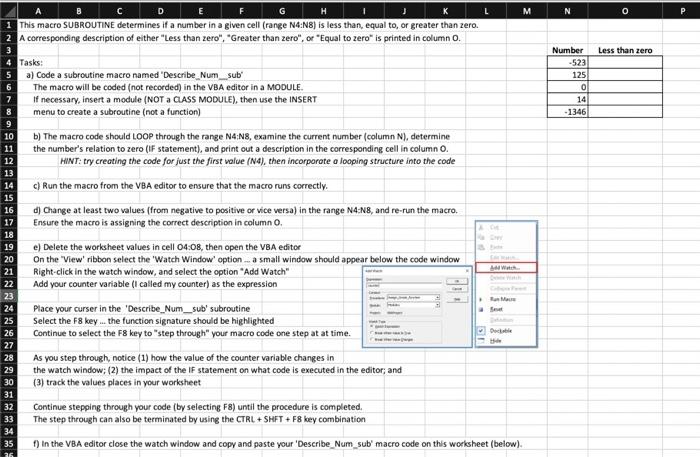
b) The macro code should LOOP through the range N4:N8, examine the current number (column N), determine the number's relation to zero (IF statement), and print out a description in the corresponding cell in column O. HINT: try creating the code for just the first value (N4), then incorporote a looping structure into the cade c) Run the macro from the VBA editor to ensure that the macro runs correctly. As you step through, notice (1) how the value of the counter variable changes in the watch window; (2) the impact of the If statement on what code is executed in the editor; and (3) track the values places in your worksheet Continue stepping through your code (by selecting F ) until the procedure is completed. The step through can also be terminated by using the CTRL + SHFT + F8 key combination f) In the VBA editor close the watch window and copy and paste your 'Describe_Num_sub' macro code on this worksheet (below). b) The macro code should LOOP through the range N4:N8, examine the current number (column N), determine the number's relation to zero (IF statement), and print out a description in the corresponding cell in column O. HINT: try creating the code for just the first value (N4), then incorporote a looping structure into the cade c) Run the macro from the VBA editor to ensure that the macro runs correctly. As you step through, notice (1) how the value of the counter variable changes in the watch window; (2) the impact of the If statement on what code is executed in the editor; and (3) track the values places in your worksheet Continue stepping through your code (by selecting F ) until the procedure is completed. The step through can also be terminated by using the CTRL + SHFT + F8 key combination f) In the VBA editor close the watch window and copy and paste your 'Describe_Num_sub' macro code on this worksheet (below)
Step by Step Solution
There are 3 Steps involved in it

Get step-by-step solutions from verified subject matter experts
 Study Help