







Question: Please help!! Create a subreutine (orocedure) named Range_fir The subroutine should first declare two variables, each of type integer. The first yariable should store the
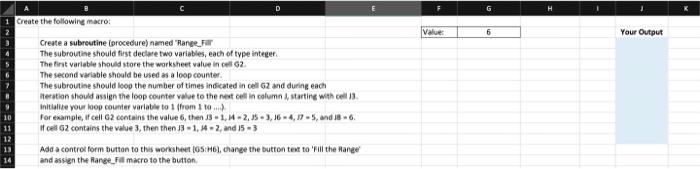
Create a subreutine (orocedure) named "Range_fir The subroutine should first declare two variables, each of type integer. The first yariable should store the worksheet value in 6 ill 662. The second variable should be used as a loop counter. The subroutine should lsop the number of times indicated in cell 62 and during each iteration should assign the loop counter value to the neat cell in column k1 starting with cell i3. initialize wour leop counter variable to 1 (from 1 to mil. for example, If cell 62 contains the value 6 , then 13=1,M=2,15+3,16=4,D=5, and 18=6. If cell 62 contains the value 3 , then then 13=1, 14=2, and 15=3 Add a controd form button to this worksheet \{0S:H6\}, change the button text to 'fili the Hanee' and assign the fange_fill macro to the button. Create a subreutine (orocedure) named "Range_fir The subroutine should first declare two variables, each of type integer. The first yariable should store the worksheet value in 6 ill 662. The second variable should be used as a loop counter. The subroutine should lsop the number of times indicated in cell 62 and during each iteration should assign the loop counter value to the neat cell in column k1 starting with cell i3. initialize wour leop counter variable to 1 (from 1 to mil. for example, If cell 62 contains the value 6 , then 13=1,M=2,15+3,16=4,D=5, and 18=6. If cell 62 contains the value 3 , then then 13=1, 14=2, and 15=3 Add a controd form button to this worksheet \{0S:H6\}, change the button text to 'fili the Hanee' and assign the fange_fill macro to the button
Step by Step Solution
There are 3 Steps involved in it

Get step-by-step solutions from verified subject matter experts
 Study Help