







Question: please help! here you are, sorry about that i dont know the equations to fill the chart 14. Use the data in the Loan Worksheet
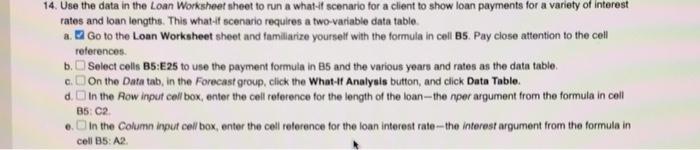
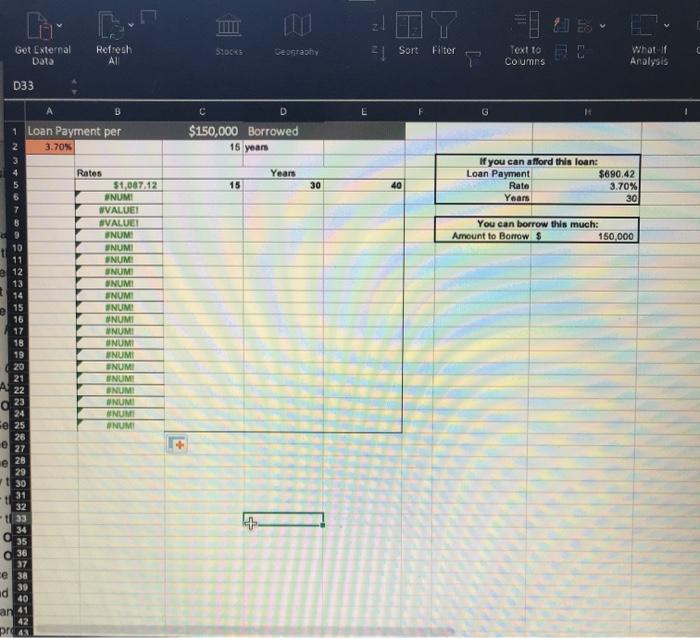
14. Use the data in the Loan Worksheet sheet to run a what-it scenario for a client to show loan payments for a variety of interest rates and loan lengths. This what-it scenario requires a two variable data table a. Go to the Loan Worksheet sheet and familiarize yourself with the formula in coll Bs. Pay close attention to the cell references b.Select cells B5:E25 to use the payment formula in 85 and the various years and rates as the data table c. On the Data tab, in the Forecast group, click the What It Analysis button and click Data Tablo. d. In the Row input cell box, enter the cell reference for the length of the loan-the per argument from the formula in coll e. In the Column input cell box, enter the cell reference for the loan interest rate-the interest argument from the formula in B5: C2 cell 35: A2 Get External Data Refresh AI SHOCK | Sort Filter Text to EE T What if Analysis Columns D33 B G 1 Loan Payment per 3.70% C D $150,000 Borrowed 15 years Years If you can afford this loan: Loan Payment $690,42 Rate 3.70% Years 30 15 30 40 You can borrow this much: Amount to Borrow $ 150.000 11 12 13 14 15 16 17 18 19 20 21 Rates $1,087.12 ENUMI UVALUEI #VALUE! ONUM UNUMI INUM INUM UNUM INUM NUM! NUMI UNUMI UNUMI SNUMI NUMI INUMI ENUMI WNUM UNUM NUMI A 22 0 23 24 e 25 26 27 28 29 30 31 tu 32 33 36 37 e 38 39 id 40 an 41 pro 14. Use the data in the Loan Worksheet sheet to run a what-it scenario for a client to show loan payments for a variety of interest rates and loan lengths. This what-it scenario requires a two variable data table a. Go to the Loan Worksheet sheet and familiarize yourself with the formula in coll Bs. Pay close attention to the cell references b.Select cells B5:E25 to use the payment formula in 85 and the various years and rates as the data table c. On the Data tab, in the Forecast group, click the What It Analysis button and click Data Tablo. d. In the Row input cell box, enter the cell reference for the length of the loan-the per argument from the formula in coll e. In the Column input cell box, enter the cell reference for the loan interest rate-the interest argument from the formula in B5: C2 cell 35: A2 Get External Data Refresh AI SHOCK | Sort Filter Text to EE T What if Analysis Columns D33 B G 1 Loan Payment per 3.70% C D $150,000 Borrowed 15 years Years If you can afford this loan: Loan Payment $690,42 Rate 3.70% Years 30 15 30 40 You can borrow this much: Amount to Borrow $ 150.000 11 12 13 14 15 16 17 18 19 20 21 Rates $1,087.12 ENUMI UVALUEI #VALUE! ONUM UNUMI INUM INUM UNUM INUM NUM! NUMI UNUMI UNUMI SNUMI NUMI INUMI ENUMI WNUM UNUM NUMI A 22 0 23 24 e 25 26 27 28 29 30 31 tu 32 33 36 37 e 38 39 id 40 an 41 pro
Step by Step Solution
There are 3 Steps involved in it

Get step-by-step solutions from verified subject matter experts
 Study Help