







Question: PLEASE HELP I have to submit this assignment soon in about 4 hours, help me please to do it please very soon cuz I have
PLEASE HELP
I have to submit this assignment soon in about 4 hours, help me please to do it please very soon cuz I have to check my work and record the screen and submit it then.
thanks in advance.
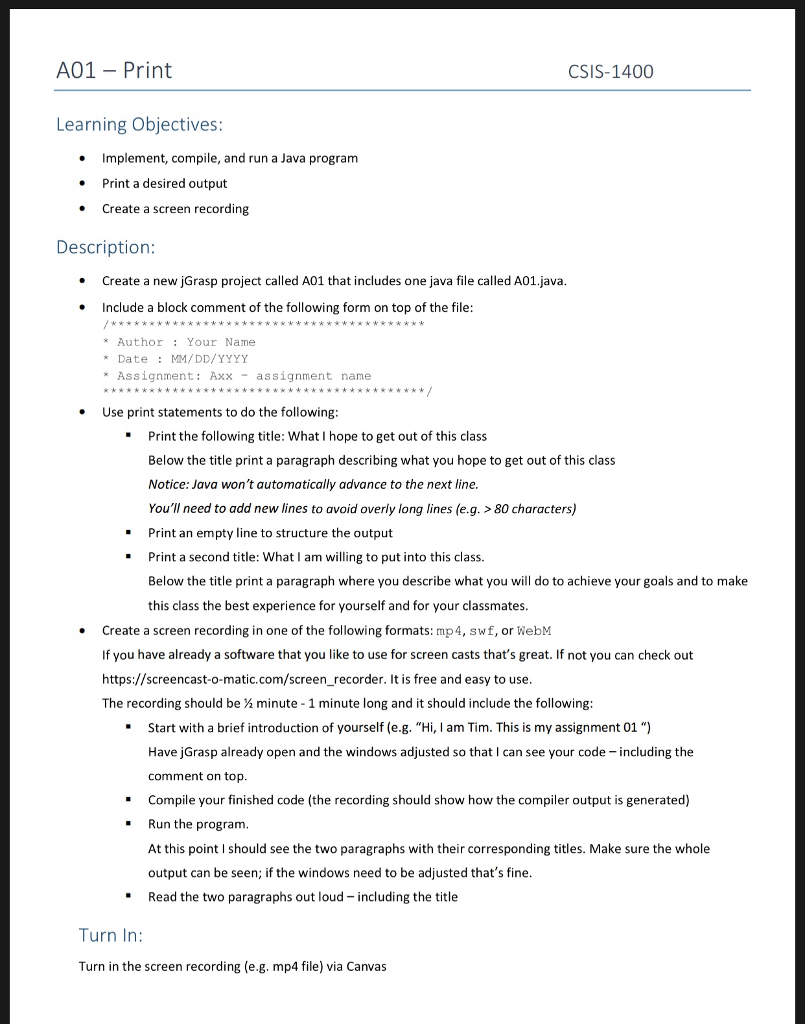
A01 Print CSIS-1400 Learning Objectives Implement, compile, and run a Java program Print a desired output Create a screen recording . Description Create a new jGrasp project called A01 that includes one java file called A01.java Include a block comment of the following form on top of the file: /**kwtwwww * w*w*wwwk*w * AuthorYour Name * Date MM/DD/YYYY Assignment: Axxassignment name . Use print statements to do the following Print the following title: What I hope to get out of this class Below the title print a paragraph describing what you hope to get out of this class Notice: Java won't automatically advance to the next line You'll need to add new lines to avoid overly long lines (e.g. >80 characters) - Print an empty line to structure the output - Print a second title: What I am willing to put into this class. Below the title print a paragraph where you describe what you will do to achieve your goals and to make this class the best experience for yourself and for your classmates. Create a screen recording in one of the following formats: mp4, swf, or WebM If you have already a software that you like to use for screen casts that's great. If not you can check out https://screencast-o-matic.com/screen_recorder. It is free and easy to use The recording should be minute 1 minute long and it should include the following: -Start with a brief introduction of yourself (e.g. "Hi, I am Tim. This is my assignment 01 ") Have jGrasp already open and the windows adjusted so that I can see your code-including the comment on top -Compile your finished code (the recording should show how the compiler output is generated) - Run the program At this point I should see the two paragraphs with their corresponding titles. Make sure the whole output can be seen; if the windows need to be adjusted that's fine Read the two paragraphs out loud - including the title ' Turn In: Turn in the screen recording (e.g. mp4 file) via Canvas
Step by Step Solution
There are 3 Steps involved in it

Get step-by-step solutions from verified subject matter experts
 Study Help