







Question: Please Help ! in Kali Linux Using redirection or the screenshot tool depending on the capture the following information to the respective file for submission
Please Help ! in Kali Linux 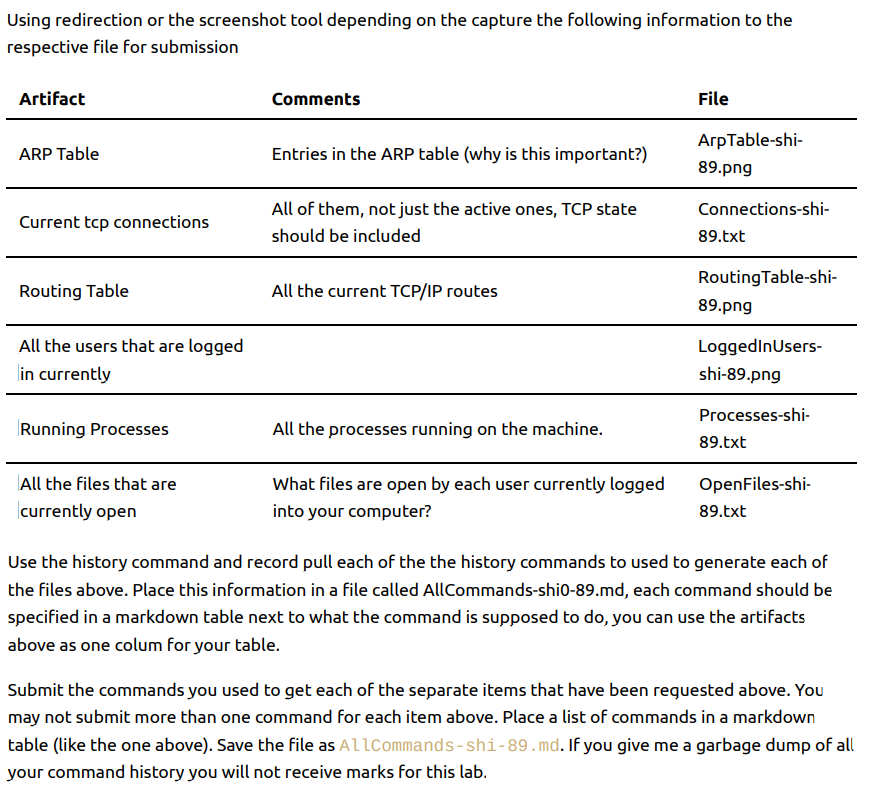
Using redirection or the screenshot tool depending on the capture the following information to the respective file for submission Use the history command and record pull each of the the history commands to used to generate each of the files above. Place this information in a file called AllCommands-shi0-89.md, each command should be specified in a markdown table next to what the command is supposed to do, you can use the artifacts above as one colum for your table. Submit the commands you used to get each of the separate items that have been requested above. You may not submit more than one command for each item above. Place a list of commands in a markdown table (like the one above). Save the file as A L.command s - shi - 89.md. If you give me a garbage dump of all your command history you will not receive marks for this lab
Step by Step Solution
There are 3 Steps involved in it

Get step-by-step solutions from verified subject matter experts
 Study Help