







Question: please help ! instructions In Python, create a simple chatbot. Your chatbot should welcome and introduce itself, ask for the user's name, and say hello.
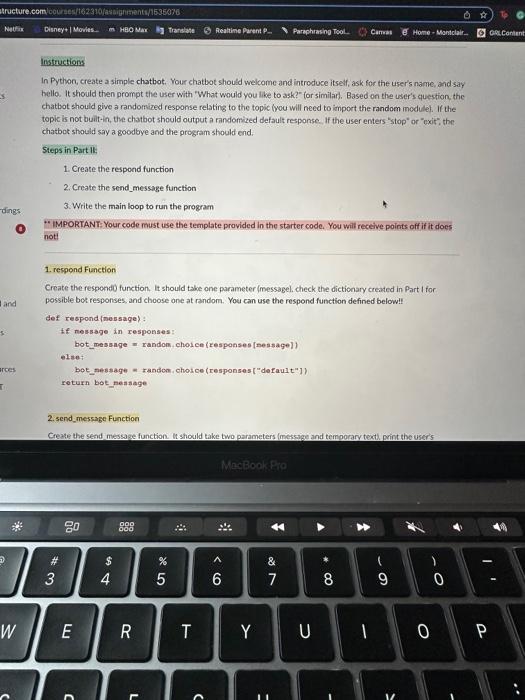
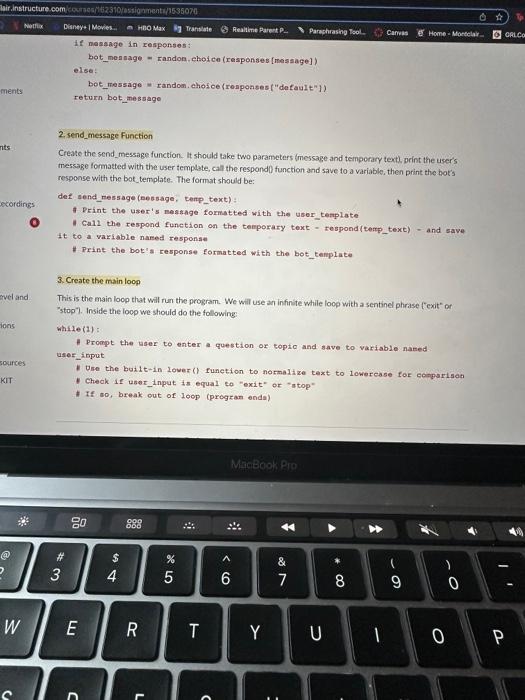
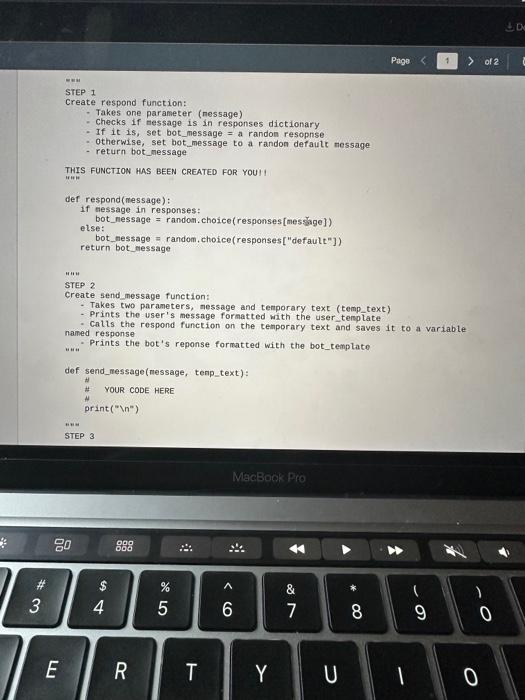
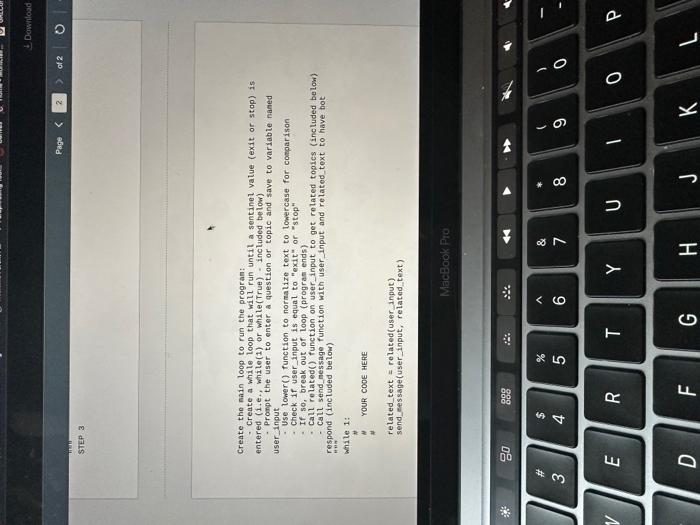
instructions In Python, create a simple chatbot. Your chatbot should welcome and introduce itself, ask for the user's name, and say hello. It should then prompt the user with "What would you like to ask?" for similar). Based on the user's question, the chatbot should give a randomized response relating to the topic loou will need to import the random incdulel. If the topic is not built-in, the chatbot should output a randomized default response. If the user enters "stop" or "exit"; the chatbot should say a goodbye and the program should end. Steps in Part II: 1. Create the respond function 2. Create the send_message function 3. Write the main loop to run the program *" IMPORTANT: Your code must use the template provided in the starter code. You will receive points off if it does not! 1. rerpond Function Create the respond0 function. It should tabe one parameter imessagel. check the dictionary created in Part I for. possible bot responses, and choose one at random. You can use the respond function defined below!! def respond \{nes sage\} : if nessage in responses: bot_message = randon, cholee (responses[nessage]) else; bet_nesseage = randen, chosce (responses ["derault"]) ceturn bot_neasage 2. send_message Function If nanagge in responses: bot mennage = randon, ehoi ce (responses [mesaage]) elise: bet_message = randon, chosce(ronpoases ( "default" 1) return bot_message 2. send_message Function Create the send_message function. It should take two parameters imessage and temporary textl, print the user's Inessage formatted with the user template, call the respondl function and save to a variable, then print the hot's response with the bot template. The format should be: def send_ressage (nessage, Eenp_text) : f. Print the user's neasnge formatted with the user tenplate 1 Call the respond function on the temporary text - respond(terp__text) = and save it to a variable nared responae \# Print the bot's response formatted with the bot_tenplate 3. Create the main loop This is the main loop that will run the program. We will use an infinite while loop with a sentinel phrase ["exit" of "stop"). Inside the loop we should do the following: while (1) : - Prompt the user to enter a question or topto and anve to variable named: user_input 1 Dee the built-in lower() function to normalize text to lowercase for cemparisan 1 Check if user_input is equal to "exit" or "ntop" I If oo, break out of loop (progran enda) STEP I Create respond function: - Takes one parameter (nessage) - Checks if nessage is in responses dictionary - If it 1s, set bot_message = a randon resopnse - otherwise, set bot_message to a randon default message - return bot_message THIS FUNCTION HAS BEEN CREATED FOR YOUII def respond(message): if message in responses: bot_nessage = random. choice(responses [mesige]) else: bot, nessage = random, choice(responses ["defautt"]) return bot message STEP 2 Create send message function: - Takes two parameters, message and tenporary text (temp_text) - Prints the user's message formatted with the user,tenplate - Calls the respond function on the tenporary text and saves it to a variable named response uun "Prints the bot's reponse formatted with the bot_templato def send_nessage(nessage, tenp_text): \# YOUR CODE HERE print (" ) STEP 3 Create the nain loop to run the progran: - Create a white loop that will run until a sentinel value (exit or stap) is entered (1.e,, while(1) or while(True) = included below) - Pronpt the user to enter a question or topic and save to variable naned user_input - Use lower(? function to normalize toxt to lowercase for conparison - Check if user_input is equal to "exit" or "stop" - If so, break out of loop (progran ends) - Call related() function on user_input to get rolated topics (included below) - Call send_message function with user_input and related_text to haye bot respond (included below) Hen While 1 : N YOUR COOE HERE related text = related (oser input) send_message(user_input, related text)
Step by Step Solution
There are 3 Steps involved in it

Get step-by-step solutions from verified subject matter experts
 Study Help