







Question: Please Help make corrections: GIven: Breadboard, Arduino,ultrasonic sensor, potentiometer, 3 red leds, 1 green. lcd moniter, temperature sensor, Photoresistor, 1- 10kohm reistor for photoresistor, 4
Please Help make corrections:
GIven:
Breadboard, Arduino,ultrasonic sensor, potentiometer, 3 red leds, 1 green. lcd moniter, temperature sensor, Photoresistor, 1- 10kohm reistor for photoresistor, 4 220ohm resistors for led lights
Objective:
Use Green LED with variable brightness as a function of ultrasonic sensor reading. 3 RED led as a warning indicator if sensors exceed a certain threshold. an application to include potentiometer, temperature sensor and photoreisistor. use the LCD1602 to display the measured values in a proper sequence and display all measured values on the PC monitor using serial communication.
My diagram:
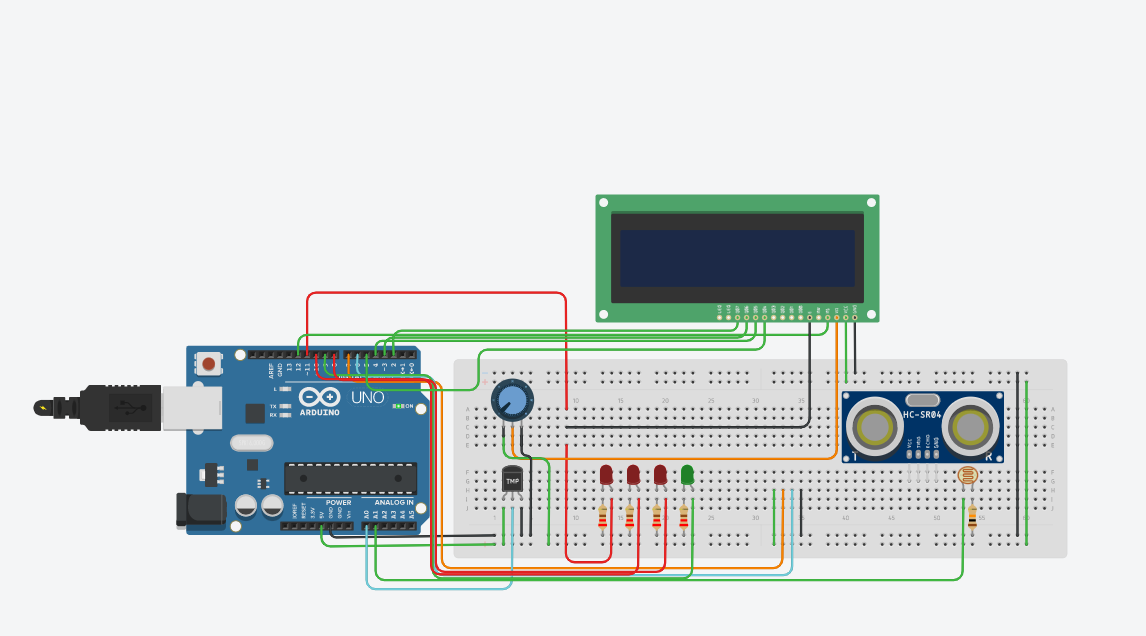
My code:
#include
LiquidCrystal lcd(12, 11, 5, 4, 3, 2);
const int trigPin = 9; const int echoPin = 10; const int greenLedPin = 6; const int redLed1Pin = 7; const int redLed2Pin = 8; const int redLed3Pin = 13; const int photoresistorPin = A0; const int thresholdValue = 50;
int buzzerPin = 14;
void setup() { lcd.begin(16, 2); pinMode(trigPin, OUTPUT); pinMode(echoPin, INPUT); pinMode(greenLedPin, OUTPUT); pinMode(redLed1Pin, OUTPUT); pinMode(redLed2Pin, OUTPUT); pinMode(redLed3Pin, OUTPUT); pinMode(photoresistorPin, INPUT); pinMode(buzzerPin, OUTPUT); }
void loop() { float duration, distance, temperature, photoresistorValue;
digitalWrite(trigPin, LOW); delayMicroseconds(2);
digitalWrite(trigPin, HIGH); delayMicroseconds(10);
digitalWrite(trigPin, LOW); duration = pulseIn(echoPin, HIGH);
distance = duration * 0.034 / 2;
temperature = analogRead(A1) * 0.48828125;
photoresistorValue = analogRead(photoresistorPin);
int brightness = map(photoresistorValue, 0, 1023, 0, 255); analogWrite(greenLedPin, brightness);
lcd.setCursor(0, 0); lcd.print("Distance: "); lcd.print(distance); lcd.print(" cm");
lcd.setCursor(0, 1); lcd.print("Temp: "); lcd.print(temperature); lcd.print(" C");
if (distance > 30) { digitalWrite(greenLedPin, HIGH); } else { digitalWrite(greenLedPin, LOW); }
if (distance > thresholdValue) { digitalWrite(redLed1Pin, LOW); digitalWrite(redLed2Pin, LOW); digitalWrite(redLed3Pin, LOW); noTone(buzzerPin); } else if (distance > thresholdValue/2) { digitalWrite(redLed1Pin, HIGH); digitalWrite(redLed2Pin, LOW); digitalWrite(redLed3Pin, LOW); tone(buzzerPin, 1000, 500); } else if (distance > thresholdValue/3) { digitalWrite(redLed1Pin, HIGH); digitalWrite(redLed2Pin, HIGH); digitalWrite(redLed3Pin, LOW); tone(buzzerPin, 1000, 1000); } else { digitalWrite(redLed1Pin, HIGH); digitalWrite(redLed2Pin, HIGH); digitalWrite(redLed3Pin, HIGH); tone(buzzerPin, 1000, 2000); }
delay(100); }
Step by Step Solution
There are 3 Steps involved in it

Get step-by-step solutions from verified subject matter experts
 Study Help