







Question: Please help me code the following in: JAVA! Please read the instructions THOROUGHLY and use many COMMENTS! Full points will be awarded, thanks in advance!
Please help me code the following in: JAVA!
Please read the instructions THOROUGHLY and use many COMMENTS!
Full points will be awarded, thanks in advance!
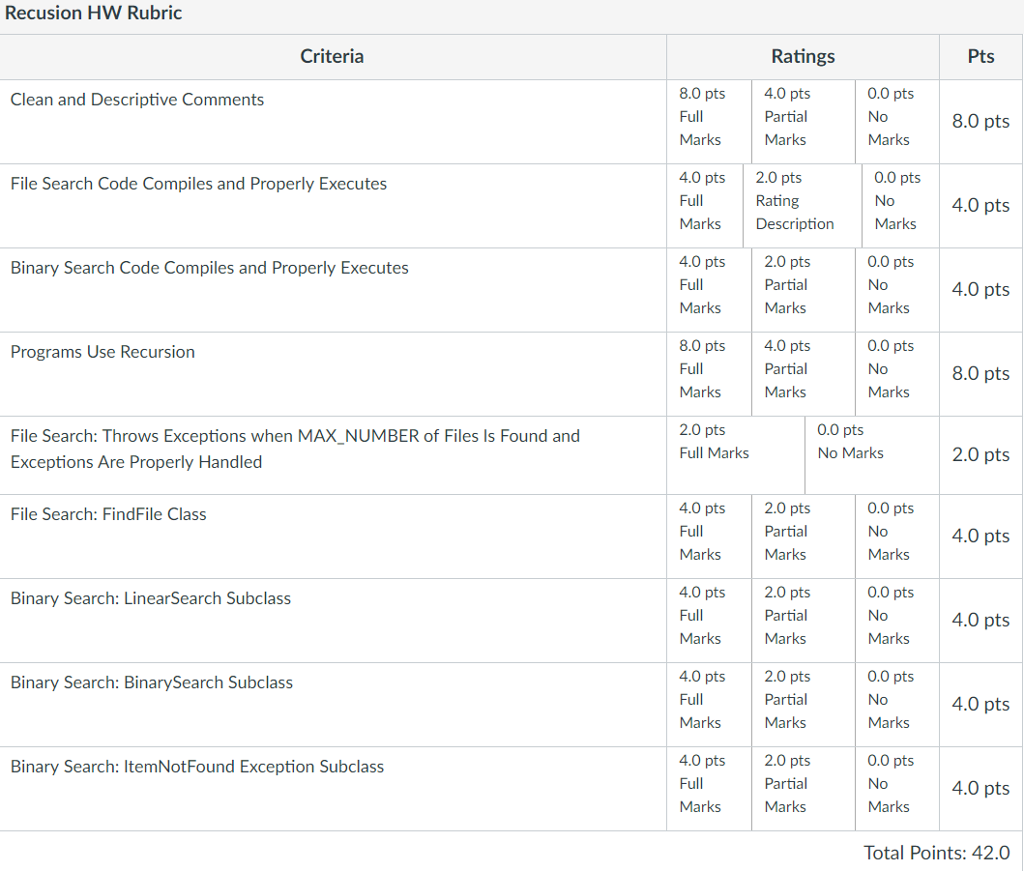
 Notes:
-One of the subprograms you write will create a stack overflow. Hint: This is why it says "attempt" and "report on the results" in the assignment description.
-Regarding the data structures you use, you can use only arrays if you want, but if you do, you'll have to figure out how to deal with the fact arrays have a fixed size. If the number of elements you're interested in goes beyond that size, your program should handle that automatically.
-Make sure you comment all methods and the class with javadoc comments. This includes constructors, getters, setters, etc.
-The driver BinSearchDriver.java only calls the method search in SearchAlgorithm (and derived classes). The driver does not call recSearch, which is where your recursive routines are called or implemented. Thus, if you want to test your recSearch methods, you'll need to modify the driver to call recSearch instead of search. However, you will not, as it says in the Hints, Etc. section, be turning in your modified BinSearchDriver driver.
-The RecursiveBinarySearchHW.docx description says,"Your three classes will be graded by compiling them with the provided SearchAlgorithm and BinSearchDriver classes without modification." Please note that this is not a restrictive statement but a minimum statement that we expect your three classes to work with the classes we provide. Another way to say it is that we may use other drivers to test your work (such as the recSearch methods), but that at minimum your classes need to work with the classes we provide, in the form you receive them.
BinSearchDriver class:
/**
* Linear and Binary Search Driver
*
* Note that nothing in this class needs to be changed except for your FILE_AND_PATH variable
*
* Implement the Binary Search using both the iterative and recursive techniques covered
* in class
*/
import java.io.File;
import java.io.FileNotFoundException;
import java.util.ArrayList;
import java.util.Scanner;
public class BinSearchDriver {
public final static String FILE_AND_PATH = "c:\\longwords.txt";
/*
* TODO: Be sure to change the FILE_AND_PATH to point to your local
* copy of longwords.txt or a FileNotFoundException will result
*/
//Note how we deal with Java's Catch-or-Declare rule here by declaring the exceptions we might throw
public static void main(String[] args) throws FileNotFoundException {
Scanner input = new Scanner(new File(FILE_AND_PATH));
int wordCount = 0;
ArrayList theWords = new ArrayList();
//read in words, count them
while(input.hasNext()) {
theWords.add( input.next() );
wordCount++;
}
//make a standard array from an ArrayList
String[] wordsToSearch = new String[theWords.size()];
theWords.toArray(wordsToSearch);
//start with the linear searches
tryLinearSearch(wordsToSearch, "DISCIPLINES");
tryLinearSearch(wordsToSearch, "TRANSURANIUM");
tryLinearSearch(wordsToSearch, "HEURISTICALLY");
tryLinearSearch(wordsToSearch, "FOO");
//and compare these results to the binary searches
tryBinarySearch(wordsToSearch, "DISCIPLINES");
tryBinarySearch(wordsToSearch, "TRANSURANIUM");
tryBinarySearch(wordsToSearch, "HEURISTICALLY");
tryBinarySearch(wordsToSearch, "FOO");
}
/**
* Method tryBinarySearch
* precondition: wordsToSearch is a nonempty array of Strings, and target is a non-null string to search for
* in our collection of strings
* postcondition: Uses a BinarySearch object (which implements this style of search) to try to find the target string
*/
private static void tryBinarySearch(String[] wordsToSearch, String target) {
//Todo: Build a LinearSearch class that inherits from SearchAlgorithm, and put it in the same directory as this class to successfully compile
SearchAlgorithm bs = new BinarySearch();
try {
System.out.print( target + " found at index: " + bs.search(wordsToSearch,target));
System.out.println( " taking " + bs.getCount() + " comparisons.");
}
catch( ItemNotFoundException e ) {
System.out.println( target + ":" + e.getMessage());
}
}
/**
* Method tryLinearSearch
* precondition: wordsToSearch is a nonempty array of Strings, and target is a non-null string to search for
* in our collection of strings
* postcondition: Uses a LinearSearch object to try to find the target string
*/
private static void tryLinearSearch(String[] wordsToSearch, String target) {
//Todo: Build a LinearSearch class that inherits from SearchAlgorithm, and put it in the same directory as this class to successfully compile
SearchAlgorithm bs = new LinearSearch();
try {
System.out.print( target + " found at index: " + bs.search(wordsToSearch,target));
System.out.println( " taking " + bs.getCount() + " comparisons.");
}
catch( ItemNotFoundException e ) {
System.out.println( target + ":" + e.getMessage());
}
}
}
SearchAlgorithm class:
/**
*
* SearchAlgorithm
* A class used to delegate a search strategy or style
*/
public abstract class SearchAlgorithm {
/**
* Method search: a "to-be-defined" method used to implement a specific search strategy over the given array looking for the target word
* Precondition: words is a nonempty array and target is a non-null string
* Postcondition: if the target word is found, return its index.
* If not found, throw an ItemNotFoundException (a subclass which you have to make)
*
*/
public abstract int search(String[] words, String wordToFind) throws ItemNotFoundException;
public abstract int recSearch(String[] words, String wordToFind) throws ItemNotFoundException;
/**
* Utility Features: This class can be used to track the number of search comparisons
* for use in comparing two different search algorithms
*/
private int count = 0;
public void incrementCount() {
count++;
}
public int getCount() {
return count;
}
public void resetCount() {
count = 0;
}
} 
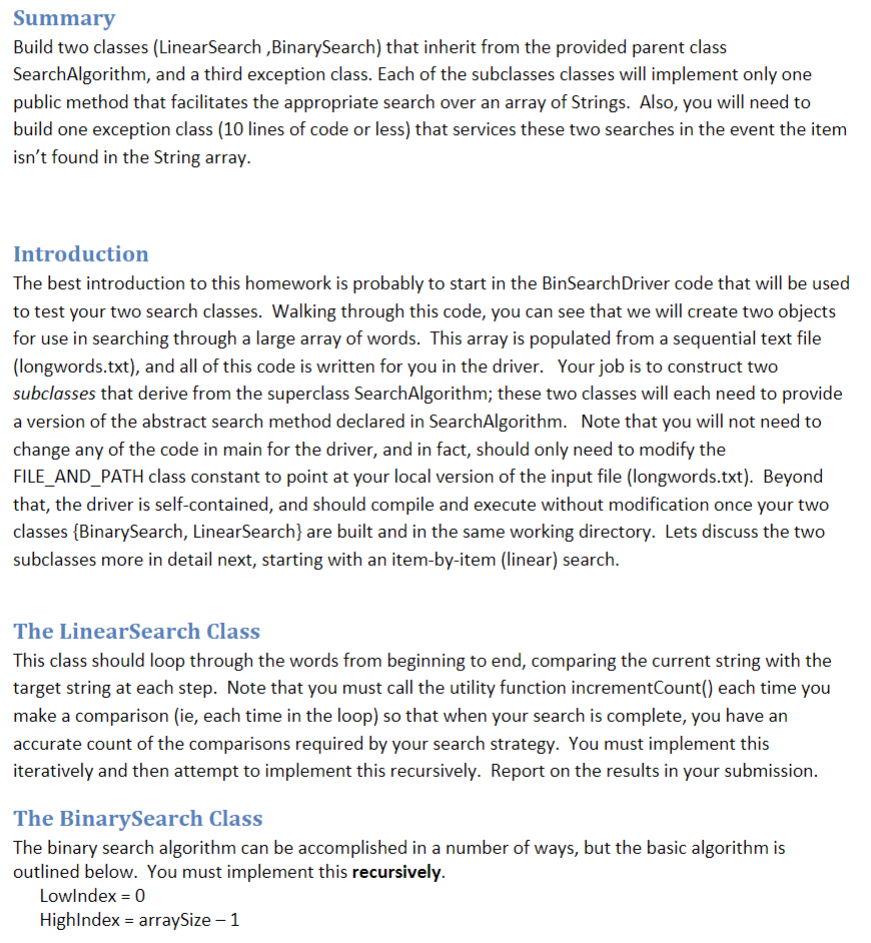
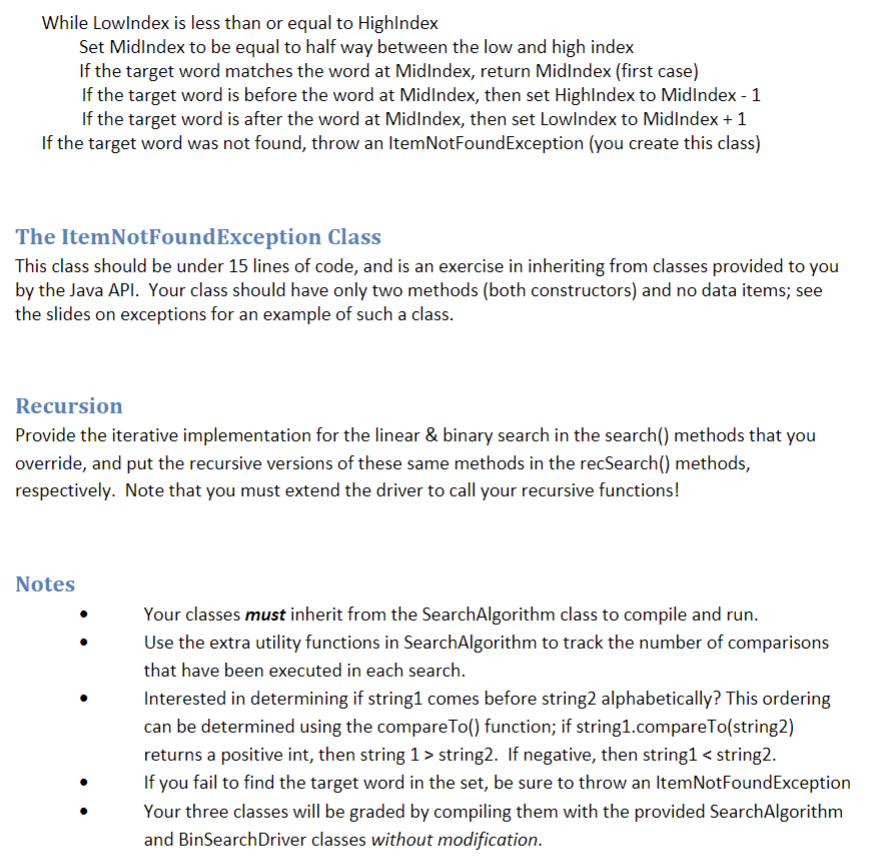
Summary Build two classes (LinearSearch ,BinarySearch) that inherit from the provided parent class SearchAlgorithm, and a third exception class. Each of the subclasses classes will implement only one public method that facilitates the appropriate search over an array of Strings. Also, you will need to build one exception class (10 lines of code or less) that services these two searches in the event the item isn't found in the String array. Introduction The best introduction to this homework is probably to start in the BinSearchDriver code that will be used to test your two search classes. Walking through this code, you can see that we will create two objects for use in searching through a large array of words. This array is populated from a sequential text file (longwords.txt), and all of this code is written for you in the driver. Your job is to construct two subclasses that derive from the superclass SearchAlgorithm; these two classes will each need to provide a version of the abstract search method declared in SearchAlgorithm. Note that you will not need to change any of the code in main for the driver, and in fact, should only need to modify the FILE_AND_PATH class constant to point at your local version of the input file (longwords.txt). Beyond that, the driver is self-contained, and should compile and execute without modification once your two classes BinarySearch, LinearSearch are built and in the same working directory. Lets discuss the two subclasses more in detail next, starting with an item-by-item (linear) search The LinearSearch Class This class should loop through the words from beginning to end, comparing the current string with the target string at each step. Note that you must call the utility function incrementCount() each time you make a comparison (ie, each time in the loop) so that when your search is complete, you have an accurate count of the comparisons required by your search strategy. You must implement this iteratively and then attempt to implement this recursively. Report on the results in your submission. The BinarySearch Class The binary search algorithm can be accomplished in a number of ways, but the basic algorithm is outlined below. You must implement this recursively Lowlndex 0 Highlndex arraySize -1 Summary Build two classes (LinearSearch ,BinarySearch) that inherit from the provided parent class SearchAlgorithm, and a third exception class. Each of the subclasses classes will implement only one public method that facilitates the appropriate search over an array of Strings. Also, you will need to build one exception class (10 lines of code or less) that services these two searches in the event the item isn't found in the String array. Introduction The best introduction to this homework is probably to start in the BinSearchDriver code that will be used to test your two search classes. Walking through this code, you can see that we will create two objects for use in searching through a large array of words. This array is populated from a sequential text file (longwords.txt), and all of this code is written for you in the driver. Your job is to construct two subclasses that derive from the superclass SearchAlgorithm; these two classes will each need to provide a version of the abstract search method declared in SearchAlgorithm. Note that you will not need to change any of the code in main for the driver, and in fact, should only need to modify the FILE_AND_PATH class constant to point at your local version of the input file (longwords.txt). Beyond that, the driver is self-contained, and should compile and execute without modification once your two classes BinarySearch, LinearSearch are built and in the same working directory. Lets discuss the two subclasses more in detail next, starting with an item-by-item (linear) search The LinearSearch Class This class should loop through the words from beginning to end, comparing the current string with the target string at each step. Note that you must call the utility function incrementCount() each time you make a comparison (ie, each time in the loop) so that when your search is complete, you have an accurate count of the comparisons required by your search strategy. You must implement this iteratively and then attempt to implement this recursively. Report on the results in your submission. The BinarySearch Class The binary search algorithm can be accomplished in a number of ways, but the basic algorithm is outlined below. You must implement this recursively Lowlndex 0 Highlndex arraySize -1
Step by Step Solution
There are 3 Steps involved in it

Get step-by-step solutions from verified subject matter experts
 Study Help