







Question: Please help me debug the erros from MATLAB code %set x,y,z to zero x = y = z = 0; %input from user n =
Please help me debug the erros from MATLAB code
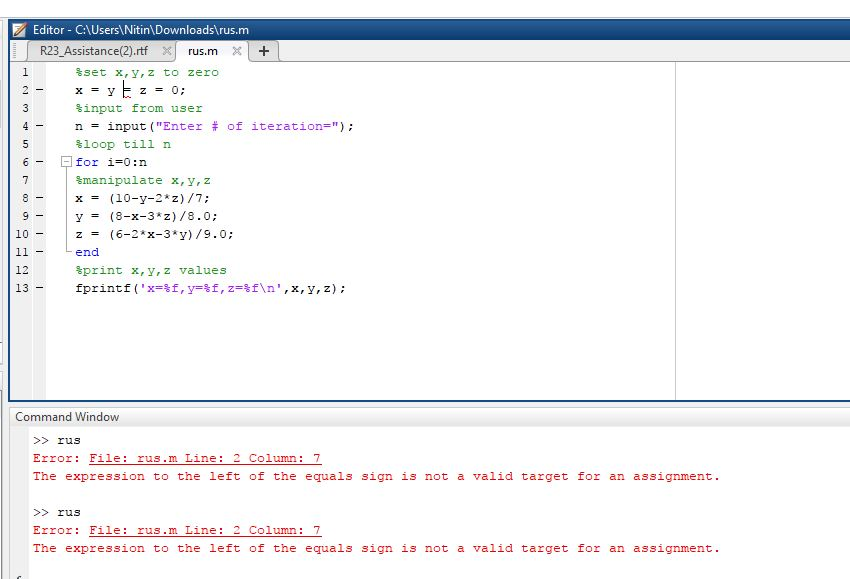
%set x,y,z to zero x = y = z = 0; %input from user n = input("Enter # of iteration="); %loop till n for i=0:n %manipulate x,y,z x = (10-y-2*z)/7; y = (8-x-3*z)/8.0; z = (6-2*x-3*y)/9.0; end %print x,y,z values fprintf('x=%f,y=%f,z=%f ',x,y,z);
%sample output %Enter # of iteration=5 %x=1.281550,y=0.796119,z=0.116505
Editor- C:\Users Nitin\Downloads rus.m R23 Assistance(2).rtf rus.m+ %set x, y, z to zero input from user n = input ("Enter # of iteration="); loop till n for i=0 : n &manipulate x,y, z x y z = (6-2*x-3*y)/9,0; end print x, y,z values fprintf ( ' x=, y=, z= ", x, y, z) ; | | (10-y-21z)/7; (8-x-31z)/8.0; = = 10 12 13 Command Window >>rus rror : File : rus.m Line : 2 Column : 7 The expression to the left of the equals sign is not a valid target for an assignment. >> rus rror : File: rus.m Line : 2 Column : 7 The expression to the left of the equals sign is not a valid target for an assignment
Step by Step Solution
There are 3 Steps involved in it

Get step-by-step solutions from verified subject matter experts
 Study Help