







Question: Please help me debug the program. Here below are an ADT Matrix program in C++ which to create slots for the matrix so it can
Please help me debug the program.
Here below are an ADT Matrix program in C++ which to create slots for the matrix so it can be added, subtract or multiply to another matrix.
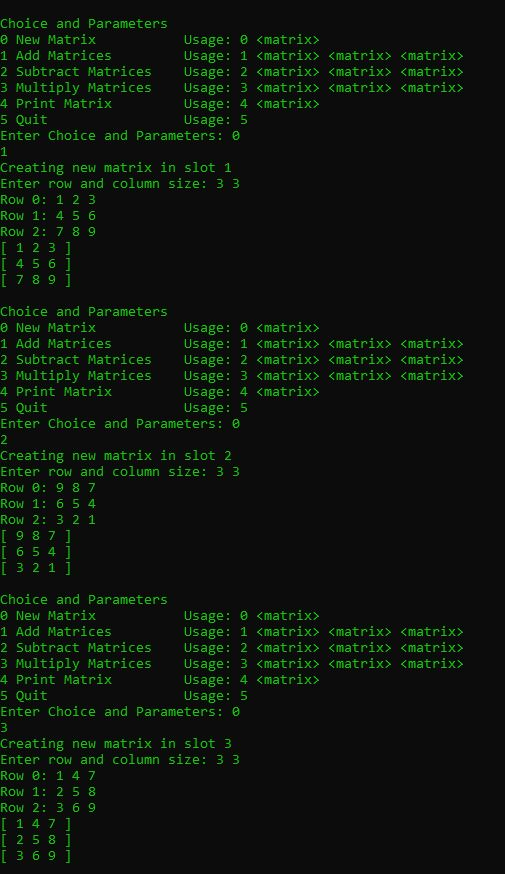
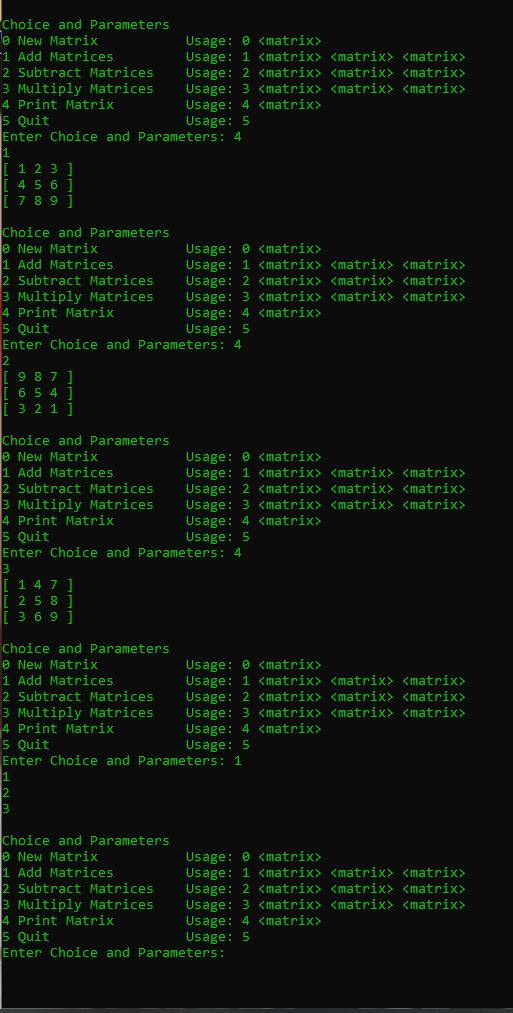
In the sample run, I created 3 matrices with the size of 3x3 and place them in slots 1, 2 and 3. I am also able to print each matrix slot out. However, I wouldn't do addition, subtraction, and multiplication.
As the sample code at the end, since I add matrix 1, 2, and 3 together it should prompt :
[11 14 17]
[12 15 18]
[13 16 19]
But as you can see in the sample run it prompt out nothing. However, when I try to print out matrix slot 3 again, it gave me:
[10 10 10]
[10 10 10]
[10 10 10]
// Code Start here:
#include #include using namespace std;
const int MAX_ROWS = 10; const int MAX_COLS = 10;
class MatrixType { public: MatrixType(); void MakeEmpty(); void SetSize(int rowsSize, int colSize); void StoreItem(int item, int row, int col); void Add(MatrixType otherOperand, MatrixType& result); void Sub(MatrixType otherOperand, MatrixType& result); void Mult(MatrixType otherOperand, MatrixType& result); void Print(ostream& outfile); bool AddSubCompatible(MatrixType otherOperand); bool MultCompatible(MatrixType otherOperand); private: int values[MAX_ROWS][MAX_COLS]; int numRows; int numCols; }; MatrixType::MatrixType() { numRows = numCols = 0; } void MatrixType::MakeEmpty() { for(int i = 0; i = 1 && c >= 1) { numRows = r; numCols = c; } else cout = 0 && c = 0) values[r][c] = item; else cout
void new_matrix(int i, MatrixType * matrices, bool * add) { int r, c, temp; cout > r >> c; if(r > 0 && r 0 && c > temp; matrices[i].StoreItem(temp, j, k); } } matrices[i].Print(cout); } else cout = 0 && i > v; if(v > i; if(v > 0 && v > j >> k; if( i == j || j == k || i == k) { cout
This is the sample run:
Choice and Parameters New Matrix Usage:
Step by Step Solution
There are 3 Steps involved in it

Get step-by-step solutions from verified subject matter experts
 Study Help