







Question: Please help me finish my client socket program file (thankyou) Server (for information if needed) Client Client Specifications $ lightclient -s -p -l LOGFILE The
Please help me finish my client socket program file (thankyou)
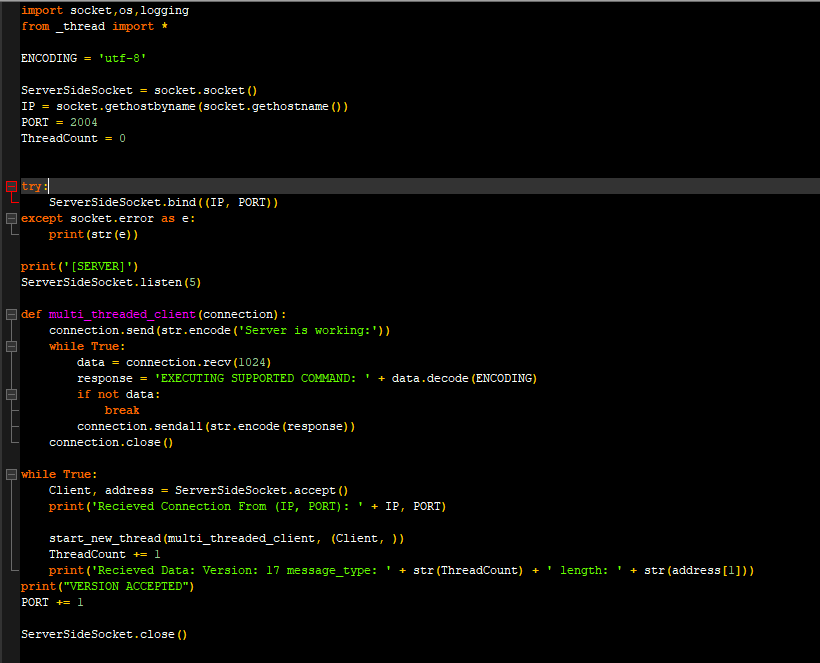
Server (for information if needed)
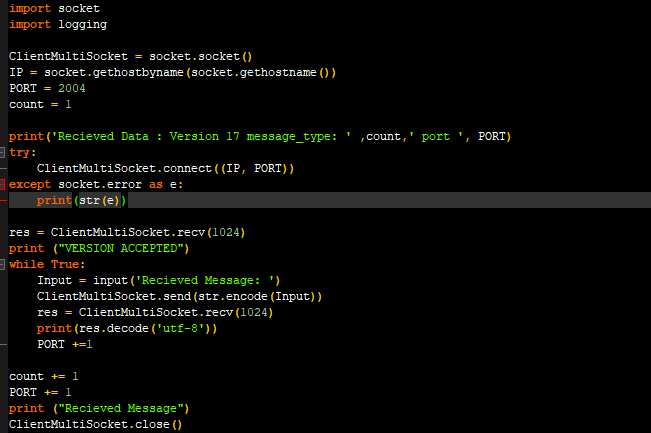
Client
Client Specifications
$ lightclient -s-p -l LOGFILE
The client takes three arguments:
1.Server IP - The IP address of the server.
2.PORT - The port the server listens on.
3.Log file location - Where you will keep a record of packets you received.
For example: $ lightclient -s 192.168.2.1 -p 6543 -l LOGFILE
-
The client must parse three command line arguments, server, port, and logfile.
-
The client should connect to the server on the specified port.
-
Constructs and sends a hello packet to the server.
+-----------------+--------------------------+-------------------------+ | | | | | | | | |Version(4 bytes) |Message type (4 bytes) |Message Length (4 bytes) | | | | | | | | | +-----------------+--------------------------+-------------------------+ | | | | | Message (HELLO) | | | | | +----------------------------------------------------------------------+
-
Receive reply from Server - if version is 17, log VERSION ACCEPTED, else log - VERSION MISMATCH
-
If version is accepted, send a command packet.
+-----------------+--------------------------+-------------------------+ | | | | | | | | |Version(4 bytes) |Message type (4 bytes) |Message Length (4 bytes) | | | | | | | | | +-----------------+--------------------------+-------------------------+ | | | | | COMMAND (LIGHTON/LIGHTOFF) | | | | | +----------------------------------------------------------------------+
-
Receive the servers reply, log the reply, send a DISCONNECT message to the server, and shutdown the socket. You can assume the server always replies with a SUCCESS message for this assignment.
-
Use TCPDUMP or Wireshark to capture the interactions, turn the .pcap file in with the assignment.
please help me finish my client file
import socket,os, logging from _thread import ENCODING = 'utf-8' ServerSideSocket - socket.socket() IP = socket.gethostbyname (socket.gethostname ()) PORT = 2004 ThreadCount = 0 try ServerSideSocket.bind((IP, PORT)) except socket.error as e: print (str(e)) print(" [SERVER]') ServerSideSocket.listen (5) def multi_threaded_client (connection) : connection.send(str.encode ("Server is working:')) while True: data = connection.recv(1024) response = 'EXECUTING SUPPORTED COMMAND: + data.decode (ENCODING) if not data: break connection.sendall (str.encode (response)) connection.close() while True: Client, address = ServerSideSocket.accept() print("Recieved Connection From (IP, PORT) : ' + IP, PORT) start_new_thread (multi_threaded_client, (Client, )) ThreadCount += 1 print("Recieved Data: Version: 17 message_type: ' + str (ThreadCount) + ' length: print("VERSION ACCEPTED") PORT += 1 + str(address[1])) ServerSideSocket.close() import socket import logging ClientMultiSocket = socket.socket() IP = socket.gethostbyname (socket.gethostname ()) PORT = 2004 count = 1 count,' port ', PORT) print('Recieved Data : Version 17 message_type: try: ClientMultiSocket.connect((IP, PORT)) except socket.error as e: print (str(e)) res = ClientMultiSocket.recv(1024) print ("VERSION ACCEPTED") while True: Input input('Recieved Message: ') ClientMultiSocket.send(str.encode (Input)) res = Client MultiSocket.recv(1024) print (res.decode('utf-8')) PORT +=1 count += 1 PORT += 1 print ("Recieved Message") ClientMultiSocket.close()
Step by Step Solution
There are 3 Steps involved in it
To complete your client socket program according to the given specifications you need to perform the following steps Step 1 Parsing Command Line Argum... View full answer

Get step-by-step solutions from verified subject matter experts
 Study Help