







Question: Please help me how to make the code The goal: make a tool that reads in a list of input files, then writes changed versions
Please help me how to make the code
The goal: make a tool that reads in a list of input files, then writes changed versions of those files to new files.
Class design requirements:
The program should contain the following classes
- FileChanger
- FileTypeException
- Tester
And following functional interface:
- Function
Here are the requirements for each class:
FileChanger:
Has the followingInstance variables:
- Private String workfile, which is a String representing the path at which the FileChanger expects to find the file detailing a list of other files to work on
- Private Function
f, which is the String-changing function that the FileChanger will apply to each line in the files it will work on - Private String outputFormat, which is the String that the FileChanger will add to the end of each of its files to distinguish it from the unmodified input file.
Has thefollowinginstance methods:
- Setters for workfile, f, and outputFormat.
- Void changeFiles() throws FileTypeException. This is the heart of FileChanger class! It does the following things:
- Attempts to open the file whose path is specified in the instance variable workfile.
- Checks that the first line of the file is the string":filelist", which is our made_up tag for a file that contains a file list that FileTypeChangers work on. If this string does not appear as the first line of the work file, a FileTypeException should be thrown
- For each subsequentnon-blank line in the work file, interpret that line as a filename in the current directory to be worked on
- Each line of each work file should have theFunction
fapplied to it, and then the modified file contents should be saved to a new file with the same name but withoutputFormat appended to the name - Before each file is worked on, print to the screen the name of the file being worked on.
- If an IOException is caught while working on the file, print to screen that one was caught.
- If noIOException is caught while working on the file, print to screen to indicate that the file was successfully worked on
FileTypeException:
A subclass of Exception:
It does not have to have any additional functionality.
It's intended to represent the state when a FileChanger is asked to work on a work file list
whose first line is not the string ":filelist"
Tester:
- Makes an instance ofFileChager with appropriate values of workfile, f, and outputFormat. (Note: the function f should be given as alambda)
- Call the FileChanger's changeFiles() method and does the following:
- Catches a FileTypeException if thrown, prints an error message explaining that the files won't be worked on, and moves on.
- Uses FileChanger's setters to set f to a different lambda, and outputFormat to a different String. (Note: The worklist does not have to be changed)
- Calls changeFiles() again and catches FileTypeException again, if thrown.
Important reminder: FileChanger.changeFiles should only throw FileTypeException, not IOException! If an IOException is thrown by some operation in FileChanger.changeFiles, it should be caught and used to print to the screen appropriately, as mentioned in the specification for changeFiles.
Here are 3 examples of output of this project which hews to the requirements listed in Tester:
- The first output is for the case in which my FileChanger's workfile does not start with ":filelist"! That is, it is not tagged as the right type of file for FileChanger to get its work list from.

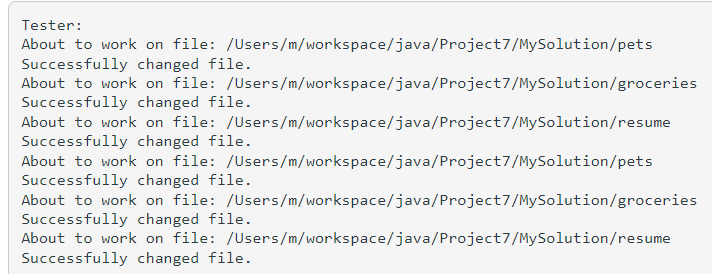
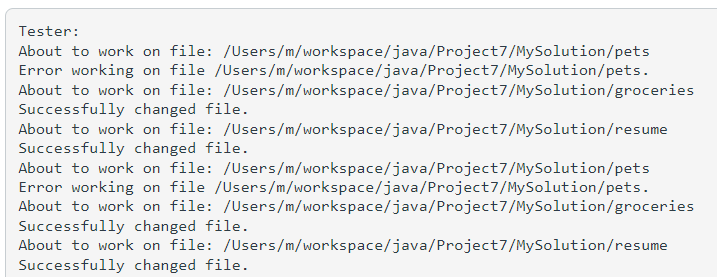
Tester: This is not a filelist! This is not a filelist!Tester: About to work on file: /Users/m/workspace/java/Project7/MySolution/pets Successfully changed file. About to work on file: /Users/m/workspace/java/Project7/MySolution/groceries Successfully changed file. About to work on file: /Users/m/workspace/java/Project7/MySolution/resume Successfully changed file. About to work on file: /Users/m/workspace/java/Project7/MySolution/pets Successfully changed file. About to work on file: /Users/m/workspace/java/Project7/MySolution/groceries Successfully changed file. About to work on file: /Users/m/workspace/java/Project7/MySolution/resume Successfully changed file.Tester : About to work on file: /Users/m/workspace/java/Project7/MySolution/pets Error working on file /Users/m/workspace/java/Project7/MySolution/pets. About to work on file: /Users/m/workspace/java/Project7/MySolution/groceries Successfully changed file. About to work on file: /Users/m/workspace/java/Project7/MySolution/resume Successfully changed file. About to work on file: /Users/m/workspace/java/Project7/MySolution/pets Error working on file /Users/m/workspace/java/Project7/MySolution/pets. About to work on file: /Users/m/workspace/java/Project7/MySolution/groceries Successfully changed file. About to work on file: /Users/m/workspace/java/Project7/MySolution/resume Successfully changed file
Step by Step Solution
There are 3 Steps involved in it

Get step-by-step solutions from verified subject matter experts
 Study Help