



Question: Please help me, i dont get this. groceries.html is contained Grocery List: egg, milk, butter as specifications. This is what i put on notepad from
Please help me, i dont get this. groceries.html is contained Grocery List: egg, milk, butter as specifications.
This is what i put on notepad from groceries.html file below (link)
Grocery List
- Eggs
- Milk
- Butter
Please help me, i dont get this. groceries.html is contained Grocery List: egg, milk, butter as specifications.
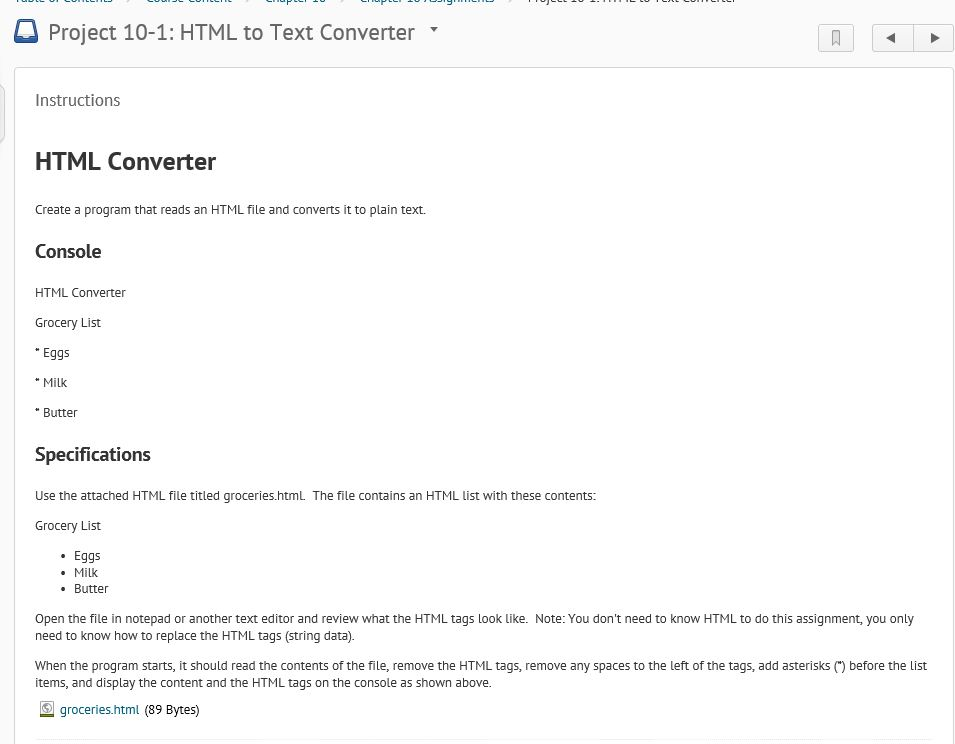
Project 10-1: HTML to Text Converter . Instructions HTML Converter Create a program that reads an HTML file and converts it to plain text. Console HTML Converter Grocery List Eggs "Milk " Butter Specifications Use the attached HTML file titled groceries.htmL The file contains an HTML list with these contents: Grocery List Eggs . Milk Butter Open the file in notepad or another text editor and review what the HTML tags look like. Note: You don't need to know HTML to do this assignment, you only need to know how to replace the HTML tags (string data). When the program starts, it should read the contents of the file, remove the HTML tags, remove any spaces to the left of the tags, add asterisks () before the List items, and display the content and the HTML tags on the console as shown above. groceries html (89 Bytes) Project 10-1: HTML to Text Converter . Instructions HTML Converter Create a program that reads an HTML file and converts it to plain text. Console HTML Converter Grocery List Eggs "Milk " Butter Specifications Use the attached HTML file titled groceries.htmL The file contains an HTML list with these contents: Grocery List Eggs . Milk Butter Open the file in notepad or another text editor and review what the HTML tags look like. Note: You don't need to know HTML to do this assignment, you only need to know how to replace the HTML tags (string data). When the program starts, it should read the contents of the file, remove the HTML tags, remove any spaces to the left of the tags, add asterisks () before the List items, and display the content and the HTML tags on the console as shown above. groceries html (89 Bytes)
Step by Step Solution
There are 3 Steps involved in it

Get step-by-step solutions from verified subject matter experts