







Question: PLEASE HELP ME! IT USING THE ASSEMBLY LANGUAGE WE ARE USING THE SOFTWARE VISUAL STUDIO 2019 I KEEP GETTING ERRORS DON'T KNOW WERE I AM
PLEASE HELP ME!
IT USING THE ASSEMBLY LANGUAGE
WE ARE USING THE SOFTWARE VISUAL STUDIO 2019
I KEEP GETTING ERRORS DON'T KNOW WERE I AM MAKING MISTAKES
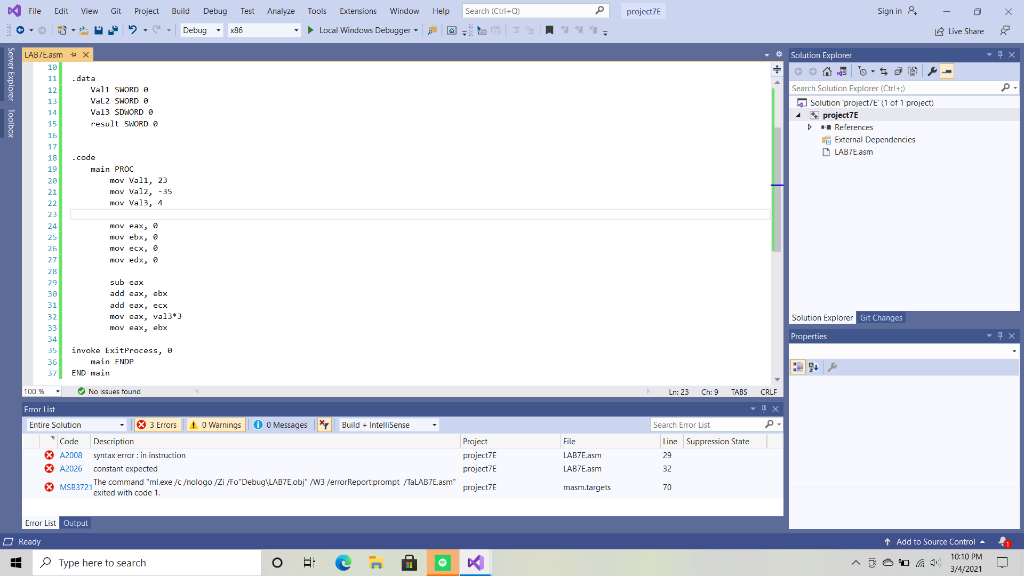
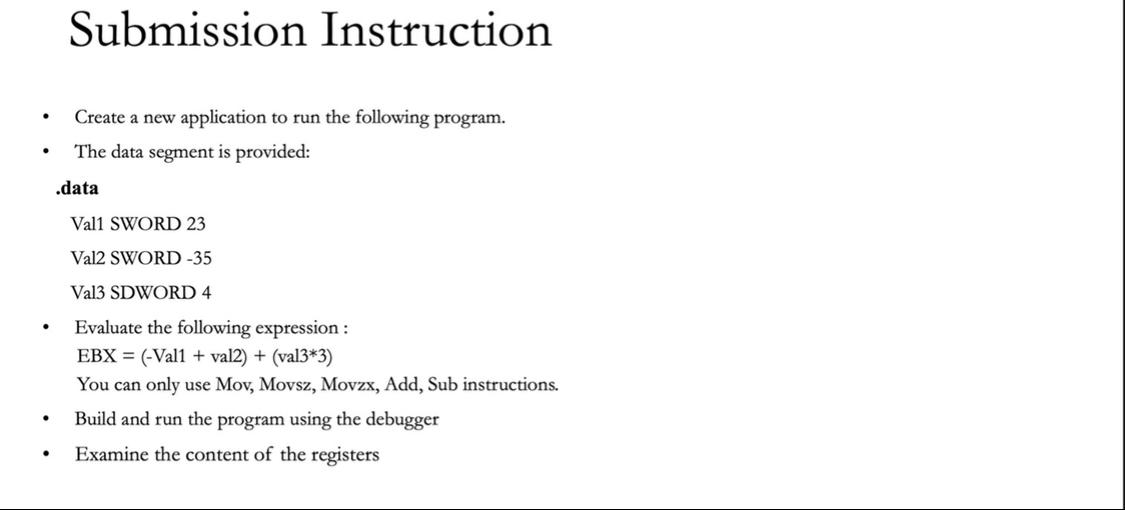
File Edit View Git P project? Sign in & Project Build Debug Test 2.- Debug 2 x96 Analyze Tools Extensions Window Help Search (Ctrlto ) Local Windows Debugger ? Live Share P - Solution Explorer - 5 Search Solution Explorer (Ctrl+;) Solution project/E' (1 of 1 project) project7E References External Dependencies LABTE asm LAB/t.asm X 19 11 data 12 VALI SWORD A 13 VaL2 SWORD 14 Val3 SDNORD 15 result SWORD G 15 17 18 -code 19 main PROC 20 mov Vali, 23 21 MOV Val2, -35 22 mov Val3, 4 23 24 25 mov ebx, 25 TOY ecx, 27 mov edx, o 28 29 sub cax 30 add cax, cbx 31 add cax, ecx 32 mov cax, val3) 33 MOV wax, cbx 34 35 invoke Exit Process, main ENDP 37 END main Solution Explorer Git Changes Properties 100% No se found Ln: 23 Ch:9 TABS CRLF Search Error List P- File Frror List Entire Solution . 3 Errors A Warnings 0 0 Messages * Build + IntelliSense Code Description Project A2008 syntax error: in instruction project7E A2026 constant expected projecte X MS23721 c //\" projecte The command "ml.exe /C ologo/Zi/FO"Debug LABTE obj" /W3 /errorfieport prompt /TaLAB7E.am" exited with code 1 LAB7E.asmi LAB7E.am line Suppression State 29 32 masm.targets 70 Error List Output Ready Type here to search + Add to Source Control 10:10 PM 3/4/2021 o DC Submission Instruction . Create a new application to run the following program. The data segment is provided: . .data Vall SWORD 23 Val2 SWORD -35 . Val3 SDWORD 4 Evaluate the following expression : EBX = (-Vall + val.) + (val3*3) You can only use Mov, Movsz, Movzx, Add, Sub instructions. Build and run the program using the debugger Examine the content of the registers
Step by Step Solution
There are 3 Steps involved in it

Get step-by-step solutions from verified subject matter experts
 Study Help