







Question: please help me L7.4 - Console-Based Shopping Basket We are going to write a console-based e-commerce product catalogue and shopping basket application. For simplification, we
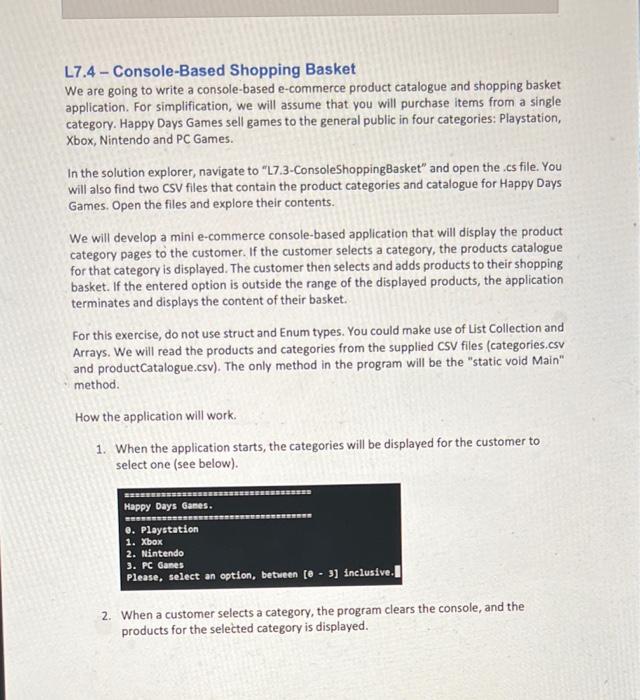
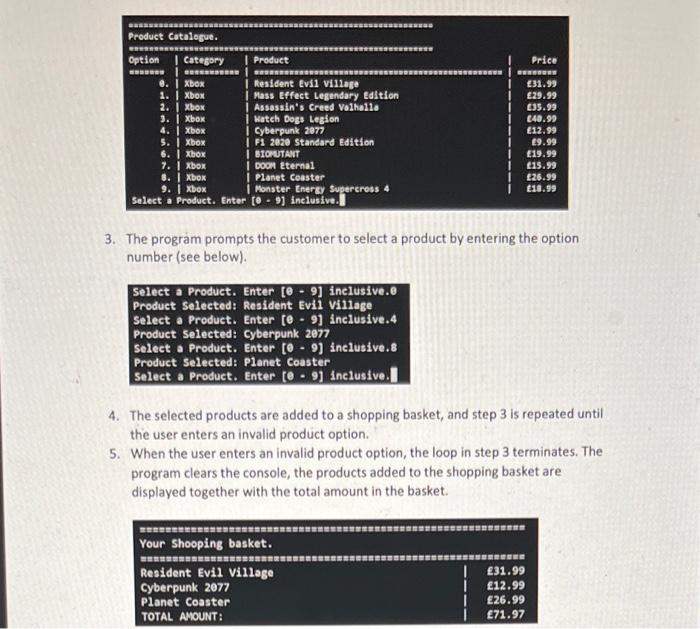
L7.4 - Console-Based Shopping Basket We are going to write a console-based e-commerce product catalogue and shopping basket application. For simplification, we will assume that you will purchase items from a single category. Happy Days Games sell games to the general public in four categories: Playstation, Xbox, Nintendo and PC Games. In the solution explorer, navigate to "L7.3-ConsoleShopping Basket" and open the .cs file. You will also find two CSV files that contain the product categories and catalogue for Happy Days Games. Open the files and explore their contents. We will develop a mini e-commerce console-based application that will display the product category pages to the customer. If the customer selects a category, the products catalogue for that category is displayed. The customer then selects and adds products to their shopping basket. If the entered option is outside the range of the displayed products, the application terminates and displays the content of their basket. For this exercise, do not use struct and Enum types. You could make use of List Collection and Arrays. We will read the products and categories from the supplied CSV files (categories.csv and product Catalogue.csv). The only method in the program will be the "static void Main" method. How the application will work. 1. When the application starts, the categories will be displayed for the customer to select one (see below) Happy Days Games. SERRES e. Playstation 1. Xbox 2. Nintendo 3. PC Games Please select an option, between [- ] Inclusive 2. When a customer selects a category, the program clears the console, and the products for the selected category is displayed. Product Catalogue. Option Category Product ESSE @. Xbox Resident Evil village 1. Xbox | Mass Effect Legendary Edition 2. Xbox Assassin's Creed Valhalla 3. Xbox 1 Watch Dogs Legion 4. Xbox | Cyberpunk 2077 5. Xbox F1 2020 Standard Edition 6. Xbox | BIOMUTANT 7. Xbox I DOON Eternal 8. Xbox | Planet Coaster 9. Xbox | Monster Energy Supercross 4 Select a Product. Enter to. 9 inclusive. Price BERSE 31.99 29.99 35.99 040.99 12.99 9.99 19.99 19.99 26.99 10.99 1 I 3. The program prompts the customer to select a product by entering the option number (see below). - Select a Product. Enter [e 9] inclusive.e Product Selected: Resident Evil Village Select a Product. Enter [e 9] inclusive. 4 Product Selected: Cyberpunk 2077 Select a Product. Enter [e - 9) inclusive.8 Product Selected: Planet Coaster Select a Product. Enter te. 9] inclusive. I 4. The selected products are added to a shopping basket, and step 3 is repeated until the user enters an invalid product option. 5. When the user enters an invalid product option, the loop in step 3 terminates. The program clears the console, the products added to the shopping basket are displayed together with the total amount in the basket. Your Shooping basket. BURSURINARSSSS Resident Evil Village Cyberpunk 2077 Planet Coaster TOTAL AMOUNT: | | I 31.99 12.99 26.99 71.97
Step by Step Solution
There are 3 Steps involved in it

Get step-by-step solutions from verified subject matter experts
 Study Help