







Question: please help me solve these plc questions using logix pro NOTE: LOGIXPRO INPUT AND OUTPUT ADDRESSES WILL BE DIFFERENT FROM THOSE SHOWN. EXAMPLE: 1:0.0/5 WILL
please help me solve these plc questions using logix pro
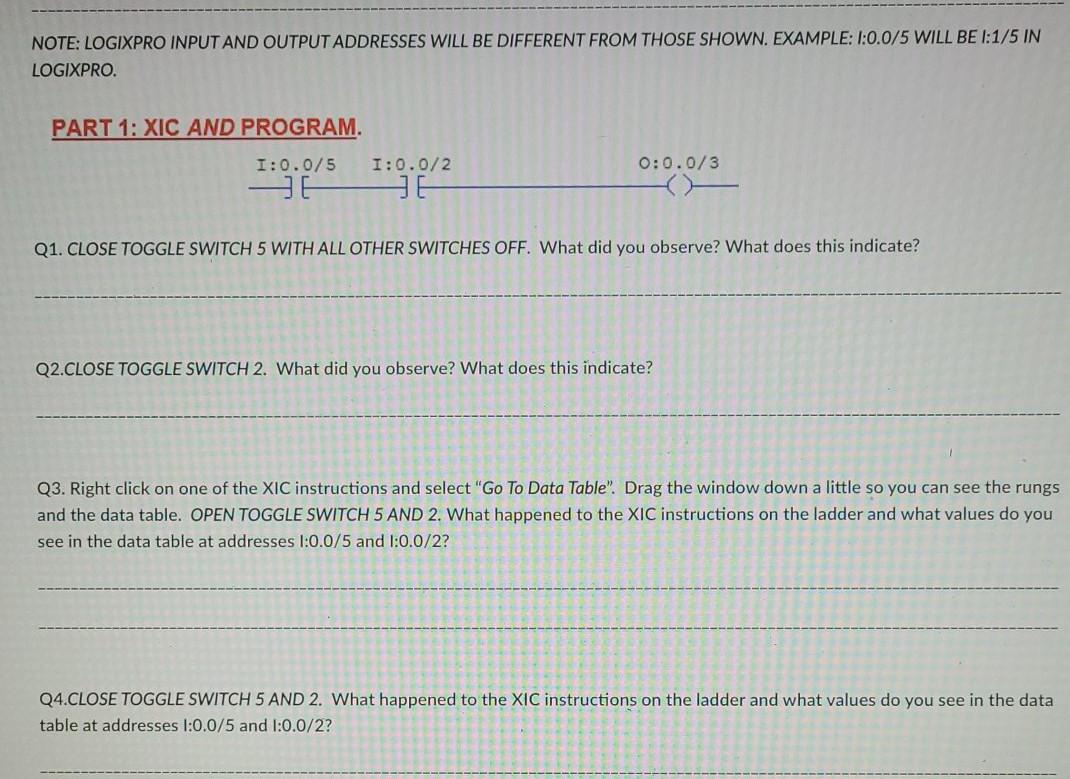
NOTE: LOGIXPRO INPUT AND OUTPUT ADDRESSES WILL BE DIFFERENT FROM THOSE SHOWN. EXAMPLE: 1:0.0/5 WILL BE I:1/5 IN LOGIXPRO PART 1: XIC AND PROGRAM. 1:0.0/5 I:0.0/2 0:0.0/3 JE Q1. CLOSE TOGGLE SWITCH 5 WITH ALL OTHER SWITCHES OFF. What did you observe? What does this indicate? Q2.CLOSE TOGGLE SWITCH 2. What did you observe? What does this indicate? Q3. Right click on one of the XIC instructions and select "Go To Data Table". Drag the window down a little so you can see the rungs and the data table. OPEN TOGGLE SWITCH 5 AND 2. What happened to the XIC instructions on the ladder and what values do you see in the data table at addresses 1:0.0/5 and 1:0.0/2? Q4.CLOSE TOGGLE SWITCH 5 AND 2. What happened to the XIC instructions on the ladder and what values do you see in the data table at addresses 1:0.0/5 and 1:0.0/2? NOTE: LOGIXPRO INPUT AND OUTPUT ADDRESSES WILL BE DIFFERENT FROM THOSE SHOWN. EXAMPLE: 1:0.0/5 WILL BE I:1/5 IN LOGIXPRO PART 1: XIC AND PROGRAM. 1:0.0/5 I:0.0/2 0:0.0/3 JE Q1. CLOSE TOGGLE SWITCH 5 WITH ALL OTHER SWITCHES OFF. What did you observe? What does this indicate? Q2.CLOSE TOGGLE SWITCH 2. What did you observe? What does this indicate? Q3. Right click on one of the XIC instructions and select "Go To Data Table". Drag the window down a little so you can see the rungs and the data table. OPEN TOGGLE SWITCH 5 AND 2. What happened to the XIC instructions on the ladder and what values do you see in the data table at addresses 1:0.0/5 and 1:0.0/2? Q4.CLOSE TOGGLE SWITCH 5 AND 2. What happened to the XIC instructions on the ladder and what values do you see in the data table at addresses 1:0.0/5 and 1:0.0/2
Step by Step Solution
There are 3 Steps involved in it

Get step-by-step solutions from verified subject matter experts
 Study Help