







Question: Please help me solve this problem in C language, thank you. I need *C language code*, but not shell script, thank you! Modify and correct
Please help me solve this problem in C language, thank you.
I need *C language code*, but not shell script, thank you!
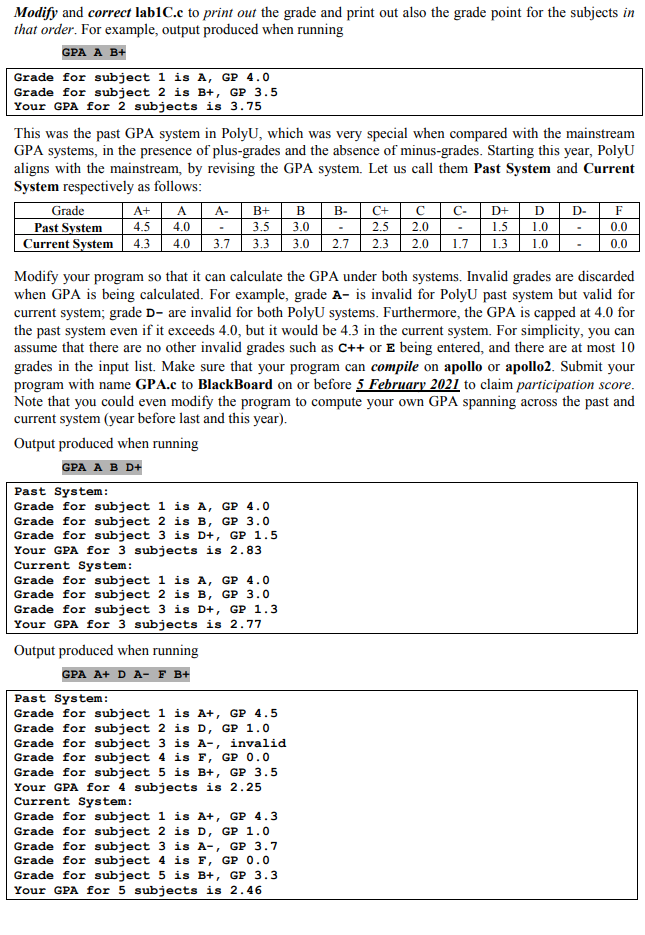
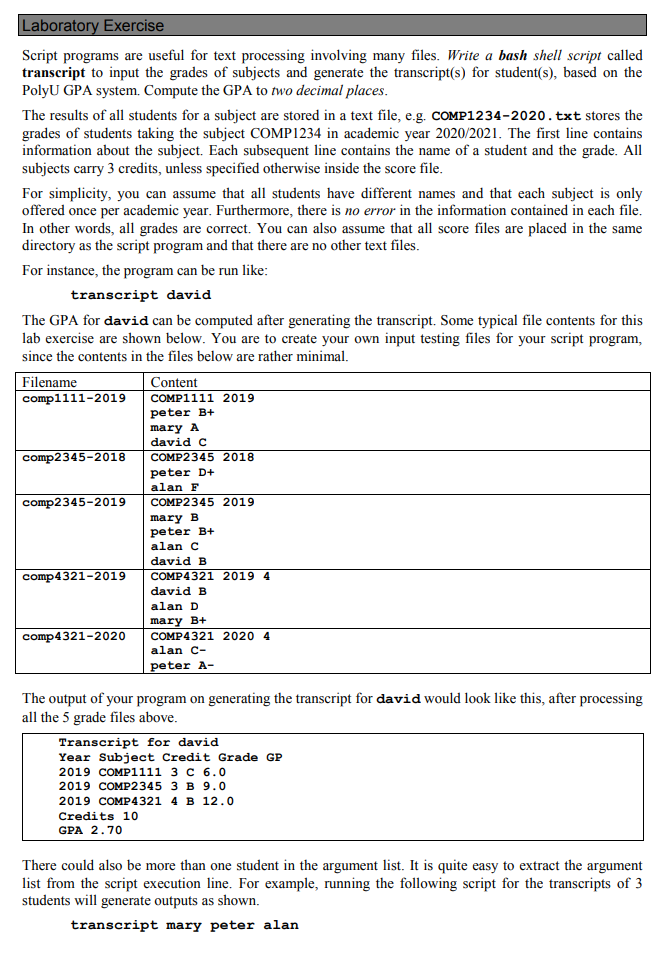
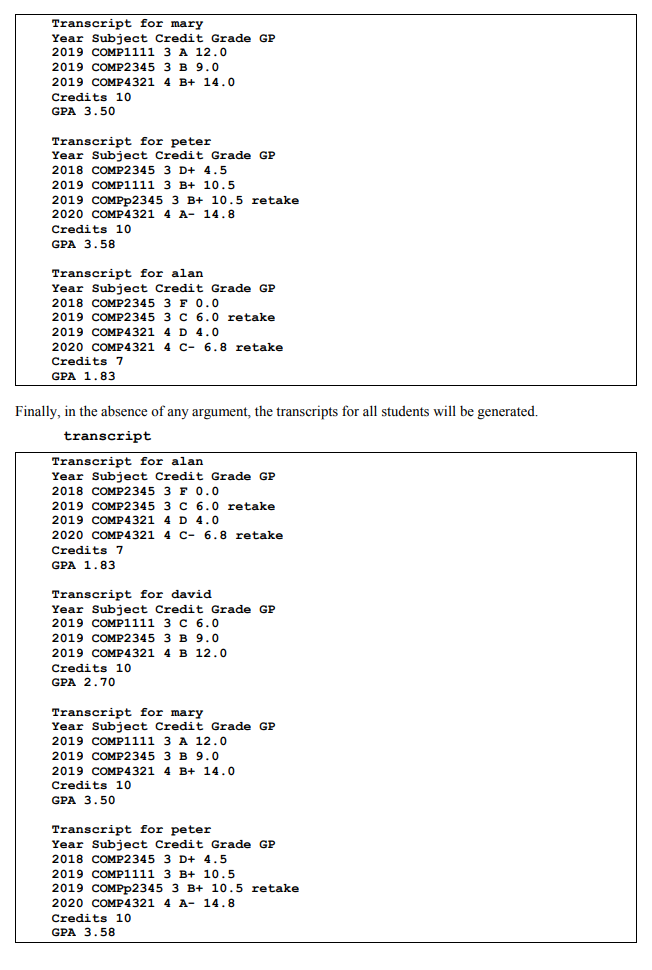
Modify and correct lab1C.c to print out the grade and print out also the grade point for the subjects in that order. For example, output produced when running GPA A B+ Grade for subject 1 is A, GP 4.0 Grade for subject 2 is B+, GP 3.5 Your GPA for 2 subjects is 3.75 This was the past GPA system in PolyU, which was very special when compared with the mainstream GPA systems, in the presence of plus-grades and the absence of minus-grades. Starting this year, Polyu aligns with the mainstream, by revising the GPA system. Let us call them Past System and Current System respectively as follows: Grade Past System Current System 1.7 A- B- D- A+ 4.5 4.3 A 4.0 4.0 B+ 3.5 3.3 B 3.0 3.0 C+ 2.5 2.3 2.0 2.0 D+ 1.5 1.3 D 1.0 1.0 F 0.0 0.0 3.7 2.7 Modify your program so that it can calculate the GPA under both systems. Invalid grades are discarded when GPA is being calculated. For example, grade A- is invalid for Polyu past system but valid for current system; grade D- are invalid for both PolyU systems. Furthermore, the GPA is capped at 4.0 for the past system even if it exceeds 4.0, but it would be 4.3 in the current system. For simplicity, you can assume that there are no other invalid grades such as C++ or E being entered, and there are at most 10 grades in the input list. Make sure that your program can compile on apollo or apollo2. Submit your program with name GPA.c to BlackBoard on or before 5 February 2021 to claim participation score. Note that you could even modify the program to compute your own GPA spanning across the past and current system (year before last and this year). Output produced when running GPA A B D+ Past System: Grade for subject 1 is A, GP 4.0 Grade for subject 2 is B, GP 3.0 Grade for subject 3 is D+, GP 1.5 Your GPA for 3 subjects is 2.83 Current System: Grade for subject 1 is A, GP 4.0 Grade for subject 2 is B, GP 3.0 Grade for subject 3 is D+, GP 1.3 Your GPA for 3 subjects is 2.77 Output produced when running GPA A+ D A- F B+ Past System: Grade for subject 1 is A+, GP 4.5 Grade for subject 2 is D, GP 1.0 Grade for subject 3 is A-, invalid Grade for subject 4 is F, GP 0.0 Grade for subject 5 is B+, GP 3.5 Your GPA for 4 subjects is 2.25 Current System: Grade for subject 1 is A+, GP 4.3 Grade for subject 2 is D, GP 1.0 Grade for subject 3 is A-, GP 3.7 Grade for subject 4 is F, GP 0.0 Grade for subject 5 is B+, GP 3.3 Your GPA for 5 subjects is 2.46 Laboratory Exercise Script programs are useful for text processing involving many files. Write a bash shell script called transcript to input the grades of subjects and generate the transcript(s) for student(s), based on the PolyU GPA system. Compute the GPA to two decimal places. The results of all students for a subject are stored in a text file, e.g. COMP1234-2020.txt stores the grades of students taking the subject COMP1234 in academic year 2020/2021. The first line contains information about the subject. Each subsequent line contains the name of a student and the grade. All subjects carry 3 credits, unless specified otherwise inside the score file. For simplicity, you can assume that all students have different names and that each subject is only offered once per academic year. Furthermore, there is no error in the information contained in each file. In other words, all grades are correct. You can also assume that all score files are placed in the same directory as the script program and that there are no other text files. For instance, the program can be run like: transcript david The GPA for david can be computed after generating the transcript. Some typical file contents for this lab exercise are shown below. You are to create your own input testing files for your script program, since the contents in the files below are rather minimal. Filename Content comp1111-2019 COMP1111 2019 peter B+ mary A david c comp2345-2018 COMP2345 2018 peter D+ alan F comp2345-2019 COMP2345 2019 mary B peter B+ alanc david B comp 4321-2019 COMP 4321 2019 4 david B alan D mary B+ comp 4321-2020 COMP 4321 2020 4 alan C- peter A- The output of your program on generating the transcript for david would look like this, after processing all the 5 grade files above. Transcript for david Year Subject Credit Grade GP 2019 COMP1111 3 C 6.0 2019 COMP2345 3 B 9.0 2019 COMP4 321 4 B 12.0 Credits 10 GPA 2.70 There could also be more than one student in the argument list. It is quite easy to extract the argument list from the script execution line. For example, running the following script for the transcripts of 3 students will generate outputs as shown. transcript mary peter alan Transcript for mary Year Subject Credit Grade GP 2019 COMP1111 3 A 12.0 2019 COMP2345 3 B 9.0 2019 COMP4321 4 B+ 14.0 Credits 10 GPA 3.50 Transcript for peter Year Subject Credit Grade GP 2018 COMP2345 3 D+ 4.5 2019 COMP1111 3 B+ 10.5 2019 COMPp2345 3 B+ 10.5 retake 2020 COMP4321 4 A- 14.8 Credits 10 GPA 3.58 Transcript for alan Year Subject Credit Grade GP 2018 COMP2345 3 F 0.0 2019 COMP2345 3 C 6.0 retake 2019 COMP4321 4 D 4.0 2020 COMP4 321 4 C- 6.8 retake Credits 7 GPA 1.83 Finally, in the absence of any argument, the transcripts for all students will be generated. transcript Transcript for alan Year Subject Credit Grade GP 2018 COMP2345 3 F 0.0 2019 COMP2 345 3 C 6.0 retake 2019 COMP 4321 4 D 4.0 2020 COMP4321 4 C- 6.8 retake Credits 7 GPA 1.83 Transcript for david Year Subject Credit Grade GP 2019 COMP1111 3 C 6.0 2019 COMP2345 3 B 9.0 2019 COMP 4321 4 B 12.0 Credits 10 GPA 2.70 Transcript for mary Year Subject Credit Grade GP 2019 COMP1111 3 A 12.0 2019 COMP2345 3 B 9.0 2019 COMP4321 4 B+ 14.0 Credits 10 GPA 3.50 Transcript for peter Year Subject Credit Grade GP 2018 COMP2345 3 D+ 4.5 2019 COMP1111 3 B+ 10.5 2019 COMPp2345 3 B+ 10.5 retake 2020 COMP 4321 4 A- 14.8 Credits 10 GPA 3.58
Step by Step Solution
There are 3 Steps involved in it

Get step-by-step solutions from verified subject matter experts
 Study Help