







Question: please help me with that assignment. The deadline is tomorrow Experiment 1: Audio processing Part 1 Experimental requirements: 1. Prepare a background music, named as
please help me with that assignment. The deadline is tomorrow
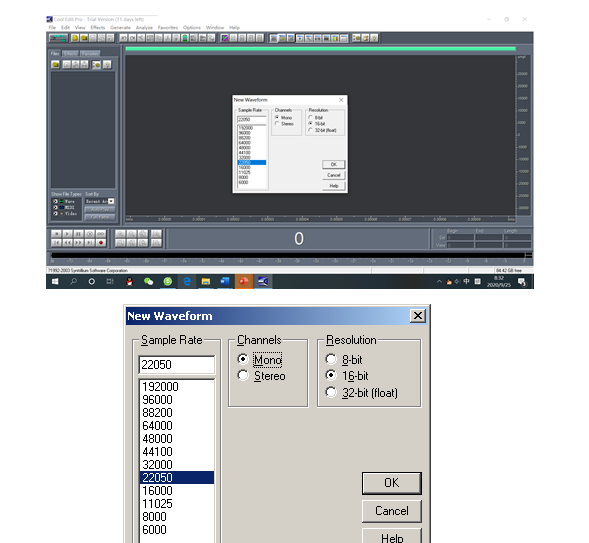
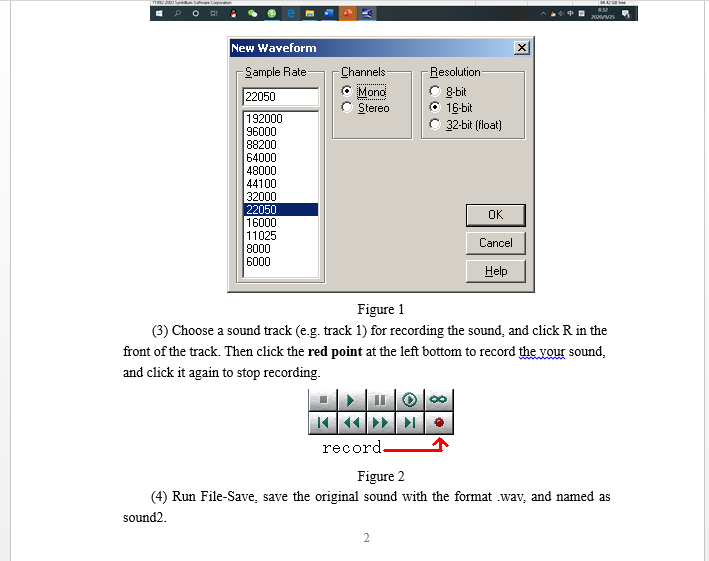
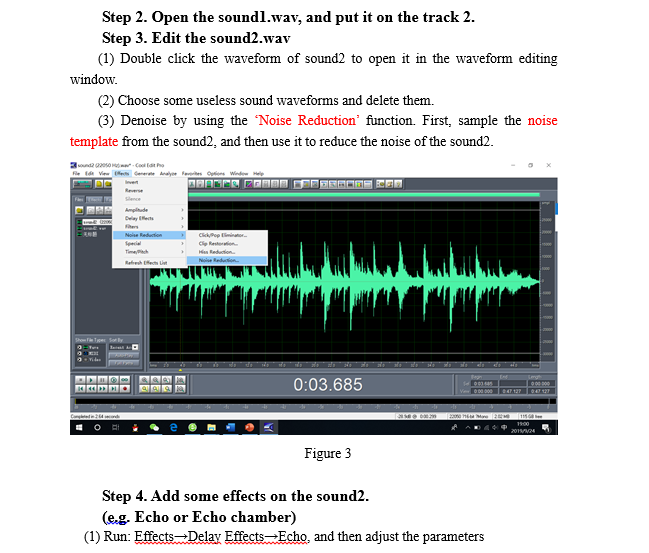
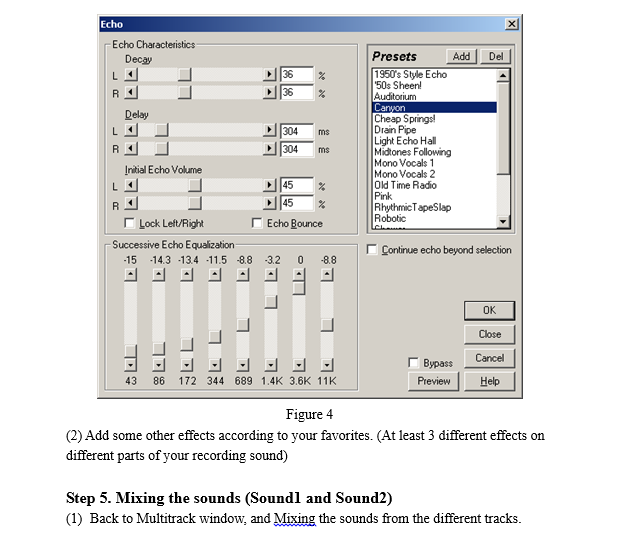
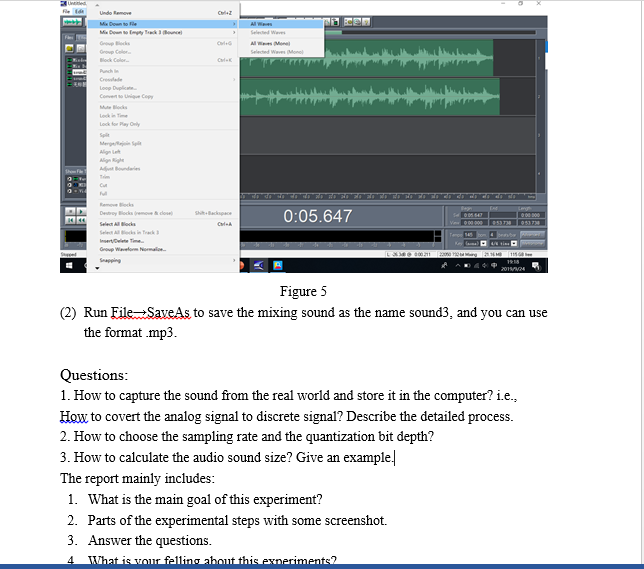
Experiment 1: Audio processing Part 1 Experimental requirements: 1. Prepare a background music, named as soundl.wav Note: It is a background sound, its loudness cannot higher than that of the sound2.wav, otherwise, we cannot hear the sound2 clearly )) 2. Record a sound (Self-introduction) through the software Cool Edit or Adobe Audition, named as sound2.wav 3. Process the sound2 (noise reduction, delete useless sound, adjust the sound, add some effects) (Note: at least insert 3 different sound effects in the mixed sound.) 4. Mix the sound and sound2. 5. Save it as sound3 with the format mp3 and wav Part 2 Experimental steps (Just for reference only) Step 1. Record sound. (1) Open "CoolEdit pro2.1" (or Adobe audition (Au), download it by yourself) (2) Click the menu FileNew Session, choose the parameters for sound recording: the sample rate is 22050. quantization rate (resolution) is 16 bit, channel is Mono, and click OK w Wom Sale Dame 100 Cance Show Soly 0 8. X Channels Mono Stereo Resolution 8-bit 16-bit 32-bit (float) New Waveform Sample Rate 22050 192000 96000 88200 64000 48000 44100 32000 22050 16000 11025 8000 6000 OK Cancel Help mm LC 2009/NGS X New Waveform Sample Rate 22050 Channels Mono Stereo Resolution 8-bit 16-bit 32-bit (float) 192000 96000 88200 64000 48000 44100 32000 22050 16000 11025 8000 6000 OK Cancel Help Figure 1 (3) Choose a sound track (e.g. track 1) for recording the sound, and click R in the front of the track. Then click the red point at the left bottom to record the your sound, and click it again to stop recording. record- Figure 2 (4) Run File-Save, save the original sound with the format .wav, and named as sound2. 2 Step 2. Open the soundl.wav, and put it on the track 2. Step 3. Edit the sound2.wav (1) Double click the waveform of sound2 to open it in the waveform editing window. (2) Choose some useless sound waveforms and delete them. (3) Denoise by using the "Noise Reduction function. First, sample the noise template from the sound, and then use it to reduce the noise of the sound2. 320200 Cootho Vir Cerere Analyse faites in Window Help Amplitude Dwilayet ip fie.. Meduction Nair talai Refresh chat gides les 0:03.685 OD 600 1800 2011 Figure 3 Step 4. Add some effects on the sound2. (e.g. Echo or Echo chamber) (1) Run: EffectsDelay Effects Echo, and then adjust the parameters X x Echo Echo Characteristics Decay Del % 36 36 - R Delay L ms 304 304 Presets Add 1950's Style Echo '50s Sheen! Auditorium Canyon Cheap Springs! Drain Pipe Light Echo Hall Midtones Following Mono Vocals 1 Mono Vocals 2 Old Time Radio Pink Rhythmic Tape Slap Robotic R ms Initial Echo Volume L || 45 45 . Echo Bounce Lock Left/Right Successive Echo Equalization -15 -14.3 -13.4 -11.5 8.8 AA - - Continue echo beyond selection 32 0 -8.8 OK Close Bypass Preview Cancel Help 43 86 172 344 689 1.4K 3.6K 11K Figure 4 (2) Add some other effects according to your favorites. (At least 3 different effects on different parts of your recording sound) Step 5. Mixing the sounds (Soundl and Sound2) (1) Back to Multitrack window, and Mixing the sounds from the different tracks. Cule Undo Kamere Me Down to the Gel We Group Color Selected Www Monol Loop Dupla Copy Lock for Play Only Mode 0:05.647 OST C Destroyed more Select Mode Insert/Delete Time Group Warefoot 00012 og TH 2011/124 Figure 5 Run FileSaveAs to save the mixing sound as the name sound3, and you can use the format mp3. Questions: 1. How to capture the sound from the real world and store it in the computer? i.e., How to covert the analog signal to discrete signal? Describe the detailed process. 2. How to choose the sampling rate and the quantization bit depth? 3. How to calculate the audio sound size? Give an example, The report mainly includes: 1. What is the main goal of this experiment? 2. Parts of the experimental steps with some screenshot. 3. Answer the questions. What is your felling about this experiments2 4 Experiment 1: Audio processing Part 1 Experimental requirements: 1. Prepare a background music, named as soundl.wav Note: It is a background sound, its loudness cannot higher than that of the sound2.wav, otherwise, we cannot hear the sound2 clearly )) 2. Record a sound (Self-introduction) through the software Cool Edit or Adobe Audition, named as sound2.wav 3. Process the sound2 (noise reduction, delete useless sound, adjust the sound, add some effects) (Note: at least insert 3 different sound effects in the mixed sound.) 4. Mix the sound and sound2. 5. Save it as sound3 with the format mp3 and wav Part 2 Experimental steps (Just for reference only) Step 1. Record sound. (1) Open "CoolEdit pro2.1" (or Adobe audition (Au), download it by yourself) (2) Click the menu FileNew Session, choose the parameters for sound recording: the sample rate is 22050. quantization rate (resolution) is 16 bit, channel is Mono, and click OK w Wom Sale Dame 100 Cance Show Soly 0 8. X Channels Mono Stereo Resolution 8-bit 16-bit 32-bit (float) New Waveform Sample Rate 22050 192000 96000 88200 64000 48000 44100 32000 22050 16000 11025 8000 6000 OK Cancel Help mm LC 2009/NGS X New Waveform Sample Rate 22050 Channels Mono Stereo Resolution 8-bit 16-bit 32-bit (float) 192000 96000 88200 64000 48000 44100 32000 22050 16000 11025 8000 6000 OK Cancel Help Figure 1 (3) Choose a sound track (e.g. track 1) for recording the sound, and click R in the front of the track. Then click the red point at the left bottom to record the your sound, and click it again to stop recording. record- Figure 2 (4) Run File-Save, save the original sound with the format .wav, and named as sound2. 2 Step 2. Open the soundl.wav, and put it on the track 2. Step 3. Edit the sound2.wav (1) Double click the waveform of sound2 to open it in the waveform editing window. (2) Choose some useless sound waveforms and delete them. (3) Denoise by using the "Noise Reduction function. First, sample the noise template from the sound, and then use it to reduce the noise of the sound2. 320200 Cootho Vir Cerere Analyse faites in Window Help Amplitude Dwilayet ip fie.. Meduction Nair talai Refresh chat gides les 0:03.685 OD 600 1800 2011 Figure 3 Step 4. Add some effects on the sound2. (e.g. Echo or Echo chamber) (1) Run: EffectsDelay Effects Echo, and then adjust the parameters X x Echo Echo Characteristics Decay Del % 36 36 - R Delay L ms 304 304 Presets Add 1950's Style Echo '50s Sheen! Auditorium Canyon Cheap Springs! Drain Pipe Light Echo Hall Midtones Following Mono Vocals 1 Mono Vocals 2 Old Time Radio Pink Rhythmic Tape Slap Robotic R ms Initial Echo Volume L || 45 45 . Echo Bounce Lock Left/Right Successive Echo Equalization -15 -14.3 -13.4 -11.5 8.8 AA - - Continue echo beyond selection 32 0 -8.8 OK Close Bypass Preview Cancel Help 43 86 172 344 689 1.4K 3.6K 11K Figure 4 (2) Add some other effects according to your favorites. (At least 3 different effects on different parts of your recording sound) Step 5. Mixing the sounds (Soundl and Sound2) (1) Back to Multitrack window, and Mixing the sounds from the different tracks. Cule Undo Kamere Me Down to the Gel We Group Color Selected Www Monol Loop Dupla Copy Lock for Play Only Mode 0:05.647 OST C Destroyed more Select Mode Insert/Delete Time Group Warefoot 00012 og TH 2011/124 Figure 5 Run FileSaveAs to save the mixing sound as the name sound3, and you can use the format mp3. Questions: 1. How to capture the sound from the real world and store it in the computer? i.e., How to covert the analog signal to discrete signal? Describe the detailed process. 2. How to choose the sampling rate and the quantization bit depth? 3. How to calculate the audio sound size? Give an example, The report mainly includes: 1. What is the main goal of this experiment? 2. Parts of the experimental steps with some screenshot. 3. Answer the questions. What is your felling about this experiments2 4
Step by Step Solution
There are 3 Steps involved in it

Get step-by-step solutions from verified subject matter experts
 Study Help