







Question: Please help me with the code for this javascript/ jQuery problem EXTRA CREDIT The exchange rates for 1 U.S. dollar in July 2019 were: Euro
Please help me with the code for this javascript/ jQuery problem
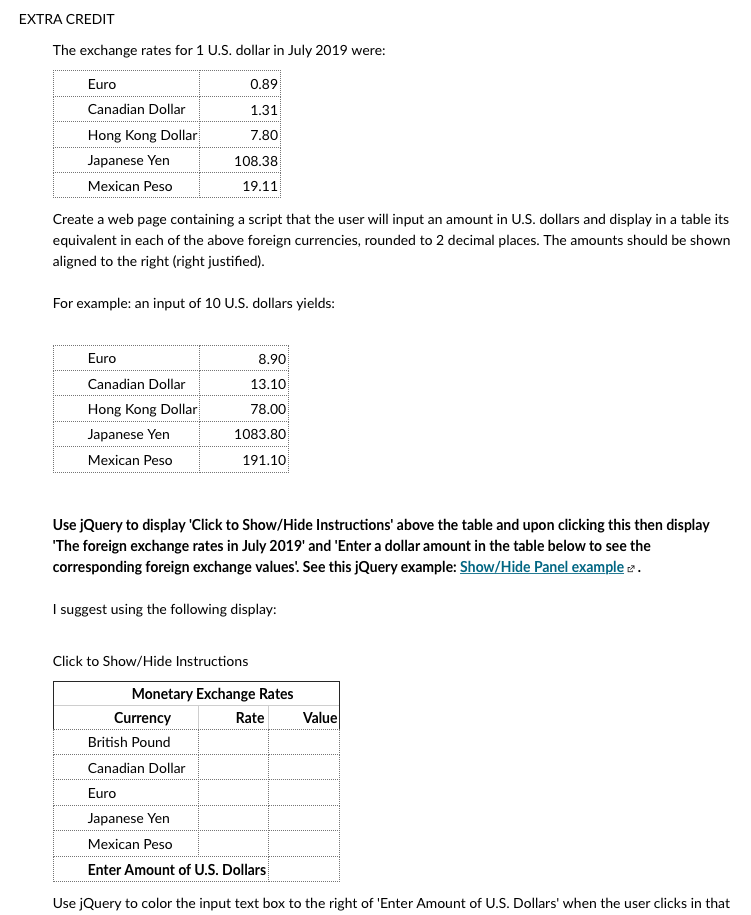
EXTRA CREDIT The exchange rates for 1 U.S. dollar in July 2019 were: Euro Canadian Dollar Hong Kong Dollar Japanese Yen Mexican Peso 0.89 1.31 7.80 108.38 19.11 Create a web page containing a script that the user will input an amount in U.S. dollars and display in a table its equivalent in each of the above foreign currencies, rounded to 2 decimal places. The amounts should be shown aligned to the right (right justified). For example: an input of 10 U.S. dollars yields: 8.90 13.10 Euro Canadian Dollar Hong Kong Dollar Japanese Yen Mexican Peso 78.00 1083.80 191.10 Use jQuery to display 'Click to Show/Hide Instructions' above the table and upon clicking this then display 'The foreign exchange rates in July 2019' and 'Enter a dollar amount in the table below to see the corresponding foreign exchange values! See this jQuery example: Show/Hide Panel example 2. I suggest using the following display: Value Click to Show/Hide Instructions Monetary Exchange Rates Currency Rate British Pound Canadian Dollar Euro Japanese Yen Mexican Peso Enter Amount of U.S. Dollars Use jQuery to color the input text box to the right of 'Enter Amount of U.S. Dollars' when the user clicks in that
Step by Step Solution
There are 3 Steps involved in it

Get step-by-step solutions from verified subject matter experts
 Study Help