







Question: Please, help me with the excel assignment . show how to enter the formula in excel cel assignment Casa Grande Resort & Spa Profit Center
Please, help me with the excel assignment . show how to enter the formula in excel
 cel assignment
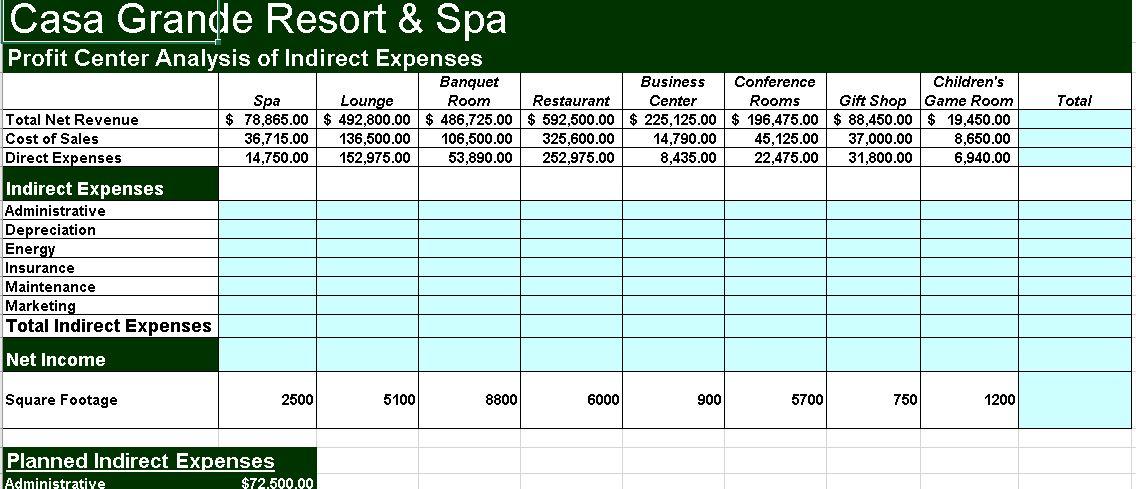
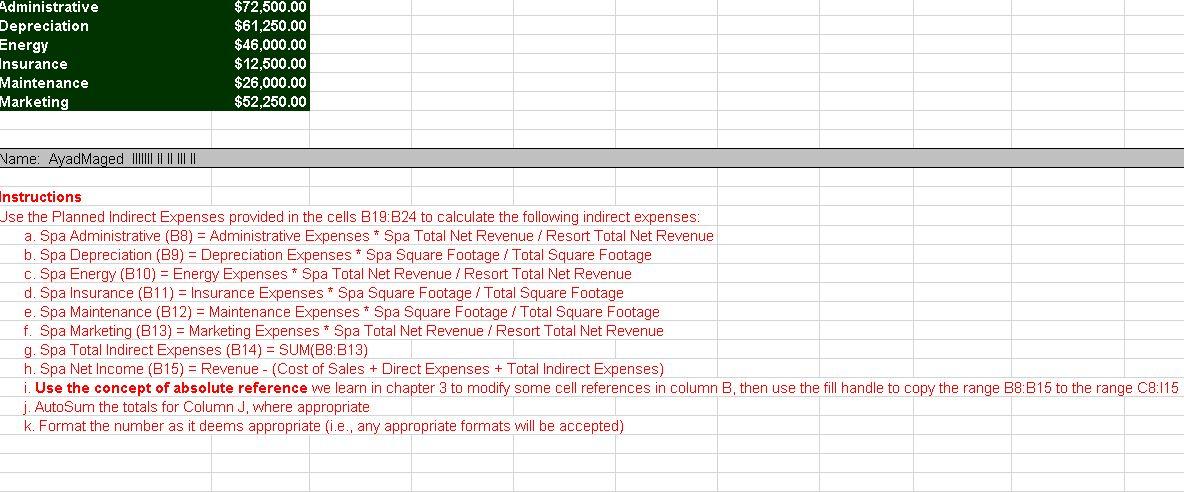
Casa Grande Resort & Spa Profit Center Analysis of Indirect Expenses Banquet Room Business Restaurant Center Conference Rooms Spa Lounge Total Net Revenue Cost of Sales Direct Expenses $78,865.00 $ 492,800.00 $ 486,725.00 $ 592,500.00 $ 225,125.00 $ 196,475.00 36,715.00 136,500.00 106,500.00 325,600.00 14,750.00 152,975.00 53,890.00 252,975.00 14,790.00 8,435.00 Indirect Expenses Administrative Depreciation Energy Insurance Maintenance Marketing Total Indirect Expenses Net Income Square Footage 5100 8800 6000 900 Planned Indirect Expenses Administrative 2500 $72.500.00 Gift Shop $ 88,450.00 45,125.00 37,000.00 22,475.00 31,800.00 5700 750 Children's Game Room $ 19,450.00 8,650.00 6,940.00 1200 Total Administrative $72,500.00 Depreciation $61,250.00 $46,000.00 Energy Insurance $12,500.00 Maintenance $26,000.00 Marketing $52,250.00 Name: AyadMaged |||||||||||| Instructions Use the Planned Indirect Expenses provided in the cells B19:B24 to calculate the following indirect expenses: a. Spa Administrative (B8) = Administrative Expenses * Spa Total Net Revenue / Resort Total Net Revenue b. Spa Depreciation (B9) = Depreciation Expenses * Spa Square Footage / Total Square Footage c. Spa Energy (B10) = Energy Expenses * Spa Total Net Revenue / Resort Total Net Revenue d. Spa Insurance (B11) = Insurance Expenses * Spa Square Footage / Total Square Footage e. Spa Maintenance (B12) = Maintenance Expenses * Spa Square Footage / Total Square Footage f. Spa Marketing (B13) = Marketing Expenses * Spa Total Net Revenue / Resort Total Net Revenue g. Spa Total Indirect Expenses (B14) = SUM(B8:B13) h. Spa Net Income (B15) = Revenue - (Cost of Sales + Direct Expenses + Total Indirect Expenses) i. Use the concept of absolute reference we learn in chapter 3 to modify some cell references in column B, then use the fill handle to copy the range B8:B15 to the range C8:115 j. AutoSum the totals for Column J, where appropriate k. Format the number as it deems appropriate (i.e., any appropriate formats will be accepted)
Step by Step Solution
There are 3 Steps involved in it

Get step-by-step solutions from verified subject matter experts
 Study Help