







Question: Please help me with the VBA for the practice problem. Part A The Data worksheet in the file Product Info.xlsx lists information on various software
Please help me with the VBA for the practice problem.
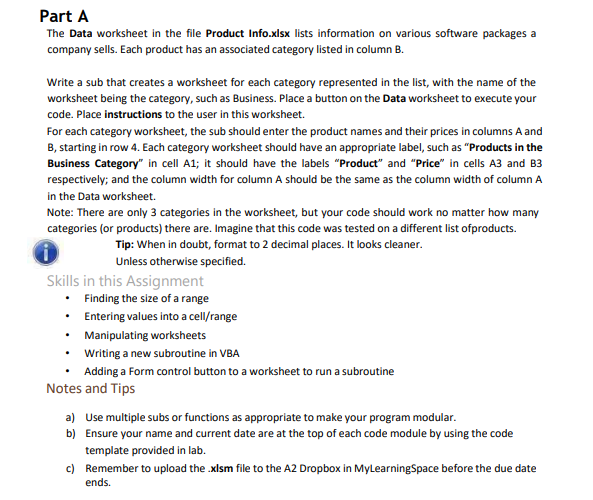
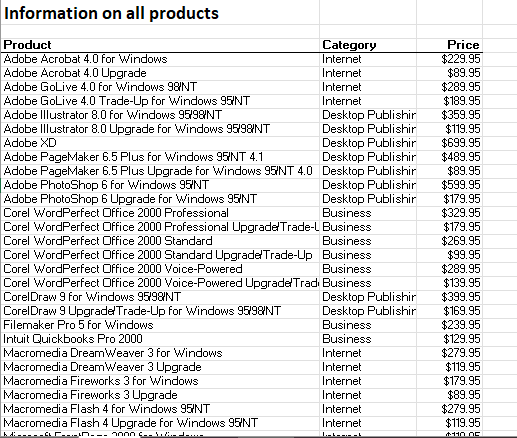
Part A The Data worksheet in the file Product Info.xlsx lists information on various software packages a company sells. Each product has an associated category listed in column B. Write a sub that creates a worksheet for each category represented in the list, with the name of the worksheet being the category, such as Business. Place a button on the Data worksheet to execute your code. Place instructions to the user in this worksheet. For each category worksheet, the sub should enter the product names and their prices in columns A and B, starting in row 4. Each category worksheet should have an appropriate label, such as "Products in the Business Category" in cell A1; it should have the labels "Product" and "Price" in cells A3 and B3 respectively; and the column width for column A should be the same as the column width of column A in the Data worksheet. Note: There are only 3 categories in the worksheet, but your code should work no matter how many categories (or products) there are. Imagine that this code was tested on a different list ofproducts. Tip: When in doubt, format to 2 decimal places. It looks cleaner. Unless otherwise specified. Skills in this Assignment - Finding the size of a range - Entering values into a cell/range - Manipulating worksheets - Writing a new subroutine in VBA - Adding a Form control button to a worksheet to run a subroutine Notes and Tips a) Use multiple subs or functions as appropriate to make your program modular. b) Ensure your name and current date are at the top of each code module by using the code template provided in lab. c) Remember to upload the .xlsm file to the A2 Dropbox in MyLearningSpace before the due date ends. Information on all products
Step by Step Solution
There are 3 Steps involved in it

Get step-by-step solutions from verified subject matter experts
 Study Help