







Question: Please help me with this c + + ! ! ! Create an object - oriented programming ( OOP ) program that manages user profiles.
Please help me with this cCreate an objectoriented programming OOP program that manages user profiles. Your program should run continuously until the user selects exit.
Requirements:
Create a base class Time and all mutatoraccessor methods, constructor, and destructor
private:
int hour;
int minute;
int second
Create a derived class DateTime : public Time and all mutatoraccessor methods, constructor, and destructor
private:
int month;
int day;
int year;
Create a class user.h and user.cpp that contains username, password, signin datetime, and sign out datetime.
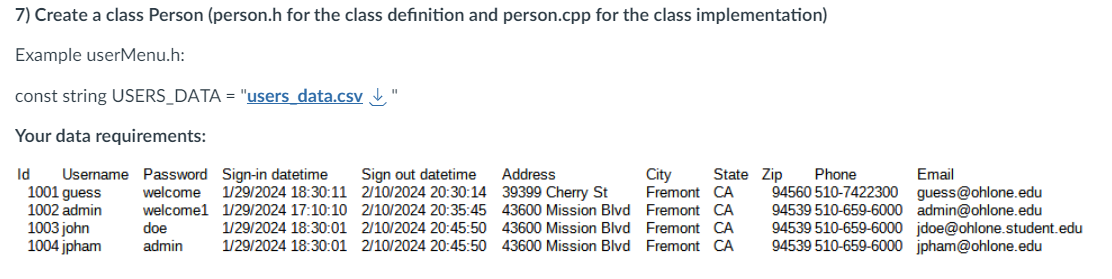
See usersdata.csv for the data requirements and create the member variables:
private:
int userId;
string username;
string password;
DateTime loginDateTime;
DateTime logoutDateTime;
Your program allows:
As discussed in class today, below is the suggested format. You may use any DateTime format for display, input, etc.
Save to disk usersdata.csv Download usersdata.csvdatetime format: ddmmyyyy hh:mm:ss
Display format: Monday
Users input from system datetime format you may use the provided utils.cpp
Create a base class Menu
Create a derived class UserMenu
Read from file usersdata.csv Download usersdata.csvand populate users to vector
and prompt the login screen menu, like:
Your Manage User Accounts, including:
User Menu
Signin
Enter email or mobile phone number
Enter password
Update sign in datetime
Sign Out
User must be already signin
Update sign out datetime
Save new signin and signout datetime to usersdata.csv
Reset Password
User must be already signin
Enter old password
Enter new password
Save new password to usersdata.csv
Create account
Enter first and last name
Enter mobile number or email
Enter password
Enter reenter password
Forgot your password? Only roleadmin can reset your password.
Save new signin signout datetime, and data to usersdata.csv
Manage Profiles
User must be already signin
Allow user to change update or delete personal information, name, role, address, phone, email
Save new data to usersdata.csv
x Quit
Enter char x to exit Sign Out and update sign out datetime.
Create a class Person personh for the class definition and person.cpp for the class implementation
Example userMenu.h:
const string USERSDATA "usersdata.csv Download usersdata.csv
Your data requirements:
samplepicture is belowCreate a class Person personh for the class definition and person.cpp for the class implementation
Example userMenu.h:
const string USERSDATA "users data.cSv ubrace
Your data requirements:
enum USERMENUOPTION
USERMENUSIGNIN
USERMENUCREATE
USERMENUCREATE
USERMENUREMOVE
USERMENURESET
USERMENUMANAGEPROFILE
USERMENUEXIT x
;
class UserMenu : public Menu
private:
Member variables and any other variables if necessary
fstream inFile;
User user;
vector users;
Prompt username and password, and authentication
Allow retries if the user enters an invalid username and password
If the user enters a valid username and password, output a message to indicate successful login or error
Add to class UserMenu the following member methods:
private:
void initUserData; Initialize and read from usersdata.csv; and populate the list vector users;
public:
bool signIn; Add a member method LoginMenu::signIn definition and implementation
public:
bool create; Add a member method create user definition and implementation
public:
bool remove; Add a member method remove user definition and implementation
public:
bool reset; Add a member method reset user definition and implementation
public:
bool manageProfiles; Add a member method to manage user definition and implementation
public:
void exit; Enter char x to exit Sign Out and update sign out datetime.
example
public:
bool signOut; Save loginDateTime and logoutDateTime data to file usersdata.csv
Create a main.cpp and implement the above requirements
int main
TODO implement Login here!!!
return ;
Step by Step Solution
There are 3 Steps involved in it
1 Expert Approved Answer
Step: 1 Unlock

Question Has Been Solved by an Expert!
Get step-by-step solutions from verified subject matter experts
Step: 2 Unlock
Step: 3 Unlock
 Study Help