







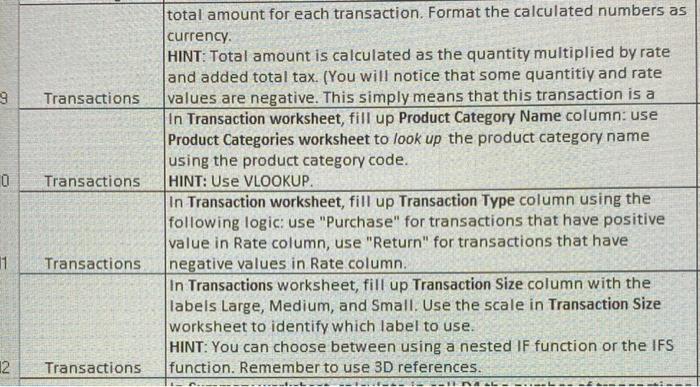
Question: Please help me with this homework assignment total amount for each transaction. Format the calculated numbers as currency. HINT: Total amount is calculated as the
 Please help me with this homework assignment
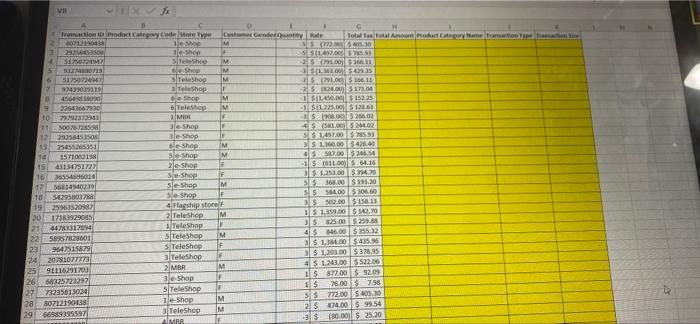
total amount for each transaction. Format the calculated numbers as currency. HINT: Total amount is calculated as the quantity multiplied by rate and added total tax. (You will notice that some quantitiy and rate values are negative. This simply means that this transaction is a In Transaction worksheet, fill up Product Category Name column: use Product Categories worksheet to look up the product category name using the product category code. HINT: USe VLOOKUP. In Transaction worksheet, fill up Transaction Type column using the following logic: use "Purchase" for transactions that have positive value in Rate column, use "Return" for transactions that have Transactions negative values in Rate column. In Transactions worksheet, fill up Transaction Size column with the labels Large, Medium, and Small. Use the scale in Transaction Size worksheet to identify which label to use. HINT: You can choose between using a nested IF function or the IFS Transactions function. Remember to use 3D references. total amount for each transaction. Format the calculated numbers as currency. HINT: Total amount is calculated as the quantity multiplied by rate and added total tax. (You will notice that some quantitiy and rate values are negative. This simply means that this transaction is a In Transaction worksheet, fill up Product Category Name column: use Product Categories worksheet to look up the product category name using the product category code. HINT: USe VLOOKUP. In Transaction worksheet, fill up Transaction Type column using the following logic: use "Purchase" for transactions that have positive value in Rate column, use "Return" for transactions that have Transactions negative values in Rate column. In Transactions worksheet, fill up Transaction Size column with the labels Large, Medium, and Small. Use the scale in Transaction Size worksheet to identify which label to use. HINT: You can choose between using a nested IF function or the IFS Transactions function. Remember to use 3D references
Step by Step Solution
There are 3 Steps involved in it

Get step-by-step solutions from verified subject matter experts
 Study Help