







Question: PLEASE HELP ME WITH THIS PLEASE package mazesolver; import java.io.FileNotFoundException; import java.io.FileReader; import java.util.Scanner; /** * Program Description: a maze solver that uses follow the
PLEASE HELP ME WITH THIS PLEASE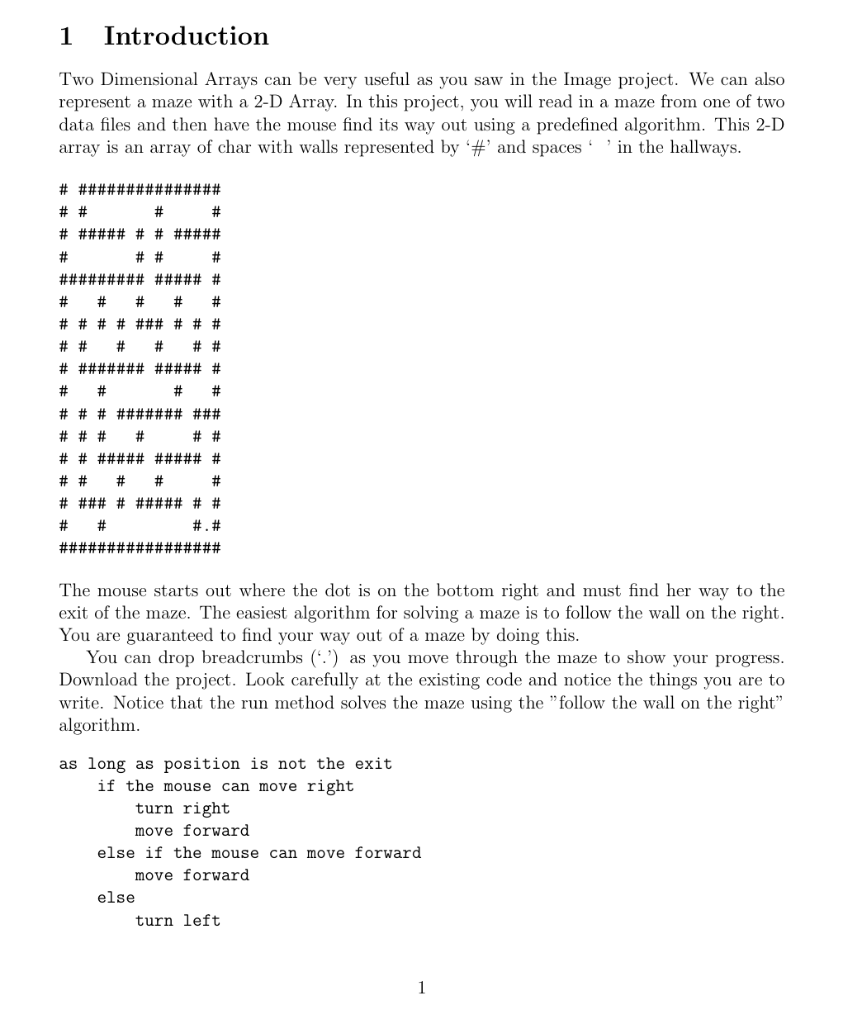
package mazesolver;
import java.io.FileNotFoundException; import java.io.FileReader; import java.util.Scanner;
/** * Program Description: a maze solver that uses "follow the right wall" as a * strategy to escape the maze. * @author aapplin */ public class MazeSolver{ // Class properties: initialized by the readMaze method /** * a Maze object */ private Maze maze; /** * A Mouse object */ private Mouse mouse; /** * This Method is complete, Do not change it * Method readmaze(). Receives a filename and reads * the contents of the specified file into local variables * and creates the mouse and the maze. * preconditions: none * postconditions: the mouse object and maze object have been created * with the data from the file. * @param filename the name of the data file that holds the information */ public void readMaze(String filename) { Scanner in = null; char ch; char[][]m; boolean fileFound = true; try{ in = new Scanner(new FileReader(filename)); int rows; int cols; // size of the maze int mouseRow; int mouseCol; String mouseDirection; int exitRow; int exitCol;
rows = in.nextInt(); cols = in.nextInt(); m = new char[rows][cols]; mouseRow = in.nextInt(); mouseCol = in.nextInt(); mouseDirection = in.next(); //this is not an error, Mouse hasn't been written yet. mouse = new Mouse(mouseRow, mouseCol, mouseDirection); exitRow = in.nextInt(); exitCol = in.nextInt(); in.nextLine(); // throw away the end of line character.
for (int r = 0; r
*/ public static void main(String[] args) { if (args.length == 0){ System.out.println("Usage java progFile dataFile"); System.exit(1); } MazeSolver solver = new MazeSolver(); solver.run(args[0]); } }
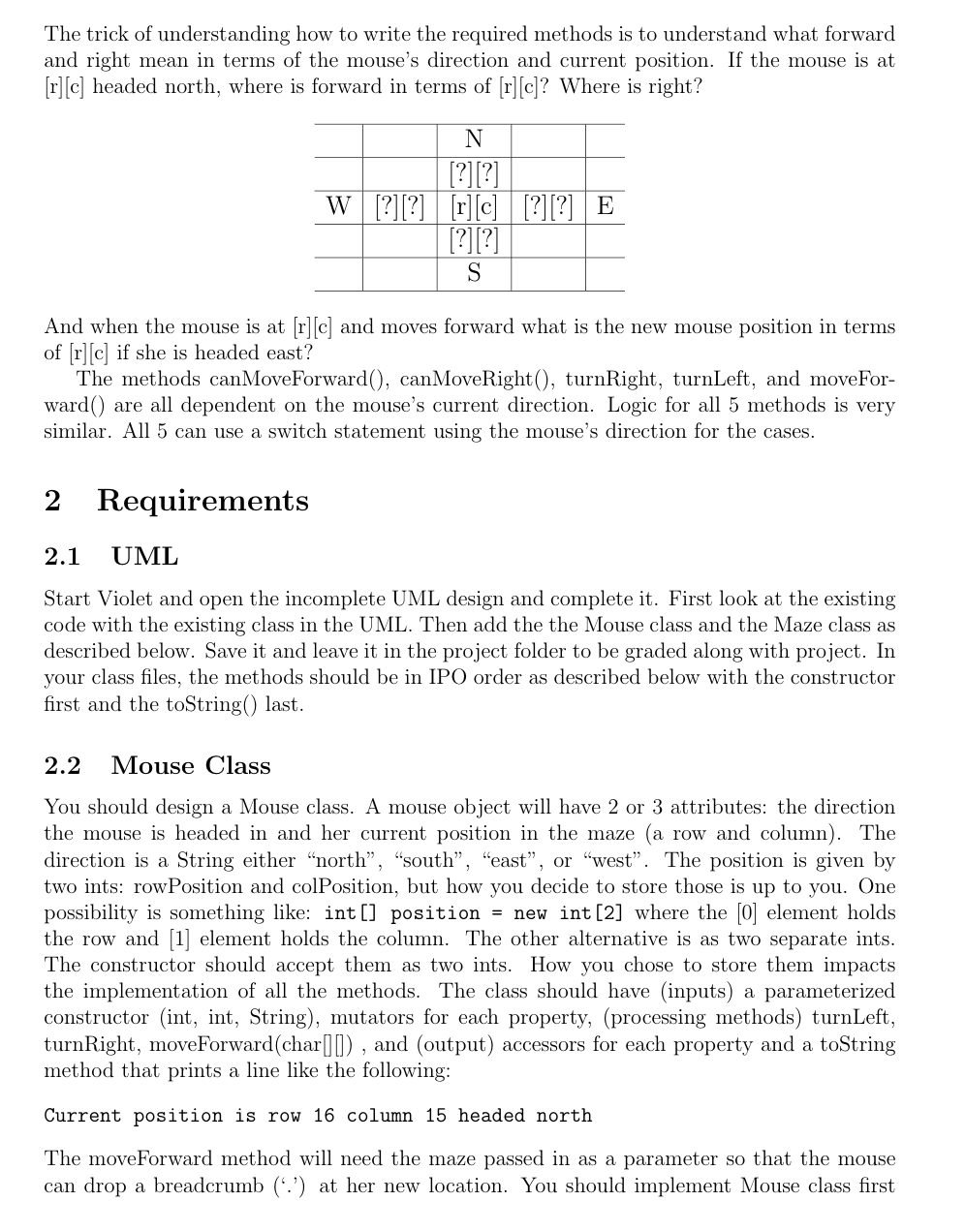
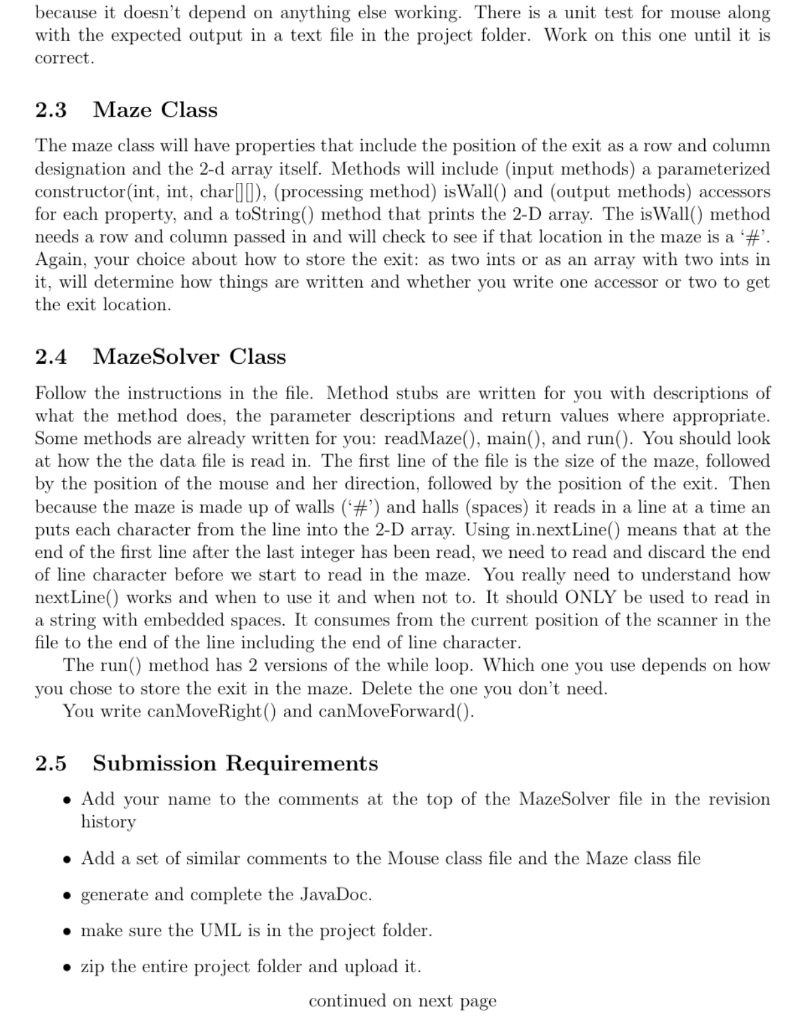
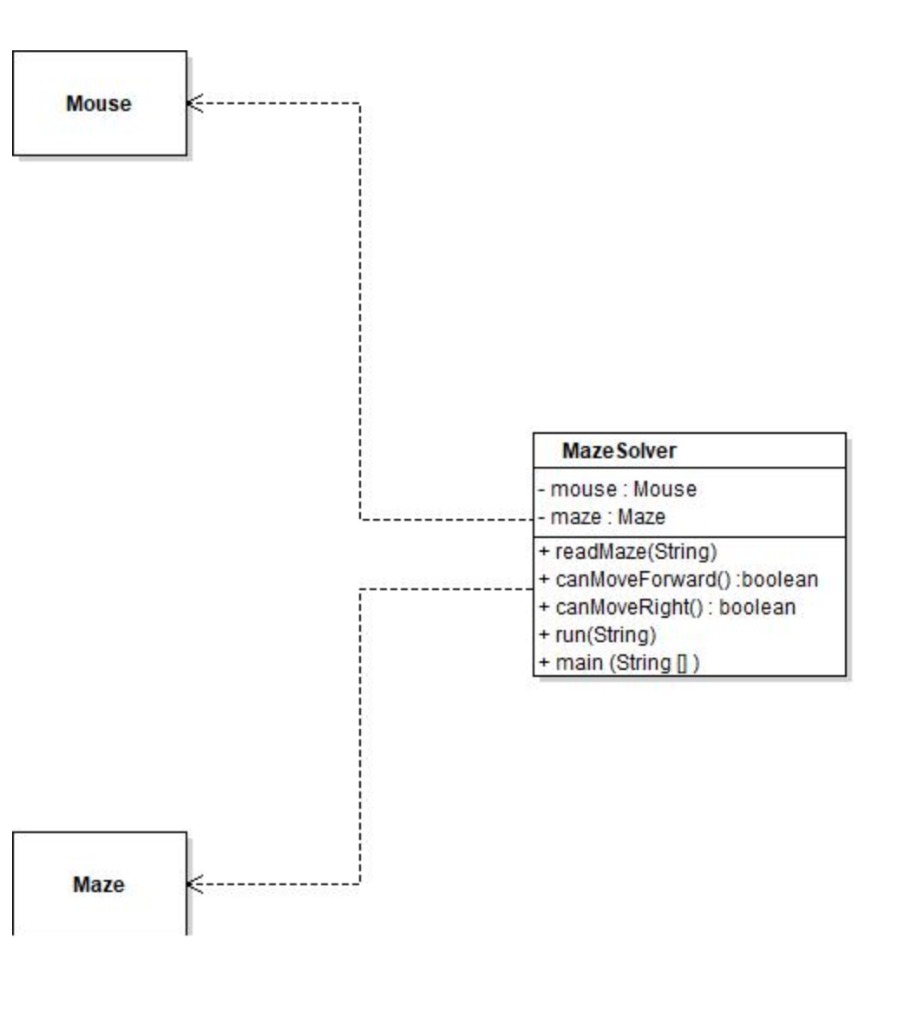
1 Introduction Two Dimensional Arrays can be very useful as you saw in the Image project. We can also represent a maze with a 2-D Array. In this project, you will read in a maze from one of two data files and then have the mouse find its way out using a predefined algorithm. This 2-D array is an array of char with walls represented by '#' and spaces in the hallways. # ############### # # # # # ##### # # ##### # # # # ############### # # # # # # # # # ### # # # # # # # # # # ####### ##### # # # # # # # # ########## # # # # # # # # ##### ##### # # # # # # # ### ######## # # #. # ################# The mouse starts out where the dot is on the bottom right and must find her way to the exit of the maze. The easiest algorithm for solving a maze is to follow the wall on the right. You are guaranteed to find your way out of a maze by doing this. You can drop breadcrumbs (':') as you move through the maze to show your progress. Download the project. Look carefully at the existing code and notice the things you are to write. Notice that the run method solves the maze using the "follow the wall on the right algorithm. as long as position is not the exit if the mouse can move right turn right move forward else if the mouse can move forward move forward else turn left 1 The trick of understanding how to write the required methods is to understand what forward and right mean in terms of the mouse's direction and current position. If the mouse is at [r][c] headed north, where is forward in terms of (r][c]? Where is right? N [?] [?] W [?][?] [r][c] [?][?] E [?][?] S And when the mouse is at [r][c] and moves forward what is the new mouse position in terms of [r][c] if she is headed east? The methods canMove Forward(), canMoveRight(), turnRight, turnLeft, and moveFor- ward() are all dependent on the mouse's current direction. Logic for all 5 methods is very similar. All 5 can use a switch statement using the mouse's direction for the cases. 2 Requirements 2.1 UML Start Violet and open the incomplete UML design and complete it. First look at the existing code with the existing class in the UML. Then add the the Mouse class and the Maze class as described below. Save it and leave it in the project folder to be graded along with project. In your class files, the methods should be in IPO order as described below with the constructor first and the toString() last. 2.2 Mouse Class You should design a Mouse class. A mouse object will have 2 or 3 attributes: the direction the mouse is headed in and her current position in the maze (a row and column). The direction is a String either "north, south, east", or "west. The position is given by two ints: rowPosition and colPosition, but how you decide to store those is up to you. One possibility is something like: int[] position = new int [2] where the [O] element holds the row and [1] element holds the column. The other alternative is as two separate ints. The constructor should accept them as two ints. How you chose to store them impacts the implementation of all the methods. The class should have (inputs) a parameterized constructor (int, int, String), mutators for each property, (processing methods) turnLeft, turnRight, moveForward(char(l), and (output) accessors for each property and a toString method that prints a line like the following: Current position is row 16 column 15 headed north The moveForward method will need the maze passed in as a parameter so that the mouse can drop a breadcrumb (*. ') at her new location. You should implement Mouse class first because it doesn't depend on anything else working. There is a unit test for mouse along with the expected output in a text file in the project folder. Work on this one until it is correct. 2.3 Maze Class The maze class will have properties that include the position of the exit as a row and column designation and the 2-d array itself. Methods will include (input methods) a parameterized constructor(int, int, char[I), (processing method) isWall() and (output methods) accessors for each property, and a toString() method that prints the 2-D array. The isWall() method needs a row and column passed in and will check to see if that location in the maze is a '#'. Again, your choice about how to store the exit: as two ints or as an array with two ints in it, will determine how things are written and whether you write one accessor or two to get the exit location. 2.4 MazeSolver Class Follow the instructions in the file. Method stubs are written for you with descriptions of what the method does, the parameter descriptions and return values where appropriate. Some methods are already written for you: read Maze(), main(), and run(). You should look at how the the data file is read in. The first line of the file is the size of the maze, followed by the position of the mouse and her direction, followed by the position of the exit. Then because the maze is made up of walls (#') and halls (spaces) it reads in a line at a time an puts each character from the line into the 2-D array. Using in.nextLine() means that at the end of the first line after the last integer has been read, we need to read and discard the end of line character before we start to read in the maze. You really need to understand how nextLine() works and when to use it and when not to. It should ONLY be used to read in a string with embedded spaces. It consumes from the current position of the scanner in the file to the end of the line including the end of line character. The run() method has 2 versions of the while loop. Which one you use depends on how you chose to store the exit in the maze. Delete the one you don't need. You write canMoveRight() and canMove Forward(). 2.5 Submission Requirements Add your name to the comments at the top of the MazeSolver file in the revision history Add a set of similar comments to the Mouse class file and the Maze class file generate and complete the JavaDoc. make sure the UML is in the project folder. zip the entire project folder and upload it. continued on next page Mouse Maze Solver - mouse: Mouse maze: Maze + + readMaze(String) canMoveForward():boolean canMoveRight(): boolean + run(String) + main(String 0) + Maze 1 Introduction Two Dimensional Arrays can be very useful as you saw in the Image project. We can also represent a maze with a 2-D Array. In this project, you will read in a maze from one of two data files and then have the mouse find its way out using a predefined algorithm. This 2-D array is an array of char with walls represented by '#' and spaces in the hallways. # ############### # # # # # ##### # # ##### # # # # ############### # # # # # # # # # ### # # # # # # # # # # ####### ##### # # # # # # # # ########## # # # # # # # # ##### ##### # # # # # # # ### ######## # # #. # ################# The mouse starts out where the dot is on the bottom right and must find her way to the exit of the maze. The easiest algorithm for solving a maze is to follow the wall on the right. You are guaranteed to find your way out of a maze by doing this. You can drop breadcrumbs (':') as you move through the maze to show your progress. Download the project. Look carefully at the existing code and notice the things you are to write. Notice that the run method solves the maze using the "follow the wall on the right algorithm. as long as position is not the exit if the mouse can move right turn right move forward else if the mouse can move forward move forward else turn left 1 The trick of understanding how to write the required methods is to understand what forward and right mean in terms of the mouse's direction and current position. If the mouse is at [r][c] headed north, where is forward in terms of (r][c]? Where is right? N [?] [?] W [?][?] [r][c] [?][?] E [?][?] S And when the mouse is at [r][c] and moves forward what is the new mouse position in terms of [r][c] if she is headed east? The methods canMove Forward(), canMoveRight(), turnRight, turnLeft, and moveFor- ward() are all dependent on the mouse's current direction. Logic for all 5 methods is very similar. All 5 can use a switch statement using the mouse's direction for the cases. 2 Requirements 2.1 UML Start Violet and open the incomplete UML design and complete it. First look at the existing code with the existing class in the UML. Then add the the Mouse class and the Maze class as described below. Save it and leave it in the project folder to be graded along with project. In your class files, the methods should be in IPO order as described below with the constructor first and the toString() last. 2.2 Mouse Class You should design a Mouse class. A mouse object will have 2 or 3 attributes: the direction the mouse is headed in and her current position in the maze (a row and column). The direction is a String either "north, south, east", or "west. The position is given by two ints: rowPosition and colPosition, but how you decide to store those is up to you. One possibility is something like: int[] position = new int [2] where the [O] element holds the row and [1] element holds the column. The other alternative is as two separate ints. The constructor should accept them as two ints. How you chose to store them impacts the implementation of all the methods. The class should have (inputs) a parameterized constructor (int, int, String), mutators for each property, (processing methods) turnLeft, turnRight, moveForward(char(l), and (output) accessors for each property and a toString method that prints a line like the following: Current position is row 16 column 15 headed north The moveForward method will need the maze passed in as a parameter so that the mouse can drop a breadcrumb (*. ') at her new location. You should implement Mouse class first because it doesn't depend on anything else working. There is a unit test for mouse along with the expected output in a text file in the project folder. Work on this one until it is correct. 2.3 Maze Class The maze class will have properties that include the position of the exit as a row and column designation and the 2-d array itself. Methods will include (input methods) a parameterized constructor(int, int, char[I), (processing method) isWall() and (output methods) accessors for each property, and a toString() method that prints the 2-D array. The isWall() method needs a row and column passed in and will check to see if that location in the maze is a '#'. Again, your choice about how to store the exit: as two ints or as an array with two ints in it, will determine how things are written and whether you write one accessor or two to get the exit location. 2.4 MazeSolver Class Follow the instructions in the file. Method stubs are written for you with descriptions of what the method does, the parameter descriptions and return values where appropriate. Some methods are already written for you: read Maze(), main(), and run(). You should look at how the the data file is read in. The first line of the file is the size of the maze, followed by the position of the mouse and her direction, followed by the position of the exit. Then because the maze is made up of walls (#') and halls (spaces) it reads in a line at a time an puts each character from the line into the 2-D array. Using in.nextLine() means that at the end of the first line after the last integer has been read, we need to read and discard the end of line character before we start to read in the maze. You really need to understand how nextLine() works and when to use it and when not to. It should ONLY be used to read in a string with embedded spaces. It consumes from the current position of the scanner in the file to the end of the line including the end of line character. The run() method has 2 versions of the while loop. Which one you use depends on how you chose to store the exit in the maze. Delete the one you don't need. You write canMoveRight() and canMove Forward(). 2.5 Submission Requirements Add your name to the comments at the top of the MazeSolver file in the revision history Add a set of similar comments to the Mouse class file and the Maze class file generate and complete the JavaDoc. make sure the UML is in the project folder. zip the entire project folder and upload it. continued on next page Mouse Maze Solver - mouse: Mouse maze: Maze + + readMaze(String) canMoveForward():boolean canMoveRight(): boolean + run(String) + main(String 0) + Maze
Step by Step Solution
There are 3 Steps involved in it

Get step-by-step solutions from verified subject matter experts
 Study Help