







Question: Please Help plus extra credit...step by step Tasks Another Sample Run - Non - extra Credit ( user input is shaded ) Enter your name:
Please Help plus extra credit...step by step
Tasks Another Sample Run Nonextra Credit user input is shaded
Enter your name: Montgomery Burns
Enter your age:
Enter how much you would like to earn a year:
Your name is Montgomery Burns
Your age is years old which is months
You hope to earn $ per year.
Sample Run Extra Credit user input is shaded
Enter your name: Wayland Smithers
Enter your age:
Enter how much you would like to earn a year:
Your name is Wayland Smithers
Your age is years old which is months
You hope to earn $ per year.
Grading Rubric points and points extra credit
Comment in program with name points
Declaration of the variables to hold the String, int, and double entered by the user points
Declaration of the variable to hold the calculation for the calculated value points
prompting the user Scanner or JOptionPane for the String, int, and double points
Calculating months and storing in a variable points
Displaying the values entered back to the user along with the calculated value console or
JOptionPane points
JOptionPane Note: if using the JOptionPane, you need this as the last line of the main method:
System.exit;
For extra credit, format the salary with commas and decimal points either using printf or
String.format points
following the naming guidelines for Classes and identifiers points
organization of your code variable declaration first prompting user for data calculations if
applicable then displaying the data points
proper indenting rightclick on code and select format points
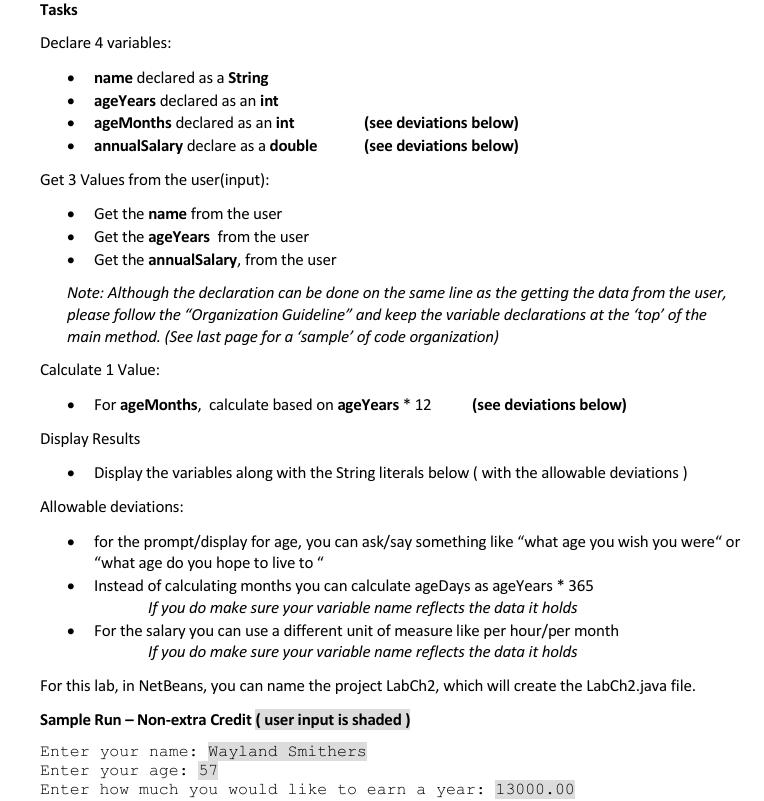
Declare variables:
name declared as a String
ageYears declared as an int
ageMonths declared as an int
see deviations below
annualSalary declare as a double
see deviations below
Get Values from the userinput:
Get the name from the user
Get the ageYears from the user
Get the annualSalary, from the user
Note: Although the declaration can be done on the same line as the getting the data from the user,
please follow the "Organization Guideline" and keep the variable declarations at the 'top' of the
main method. See last page for a 'sample' of code organization
Calculate Value:
For ageMonths, calculate based on ageYears
see deviations below
Display Results
Display the variables along with the String literals below with the allowable deviations
Allowable deviations:
for the promptdisplay for age, you can asksay something like "what age you wish you were" or
"what age do you hope to live to
Instead of calculating months you can calculate ageDays as ageYears
If you do make sure your variable name reflects the data it holds
For the salary you can use a different unit of measure like per hourper month
If you do make sure your variable name reflects the data it holds
For this lab, in NetBeans, you can name the project LabCh which will create the LabChjava file.
Sample Run Nonextra Credit user input is shaded
Enter your name: Wayland Smithers
Enter your age:
Enter how much you would like to earn a year:
Step by Step Solution
There are 3 Steps involved in it
1 Expert Approved Answer
Step: 1 Unlock

Question Has Been Solved by an Expert!
Get step-by-step solutions from verified subject matter experts
Step: 2 Unlock
Step: 3 Unlock
 Study Help