







Question: PLEASE HELP, PROGRAM: MICROSOFT VISUAL STUDIO 2 0 2 2 Develop the projects described below using good visual design and program coding practices that includes
PLEASE HELP, PROGRAM: MICROSOFT VISUAL STUDIO
Develop the projects described below using good visual design and program coding
practices that includes Meaningful title on title bar of forms
Identifiers names for objects, variables, and constants are meaningful and follow a
consistent naming conventionDescription, Developer Name, Date Created, Date Last Modified
Descriptive remarks for every method
Proper indentation & blank line after each full comment line
All variables and constants are local whenever possible scopeindependent modules, with each module performing one part of the required functionality.
Program Note: A business logic class is not required for this program
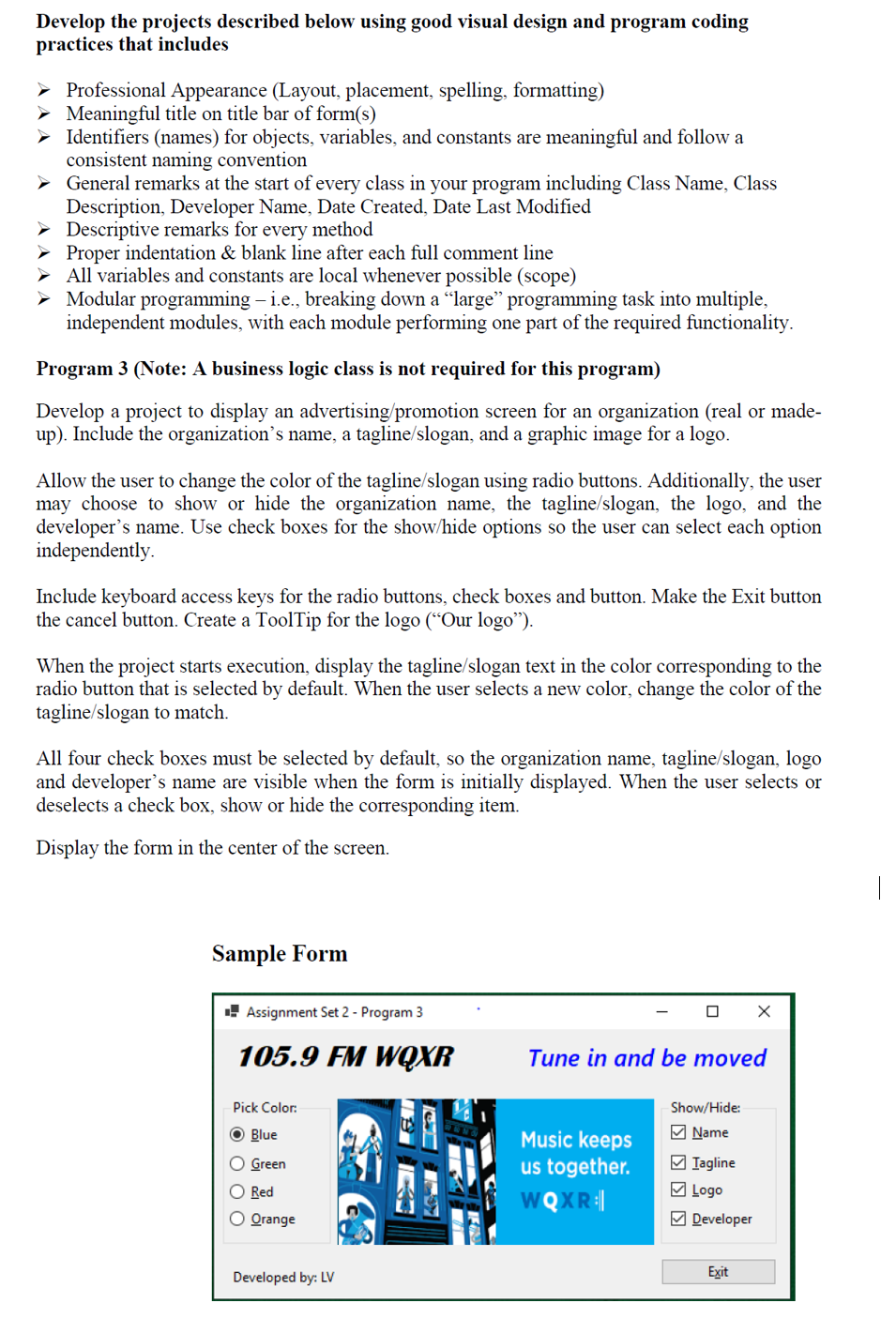
Develop a project to display an advertisingpromotion screen for an organization real or made
up Include the organization's name, a taglineslogan and a graphic image for a logo
Allow the user to change the color of the taglineslogan using radio buttons. Additionally, the user
may choose to show or hide the organization name, the taglineslogan the logo and the
developer's name. Use check boxes for the showhide options so the user can select each option
independently.
Include keyboard access keys for the radio buttons, check boxes and button. Make the Exit button
the cancel button. Create a ToolTip for the logo Our logo
When the project starts execution, display the taglineslogan text in the color corresponding to the
radio button that is selected by default. When the user selects a new color, change the color of the
taglineslogan to match.
All four check boxes must be selected by default, so the organization name, taglineslogan logo
and developer's name are visible when the form is initially displayed. When the user selects or
deselects a check box, show or hide the corresponding item.
Display the form in the center of the screen.
Sample Form
Step by Step Solution
There are 3 Steps involved in it
1 Expert Approved Answer
Step: 1 Unlock

Question Has Been Solved by an Expert!
Get step-by-step solutions from verified subject matter experts
Step: 2 Unlock
Step: 3 Unlock
 Study Help