







Question: Please help Receivables Using Excel for Aging Accounts Receivable The Lake Lucerne Company uses the allow ance method of estimating bad debts expense. An aging
Please help
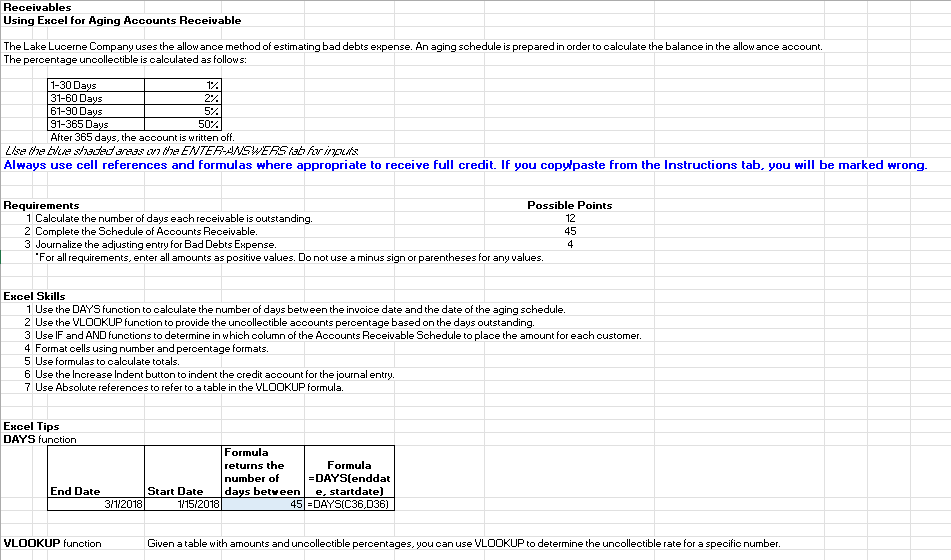
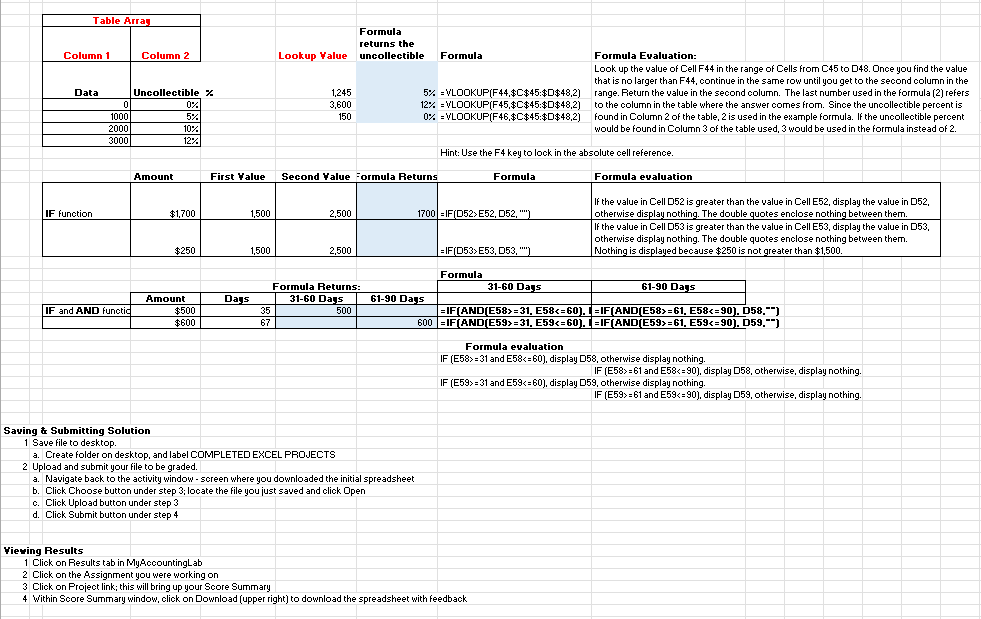
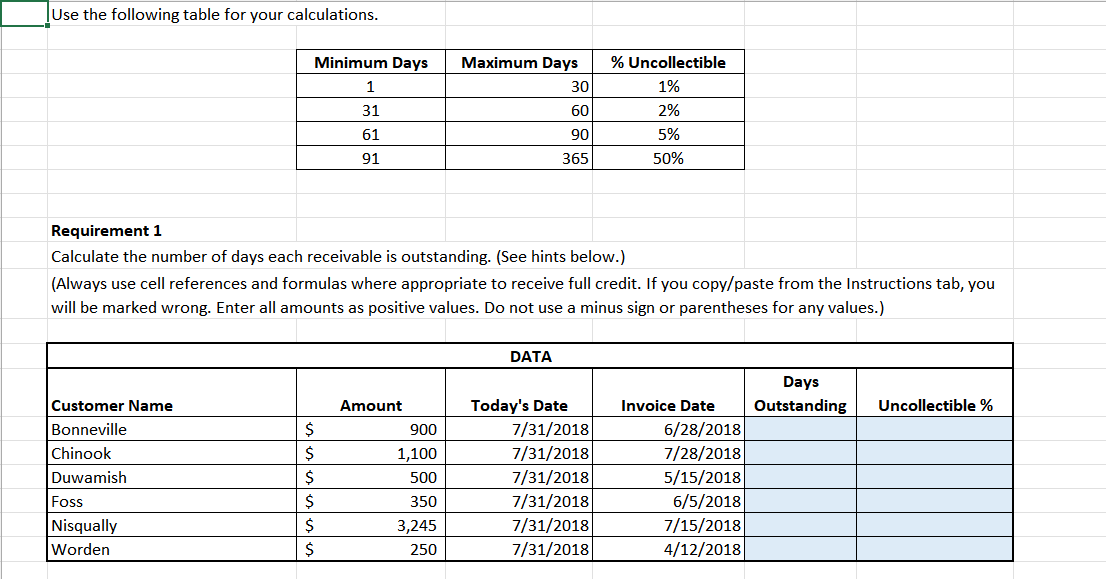
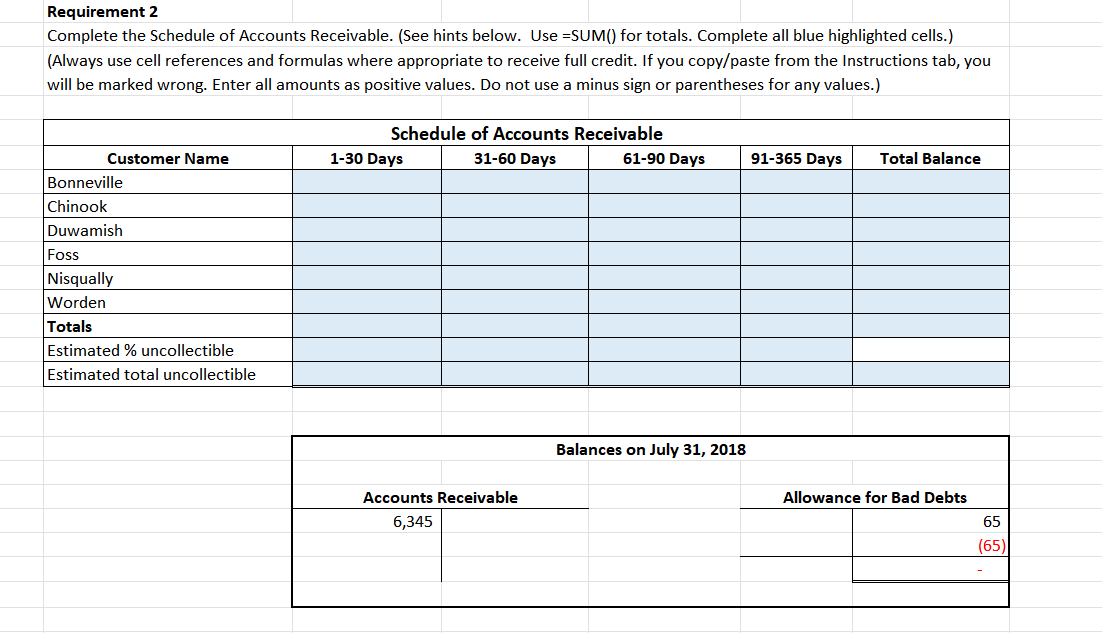
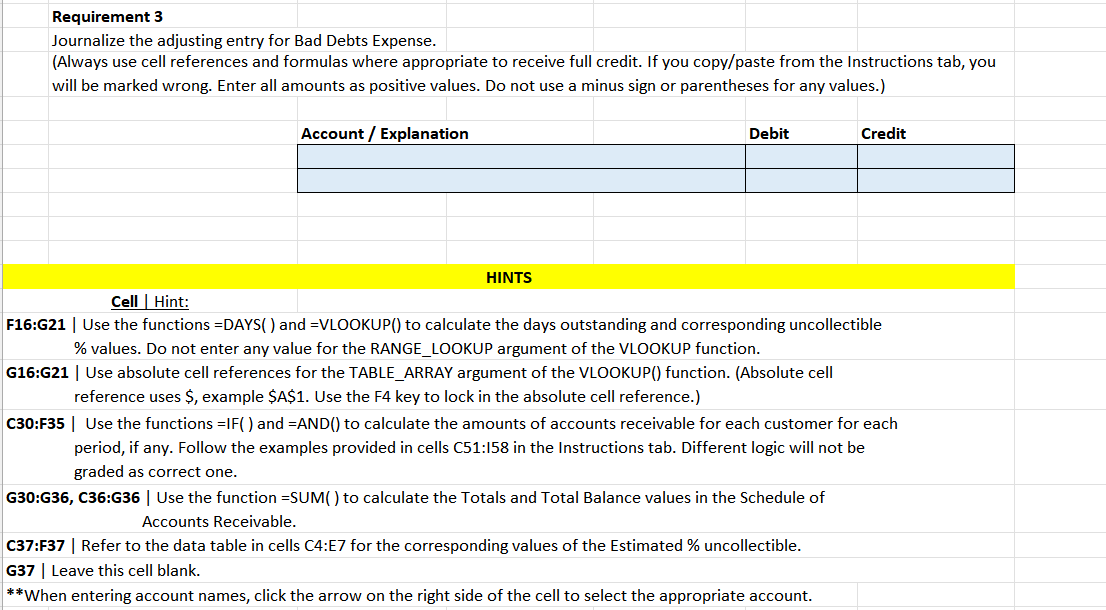
Receivables Using Excel for Aging Accounts Receivable The Lake Lucerne Company uses the allow ance method of estimating bad debts expense. An aging schedule is prepared in order to calculate the balance in the allow ance account. The percentage uncollectible is calculated as follows: \begin{tabular}{|l|r|} \hline 130 Days & 1% \\ \hline 3160 Days & 2% \\ \hline 6190 Days & 5% \\ \hline 91365 Days & 50% \\ \hline \end{tabular} After 365 days, the acoount is written off. Always use cell references and formulas where appropriate to receive full credit. If you copylpaste from the Instructions tab. you will be marked wrong. Requirements 1 Caloulate the number of days each receivable is outstanding. 2 Complete the Sohedule of Acoounts Receivable. 3 Journalize the adjusting entry for BadDebts Expense. "For all requirements, enter all amounts as positive values. Do not use a minus sign or parentheses for any values. Excel Skills 1 Use the DAAYS function to calculate the number of days between the invoice date and the date of the aging schedule. 2 Use the VLDOKUP function to provide the uncollectible acoounts percentage based on the days outstanding. 3 Use IF and AND functions to determine in which column of the Accounts Receivable Schedule to place the amount for each oustomer. 4 Format cells using number and percentage formats. 5 Use formulas to calculate totals. 6 Use the lncrease Indent button to indent the credit acoount for the journal entry. 7 Use Absolute references to refer to a table in the VLDOKUP formula. Excel Tips DAY'S function \begin{tabular}{|r|c|l|c|} \hline & & Formulareturnsthenumberofdaysbetween & Formula=DAYS[enddate,startdate) \\ \hline End Date & Start Date & 45 & =DAYS[C36,D36] \\ \hline 31/2018 & 1/15/2018 & & \end{tabular} VLOOKUP function Given a table with amounts and uncollectible percentages, you can use VLDOKUP to determine the uncollectible rate for a specific number. Sav Use the following table for your calculations. Requirement 1 Calculate the number of days each receivable is outstanding. (See hints below.) (Always use cell references and formulas where appropriate to receive full credit. If you copy/paste from the Instructions tab, you will be marked wrong. Enter all amounts as positive values. Do not use a minus sign or parentheses for any values.) Complete the Schedule of Accounts Receivable. (See hints below. Use =SUM() for totals. Complete all blue highlighted cells.) (Always use cell references and formulas where appropriate to receive full credit. If you copy/paste from the Instructions tab, you will be marked wrong. Enter all amounts as positive values. Do not use a minus sign or parentheses for any values.) Journalize the adjusting entry for Bad Debts Expense. (Always use cell references and formulas where appropriate to receive full credit. If you copy/paste from the Instructions tab, you will be marked wrong. Enter all amounts as positive values. Do not use a minus sign or parentheses for any values.) Receivables Using Excel for Aging Accounts Receivable The Lake Lucerne Company uses the allow ance method of estimating bad debts expense. An aging schedule is prepared in order to calculate the balance in the allow ance account. The percentage uncollectible is calculated as follows: \begin{tabular}{|l|r|} \hline 130 Days & 1% \\ \hline 3160 Days & 2% \\ \hline 6190 Days & 5% \\ \hline 91365 Days & 50% \\ \hline \end{tabular} After 365 days, the acoount is written off. Always use cell references and formulas where appropriate to receive full credit. If you copylpaste from the Instructions tab. you will be marked wrong. Requirements 1 Caloulate the number of days each receivable is outstanding. 2 Complete the Sohedule of Acoounts Receivable. 3 Journalize the adjusting entry for BadDebts Expense. "For all requirements, enter all amounts as positive values. Do not use a minus sign or parentheses for any values. Excel Skills 1 Use the DAAYS function to calculate the number of days between the invoice date and the date of the aging schedule. 2 Use the VLDOKUP function to provide the uncollectible acoounts percentage based on the days outstanding. 3 Use IF and AND functions to determine in which column of the Accounts Receivable Schedule to place the amount for each oustomer. 4 Format cells using number and percentage formats. 5 Use formulas to calculate totals. 6 Use the lncrease Indent button to indent the credit acoount for the journal entry. 7 Use Absolute references to refer to a table in the VLDOKUP formula. Excel Tips DAY'S function \begin{tabular}{|r|c|l|c|} \hline & & Formulareturnsthenumberofdaysbetween & Formula=DAYS[enddate,startdate) \\ \hline End Date & Start Date & 45 & =DAYS[C36,D36] \\ \hline 31/2018 & 1/15/2018 & & \end{tabular} VLOOKUP function Given a table with amounts and uncollectible percentages, you can use VLDOKUP to determine the uncollectible rate for a specific number. Sav Use the following table for your calculations. Requirement 1 Calculate the number of days each receivable is outstanding. (See hints below.) (Always use cell references and formulas where appropriate to receive full credit. If you copy/paste from the Instructions tab, you will be marked wrong. Enter all amounts as positive values. Do not use a minus sign or parentheses for any values.) Complete the Schedule of Accounts Receivable. (See hints below. Use =SUM() for totals. Complete all blue highlighted cells.) (Always use cell references and formulas where appropriate to receive full credit. If you copy/paste from the Instructions tab, you will be marked wrong. Enter all amounts as positive values. Do not use a minus sign or parentheses for any values.) Journalize the adjusting entry for Bad Debts Expense. (Always use cell references and formulas where appropriate to receive full credit. If you copy/paste from the Instructions tab, you will be marked wrong. Enter all amounts as positive values. Do not use a minus sign or parentheses for any values.)
Step by Step Solution
There are 3 Steps involved in it

Get step-by-step solutions from verified subject matter experts
 Study Help