







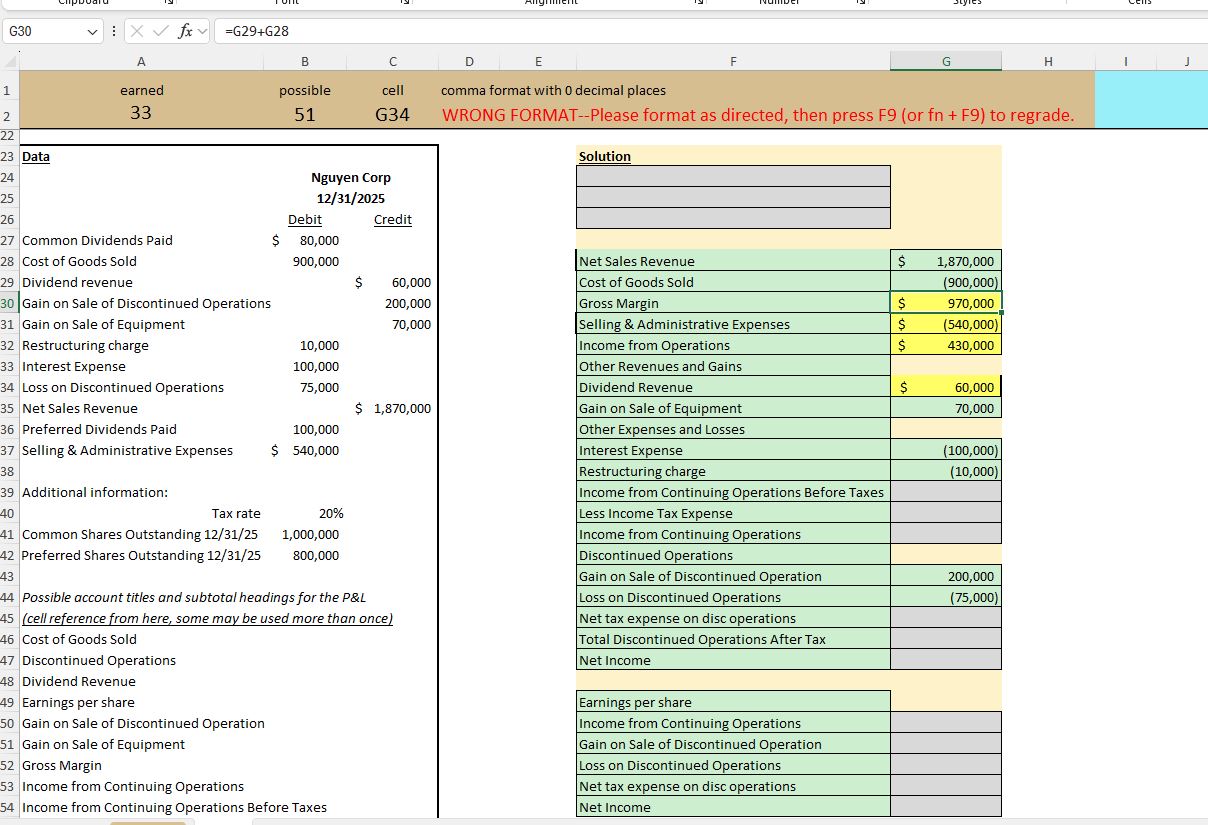
Question: Please help show the excel work 1 ) Using the data below, create a multi - step GAAP Income Statement in appropriate protessional Excel tormat
Please help show the excel work
Using the data below, create a multistep GAAP Income Statement in appropriate protessional Excel tormat ie use cell reterencing and tormulas, no hard coding numbers
All account titles and subtotals should be added using cell referencing.
Grading: possible points
This spreadsheet contains macros which will provide real time feedback on EACH cell that you enter in the Solution. There are cells which get graded, and your score on this assignment will be calculated based upon the of the cells that are completed correctly.
Tips:
The P&L header should start in cell F and the first line of data should be in row The Earnings Per Share header should be in cell F with the first line of data in row
All expenses should be reported as negative numbers
If there is more than one line item in a category in the P&L where there is flexibility in the order, list the line items in alphabetical order
All labels should be included in column F and all amounts should be included in column G
When formatting cells in a financial worksheet, it is customary that the first and last numbers have $ but all numbers are comma format.
Earnings Per Share should be taken to two decimal places
Step by Step Solution
There are 3 Steps involved in it
1 Expert Approved Answer
Step: 1 Unlock

Question Has Been Solved by an Expert!
Get step-by-step solutions from verified subject matter experts
Step: 2 Unlock
Step: 3 Unlock
 Study Help