







Question: Please help. Thank you! look Assignment 4 File I/O Purpose This assignment will provide further experience in algorithm development as well as implementing file input
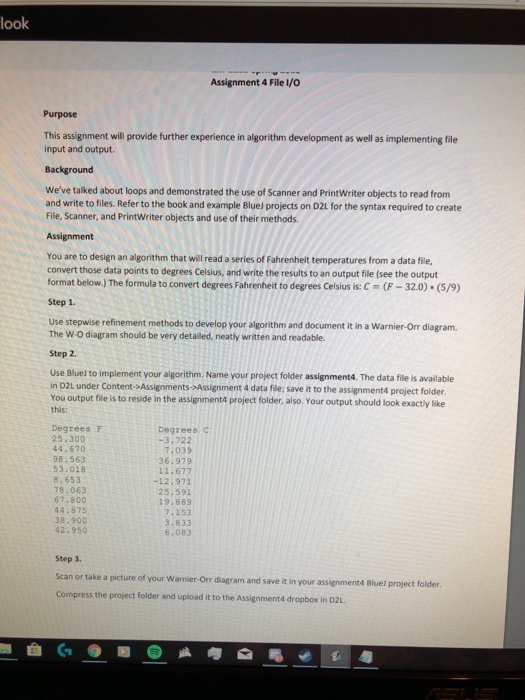
look Assignment 4 File I/O Purpose This assignment will provide further experience in algorithm development as well as implementing file input and output Background We've talked about loops and demonstrated the use of Scanner and PrintWriter objects to read from and write to files. Refer to the book and example Bluel projects on D2L for the syntax required to create File, Scanner, and PrintWriter objects and use of their methods. Assignment You are to design an algorithm that will read a series of Fahrenheit temperatures from a data file, convert those data points to degrees Celsius, and write the results to an output file (see the output format below.) The formula to convert degrees Fahrenheit to degrees Celsius is: C-(F-320)(S/9) Step 1. Use stepwise refinement methods to develop your algorithm and document it in a Warnier-Orr diagram. The W-O diagram should be very detailed, neatly written and readable. Step 2 Use Bluel to implement your algorithm. Name your project folder assignment4. The data file is available in D2L under Content->Assignments->Assignment 4 data file: save it to the assignment4 project folder You output file is to reside in the assignment4 project folder, also. Your output should look exactiy like this: Degrees F Degrees c 25.300 44.670 98.563 53.018 8,653 78.063 67.800 44.875 38.900 42.950 -3.722 7.039 36.979 11.677 -12.971 25.591 19.889 7.153 3.833 6.083 Step 3. Scan or take a picture of your Warnier-Orr diagram and save it in your assignment Bluel project Compress the project folder and upload it to the Assignment4 dropbox in D2L folder
Step by Step Solution
There are 3 Steps involved in it

Get step-by-step solutions from verified subject matter experts
 Study Help