







Question: please help !!!! thanks 8. Switch to the Platinum Editing Groups worksheet, which includes the Platinum table Ilsting editing project data for groups at the

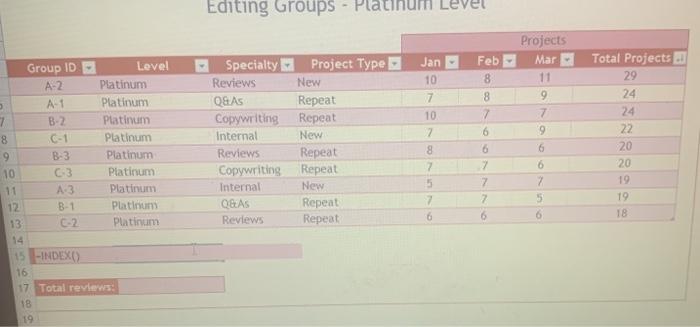
8. Switch to the Platinum Editing Groups worksheet, which includes the Platinum table Ilsting editing project data for groups at the Platinum level, the highest editing level in the company. Alex wants to display statistics in cells B15 and B17. In cell B15, use the INDEX function to display the value in the first row and first column of the Platinum table In cell 017, use the SUMIF function and structured references to display the total number of projects completed by groups with the Reviews specialty Editing Groups - Platinum Level Jan 10 7 Projects Mar 11 9 7 9 Group ID Level A-2 Platinum AT Platinum 7 B-2 Platinum 8 C-1 Platinum 9 B-3 Platinum 10 63 Platinum A. Platinum 12 B-1 Platinum 13 Platinum 14 15 -INDEXO 16 17 Total reviews: 18 19 Specialty Project Type Reviews New Q&A Repeat Copywriting Repeat Internal New Reviews Repeat Copywriting Repeat Internal New Q&AS Repeat Reviews Repeat 10 7 8 7 5 7 Feb 8 8 7 6 6 7 7 2 6 Total Projects 29 24 24 22 20 20 19 19 18 6 7 5 6 8. Switch to the Platinum Editing Groups worksheet, which includes the Platinum table Ilsting editing project data for groups at the Platinum level, the highest editing level in the company. Alex wants to display statistics in cells B15 and B17. In cell B15, use the INDEX function to display the value in the first row and first column of the Platinum table In cell 017, use the SUMIF function and structured references to display the total number of projects completed by groups with the Reviews specialty Editing Groups - Platinum Level Jan 10 7 Projects Mar 11 9 7 9 Group ID Level A-2 Platinum AT Platinum 7 B-2 Platinum 8 C-1 Platinum 9 B-3 Platinum 10 63 Platinum A. Platinum 12 B-1 Platinum 13 Platinum 14 15 -INDEXO 16 17 Total reviews: 18 19 Specialty Project Type Reviews New Q&A Repeat Copywriting Repeat Internal New Reviews Repeat Copywriting Repeat Internal New Q&AS Repeat Reviews Repeat 10 7 8 7 5 7 Feb 8 8 7 6 6 7 7 2 6 Total Projects 29 24 24 22 20 20 19 19 18 6 7 5 6
Step by Step Solution
There are 3 Steps involved in it

Get step-by-step solutions from verified subject matter experts
 Study Help