







Question: Please help. THANKS! EA2-R2 Create Financial Statements for Deep Freeze Co. In this exercise, you will create a monthly income statement, statement ofowner's equity. balance
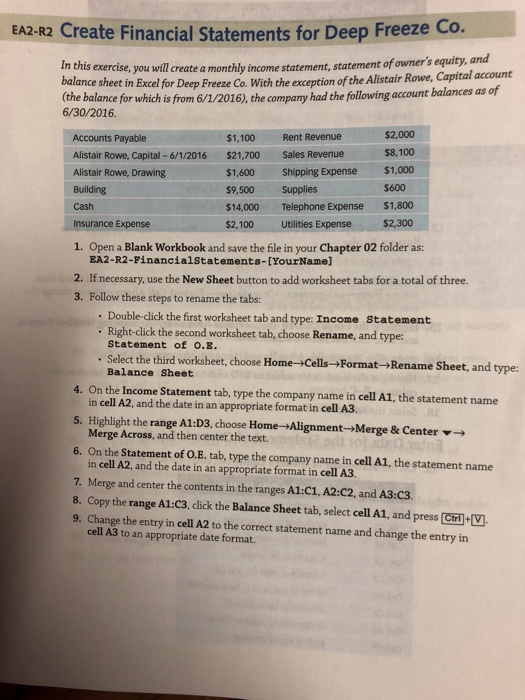
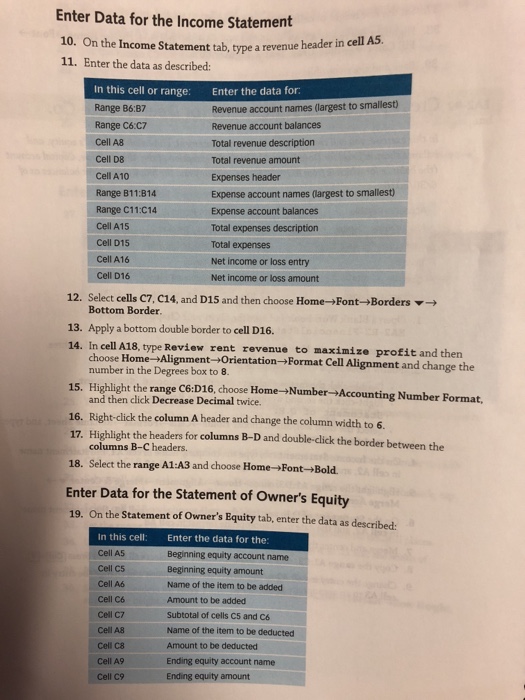
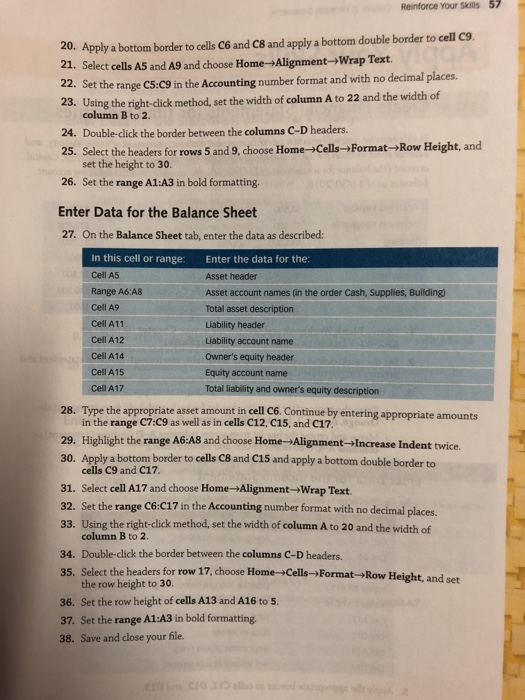
EA2-R2 Create Financial Statements for Deep Freeze Co. In this exercise, you will create a monthly income statement, statement ofowner's equity. balance sheet in Excel for and Deep Freeze Co. With the exception of the Alistair Rowe, Capital account the balance for which is from 6/1/2016), the company had the following 6/30/2016. account balances as of $2,000 $8,100 $1,600 Shipping Expense $1,000 Accounts Payable Alistair Rowe, Capital 6/1/2016 $21,700 Sales Revenue Alistair Rowe, Drawing Building Cash Insurance Expense $1,100 Rent Revenue s9,500 Supplies $600 $14,000 Telephone Expense $1,800 300 $2,100 Utilities Expense Open a Blank Workbook and save the file in your Chapter 02 folder as: BA2-R2-FinancialStatements-[YourName] 1. 2. If necessary, use the New Sheet button to add worksheet tabs for a total of three. 3. Follow these steps to rename the tabs . Double-click the first worksheet tab and type: Income Statement . Right-click the second worksheet tab, choose Rename, and type: Statement of .. Select the third worksheet, choose Home-Cells->Format-Rename Sheet, and type: Balance Sheet 4. On the Income Statement tab, type the company name in cell A1, the statement name in cell A2, and the date in an appropriate format in cell A3. 5. Highlight the range A1:D3, choose Home +Alignment-Merge & Center Merge Across, and then center the text. 6. On the Statement of O.E. tab, type the company name in cell A1, the statement name in cell A2, and the date in an appropriate format in cell A3. 7. Merge and center the contents in the ranges A1:C1, A2:C2, and A3:C3 8. Copy the range A1:C3, click the Balance Sheet tab, select cell A1, and press Cri V 9. Change the entry in cell A2 to the correct statement name and change the entry in cell A3 to an appropriate date format
Step by Step Solution
There are 3 Steps involved in it

Get step-by-step solutions from verified subject matter experts
 Study Help