







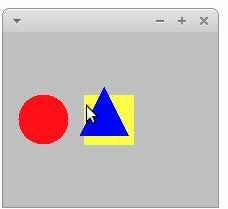
Question: Please help to change the below Java code so the output show a red circle and a yellow square and a blue triangle like in
Please help to change the below Java code so the output show a red circle and a yellow square and a blue triangle like in the added pic. Please send the code back in whole with the changes in it Thanks! import javax.swing.;
import java.awt.;
import java.awt.event.;
class Shape
int x y; Position of the top left corner
int width, height;
Color color;
public Shapeint x int y int width, int height, Color color
this.x x;
this.y y;
this.width width;
this.height height;
this.color color;
public void drawGraphics g
gsetColorcolor;
Implement drawing logic for the shape eg gfillRect, gfillOval, etc.
gfillRectx y width, height;
public boolean containsPoint point
Implement logic to check if a point is inside the shape
return pointx x && point.x x width && point.y y && point.y y height;
public void moveint dx int dy
x dx;
y dy;
class DrawingPanel extends JPanel implements MouseListener, MouseMotionListener
private Shape shapes;
private Shape selectedShape;
private Point lastMousePosition;
public DrawingPanel
shapes new Shape;
shapes new Shape Color.BLUE;
shapes new Shape Color.RED;
shapes new Shape Color.YELLOW;
addMouseListenerthis;
addMouseMotionListenerthis;
@Override
protected void paintComponentGraphics g
super.paintComponentg;
for Shape shape : shapes
shape.drawg;
@Override
public void mousePressedMouseEvent e
Point mousePoint egetPoint;
for int i shapes.length ; i ; i
if shapesicontainsmousePoint
selectedShape shapesi;
lastMousePosition mousePoint;
break;
@Override
public void mouseDraggedMouseEvent e
if selectedShape null
int dx egetX lastMousePosition.x;
int dy egetY lastMousePosition.y;
selectedShape.movedx dy;
lastMousePosition egetPoint;
repaint;
Implement other MouseListener and MouseMotionListener methods
@Override
public void mouseClickedMouseEvent e
@Override
public void mouseReleasedMouseEvent e
@Override
public void mouseEnteredMouseEvent e
@Override
public void mouseExitedMouseEvent e
@Override
public void mouseMovedMouseEvent e
public static void mainString args
JFrame frame new JFrameShape Manipulation Program";
frame.setDefaultCloseOperationJFrameEXITONCLOSE;
frame.setSize;
DrawingPanel panel new DrawingPanel;
frame.addpanel;
frame.setVisibletrue;
Step by Step Solution
There are 3 Steps involved in it
1 Expert Approved Answer
Step: 1 Unlock

Question Has Been Solved by an Expert!
Get step-by-step solutions from verified subject matter experts
Step: 2 Unlock
Step: 3 Unlock
 Study Help