







Question: Please help using java in Processing. Project 2 - Random Walk Variant Example Images 2 3 0 0 hexagons with and without stroke and terrain
Please help using java in Processing. Project Random Walk Variant Example Images
hexagons with and without stroke and terrain coloring, using the same seed value UI Specifications
The UI for this project is not complicated, but there are a fair number of components that will need
implementation. The details for these are described below. The background of the UI is a simple
rectangle with a width of Many applications will have multiple panels like this, often with dynamic
properties. WINDOW SIZE: x
Where the magic happens, the start button. You can change the
background color by using the setColorBackground function.
A DropdownList object. The following functions will be helpful:
a addItem Adds and item to the list
b setItemHeight set the height of entries in the list
c setBarHeight set the height of the "selected" item on
the top
d getvalue retrieve the based index of whatever is
selected
A slider for the maximum number of steps, with a range of to
The text above it is a Textlabel. To disable the text on a
Slider, you can call getCaptionLabelsetVisiblefalse or just pass an
empty string to the setCaptionLabel function.
A slider to indicate how many steps to take in a single frame, with a
range of to
A Slider indicating the size of a single step. This will be represent the
length of a square's side, or the radius of a hexagon. The range of
this should be to
A Slider for an additional modifier to the length of a step from one
position to the next. This is a multiplier with a range of to
A Toggle indicating whether or not the walking process should
remain bound to the viewable area or not the rest of the window
NOT covered by this UI panel To access the onoff value of a Toggle
object, simply catch the return of the getState function.
Another Toggle representing if the drawing process should color the
steps to give a rough approximation of terrain elevation, or instead
use a fixed color for each space.
A toggle to indicate whether shapes should be drawn with a stroke
outline or not.
A toggle to indicate whether a specific value should be used to seed
the random number generator or not.
A Textfield to let you specify a seed value for the random number generator. You can seed the
generator by calling the function randomseed Some helpful functions for this control:
a setInputFilter Pass ControlPINTEGER to this function to limit input to integers
b getText This retrieves the data stored in this control, as a string. In order to use this as a
number, you will have to convert itJava has Integer. parseInt to help with this.
NOTE: If you are using a high resolution display, the function pixel Density can be called after size
to increase the pixel count of your window. This will make the controls a bit larger without having to
manually change their sizes and the text of the labels Class Structure
You should create at least classes for this project:
An abstract base class with the core functions in a random walk algorithm
A class to control the square walk
A class to handle the hexagonal walk
Why set up classes like this? So you can write like this:
RandomWalkBaseClass someobject null;
if optionA
someobject new squareClass;
else if optionB
someobject new HexagonClass;
someObject.DoSomeWalkstuff; Three cheers for polymorphism!
Class Features
On a basic level, your classes should do two things:
Update Generate a random number, figure out where to move, and move to that location
Draw Draw the specific shape according to the relevant properties: location, size, color, with or
without a stroke, etc
Based on the UI controls and program layout, your base class will need to store information regarding
the following:
The maximum number of steps
The number of steps already taken
The distance of each step
The scale for each step, to add borderspadding around each shape
Whether or not to use color
Whether or not to use a stroke when drawing a shape
The boundaries of the viewable area. Normally it would be width and height but
you will need to take the side panel into account, as you don't want to draw over or under the
UIColor Details
The program approximates the idea of building up elevation depending on how many times a particular
location is "visited." How
Overview
For this project, you are going to implement variations on the previous assignment. Overall the concept will be the same, but instead of individual pointspixels you will take steps using different kinds of shapes: squares and hexagons.
Description
For this assignment you are going to create a program that looks something like the
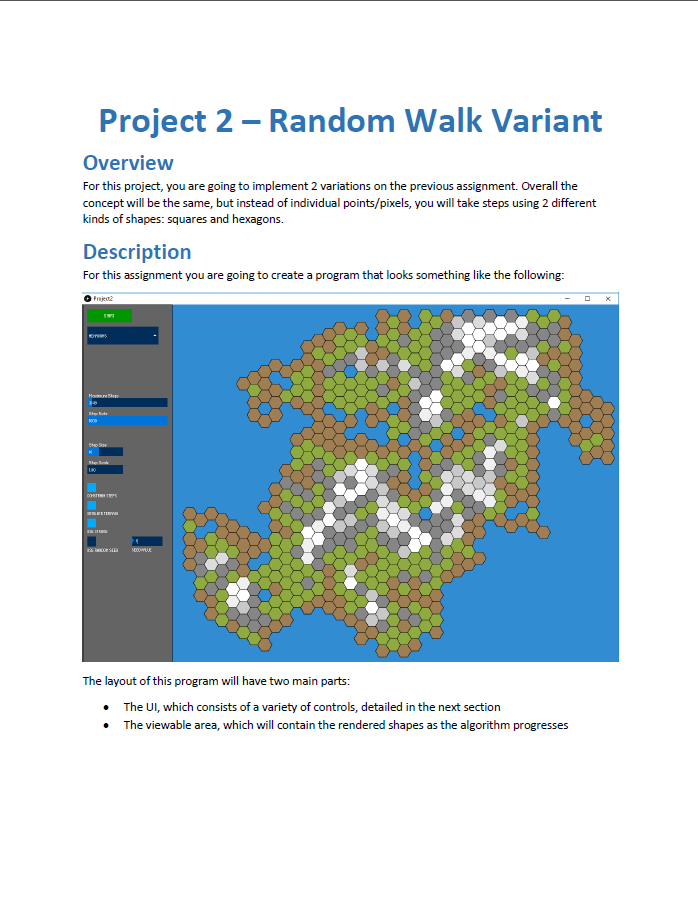
Step by Step Solution
There are 3 Steps involved in it
1 Expert Approved Answer
Step: 1 Unlock

Question Has Been Solved by an Expert!
Get step-by-step solutions from verified subject matter experts
Step: 2 Unlock
Step: 3 Unlock
 Study Help