







Question: Please help using Visual basic .Net on Visual Studio 1. Display all Arports in 2 DataGrid Vicw [frimAirports] A. Remove the columns of 5 tate,
Please help using Visual basic .Net on Visual Studio
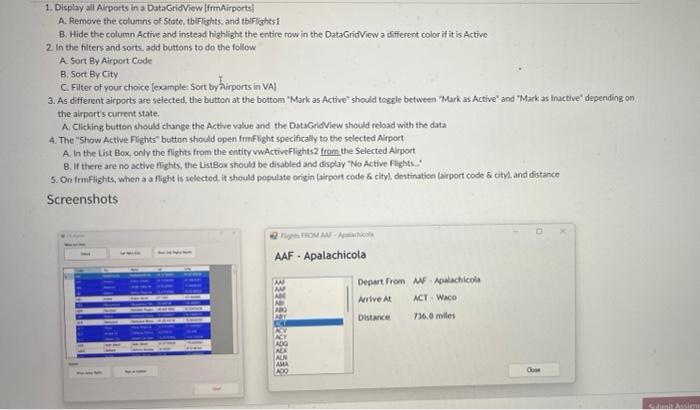
1. Display all Arports in 2 DataGrid Vicw [frimAirports] A. Remove the columns of 5 tate, tblFights, and tbifishts1 B. Hide the column Active and instead highlight the entire row in the DataGridVicw a different color if it is Active 2 In the filters and sorts. add buttons to do the follow A. Sort By Airport Code B. Sort By City C. Filter of your choice [example: 5 ort by Airports in VAI 3. As different airports are selected, the button at the bottom 'Mark as Active" should togsle between "Mark as Active" and 'Mark as inactive" depending on the airport's current state. A. Clicking button thould change the Active value and the DatsGridiew should reload with the data 4. The "Show Active Flights" button should open frmFlight specifically to the selected Airport. A. In the List Box, only the flights from the entity wactiveFlizhts 2 from the Selected Alrport B. If there are no active flights, the ListBox should be disabled and display "No Active Fights.. 5. On frmFlights, when a a flight is selected, it should populate origin laiport code cityl destinatice tairport code \& cityl and distance 1. Display all Arports in 2 DataGrid Vicw [frimAirports] A. Remove the columns of 5 tate, tblFights, and tbifishts1 B. Hide the column Active and instead highlight the entire row in the DataGridVicw a different color if it is Active 2 In the filters and sorts. add buttons to do the follow A. Sort By Airport Code B. Sort By City C. Filter of your choice [example: 5 ort by Airports in VAI 3. As different airports are selected, the button at the bottom 'Mark as Active" should togsle between "Mark as Active" and 'Mark as inactive" depending on the airport's current state. A. Clicking button thould change the Active value and the DatsGridiew should reload with the data 4. The "Show Active Flights" button should open frmFlight specifically to the selected Airport. A. In the List Box, only the flights from the entity wactiveFlizhts 2 from the Selected Alrport B. If there are no active flights, the ListBox should be disabled and display "No Active Fights.. 5. On frmFlights, when a a flight is selected, it should populate origin laiport code cityl destinatice tairport code \& cityl and distance
Step by Step Solution
There are 3 Steps involved in it

Get step-by-step solutions from verified subject matter experts
 Study Help