







Question: Please help! Will upvote! I am using ubuntu UNIX/Linux 20. Create two files similar to those in Figures 8.11 and 8.12. a. Use the cut
Please help! Will upvote! I am using ubuntu UNIX/Linux
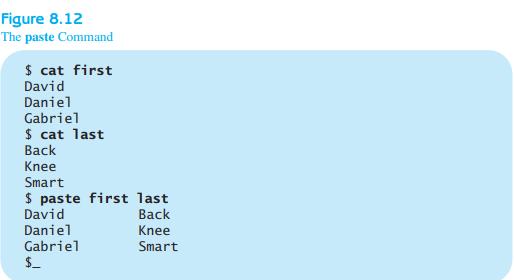
20. Create two files similar to those in Figures 8.11 and 8.12.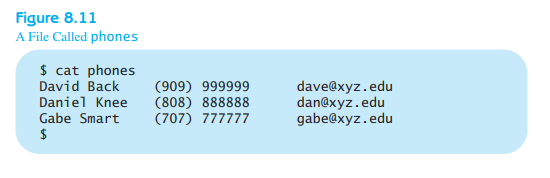
a. Use the cut command to cut out specific fields and columns.
b. Use the paste command to put the two files together.
21. Use the more command to read a large file.
22. Create two files called numbers and characters and type in lines of numbers
and characters similar to the following:
numbers characters
111111111111 AAAAAAAAAA
222222222222 BBBBBBBBBBB
333333333333 CCCCCCCCCCC
. .
. .
. .
101010101010 KKKKKKKKKKK
11 11 11 11 11 LLLLLLLLLLLLL
Make many lines of numbers so you can practice the head and tail commands and
options.
a. Show the first two lines of the numbers file.
b. Show the first two lines of numbers and characters files.
c. Show the last 10 lines of the numbers file.
d. Show the last two lines of the numbers and characters files.
23. Use the numbers and characters files to execute the following command lines:
a. Use the paste command to put together numbers and characters.
b. Use the paste command to show numbers and characters together and use
the @ character as the field separator.
c. Use the paste command to show numbers and characters together using the @
character as the field separator. Save it in a file called numbersANDcharacters.
d. Use the cut command to show first five character of each line in numbers.
e. Show how many lines are in the numbersANDcharacters file.
f. Show how many lines, words, and characters are in the numbers, characters,
and numbersANDcharacters files.
Figure 8.11 A File Called phones $ cat phones David Back Daniel Knee Gabe Smart $ (909) 999999 (808) 888888 (707) 777777 dave@xyz.edu dan@xyz.edu gabe@xyz.edu Figure 8.12 The paste Command $ cat first David Daniel Gabriel $ cat last Back Knee Smart $ paste first last David Back Daniel Knee Gabriel Smart $
Step by Step Solution
There are 3 Steps involved in it

Get step-by-step solutions from verified subject matter experts
 Study Help