







Question: Please help with code for exercise 7! Uses MATLAB! Thanks!! EXAMPLE 9 In this example we first translate the square horizontally 2 units using increments
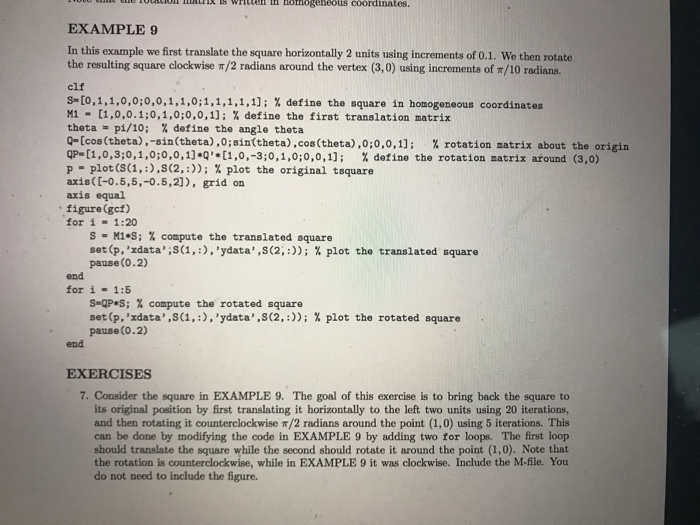
EXAMPLE 9 In this example we first translate the square horizontally 2 units using increments of 0.1. We then rotate the resulting square clockwise /2 radians around the vertex (3,0) using increm ents of /10 radians. clf s-[0,1,1,0,0:0,0,1,1,0:1,1,1,1,1); % define the square in homogeneous coordinates M1- [1,0,0. 1:0,1,0;0,0,1); % define the first translation matrix theta = pi/10; % define the angle theta q-[cos (theta),-sin(theta),0;sin(theta),cos (theta) ,0,0,0,1); % rotation natrix about the origin QP_ [1,0,3:0,1,0:0,0,1] *Q'*[1,0,-3:0,1,0:0,0,11; % define the rotation natrix around (3,0) p-plot (S(1, :),S(2, :)); % plot the original tsquare axis([-0.5,5,-0.5,21), grid on axis equal figure(gcf) for i 1:20 S-M1*S; % compute the translated square set (p,'xdata ,,S(1, :) ,'ydata,,s(2, :)); % plot the translated square pause(0.2) end for i-1:5 s-apes ; % compute the rotated square set (p,'zdata,,s(1, :),'ydata, ,502, :)); pause(0.2) % plot the rotated square end EXERCISES 7. Consider the square in EXAMPLE 9. The goal of this exercise is to bring back the square to its original position by first translating it horizontally to the left two units using 20 iterations and then rotating it counterclockwise /2 radians around the point (1,0) using 5 iterations. This can be done by modifying the code in EXAMPLE 9 by adding two for loops. The first loop should translate the square while the second should rotate it around the point (1,0). Note that the rotation is counterclockwise, while in EXAMPLE 9 it was clockwise. Include the M-file. You do not need to include the figure
Step by Step Solution
There are 3 Steps involved in it

Get step-by-step solutions from verified subject matter experts
 Study Help