







Question: please help with formulas. thank you 11. In C2, type a function that will properly capitalize each name in column D. 12. Convert C2:C62 from
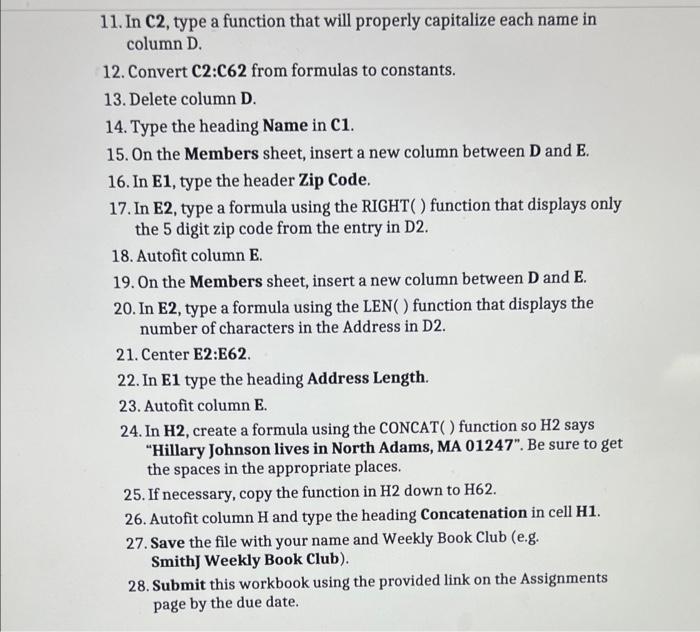
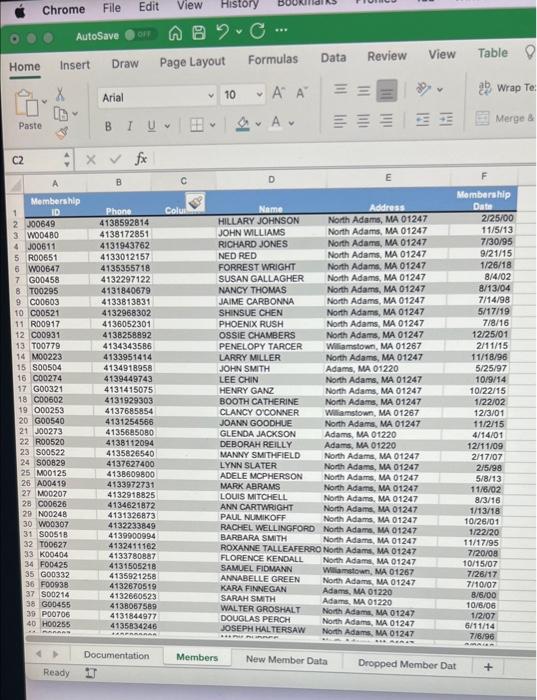
11. In C2, type a function that will properly capitalize each name in column D. 12. Convert C2:C62 from formulas to constants. 13. Delete column D. 14. Type the heading Name in C1. 15. On the Members sheet, insert a new column between D and E. 16. In E1, type the header Zip Code. 17. In E2, type a formula using the RIGHT( ) function that displays only the 5 digit zip code from the entry in D2. 18. Autofit column E. 19. On the Members sheet, insert a new column between D and E. 20. In E2, type a formula using the LEN ( ) function that displays the number of characters in the Address in D2. 21. Center E2:E62. 22. In E1 type the heading Address Length. 23. Autofit column E. 24. In H2, create a formula using the CONCAT() function so H2 says "Hillary Johnson lives in North Adams, MA 01247". Be sure to get the spaces in the appropriate places. 25. If necessary, copy the function in H2 down to H62. 26. Autofit column H and type the heading Concatenation in cell H1. 27. Save the file with your name and Weekly Book Club (e.g. SmithJ Weekly Book Club). 28. Submit this workbook using the provided link on the Assignments page by the due date. Chrome File Edit AutoSave Home Insert Draw Page Layout Formulas Data Review View Table
Step by Step Solution
There are 3 Steps involved in it

Get step-by-step solutions from verified subject matter experts
 Study Help