







Question: please help with solution Objectives: Introduction to MS Excel files, Workbooks, Worksheets, Columns and Rows. - Formatting Worksheets. - AutoFill, Numeric formats, previewing worksheets. 1.
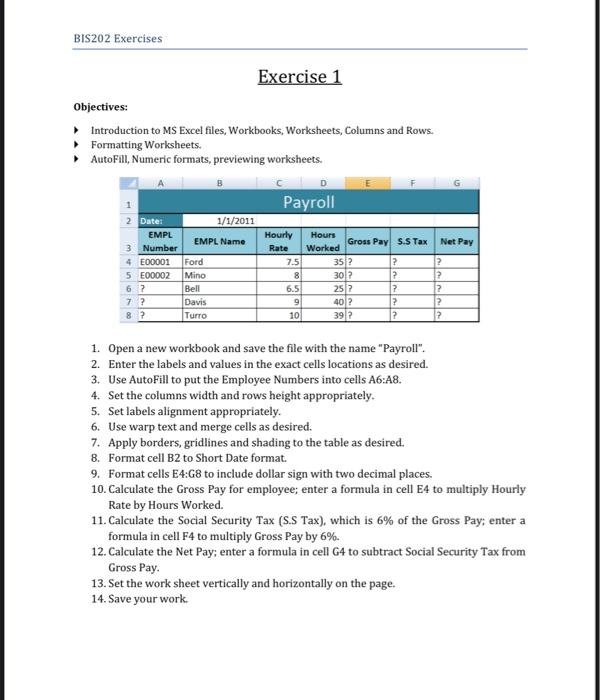
Objectives: Introduction to MS Excel files, Workbooks, Worksheets, Columns and Rows. - Formatting Worksheets. - AutoFill, Numeric formats, previewing worksheets. 1. Open a new workbook and save the file with the name \"Payroll\". 2. Enter the labels and values in the exact cells locations as desired. 3. Use AutoFill to put the Employee Numbers into cells A6:A8. 4. Set the columns width and rows height appropriately. 5. Set labels alignment appropriately. 6. Use warp text and merge cells as desired. 7. Apply borders, gridlines and shading to the table as desired. 8. Format cell B2 to Short Date format. 9. Format cells E4:G8 to include dollar sign with two decimal places. 10. Calculate the Gross Pay for employee; enter a formula in cell E4 to multiply Hourly Rate by Hours Worked. 11. Calculate the Social Security Tax (S.S Tax), which is \6 of the Gross Pay; enter a formula in cell F4 to multiply Gross Pay by \6. 12. Calculate the Net Pay; enter a formula in cell G4 to subtract Social Security Tax from Gross Pay. 13. Set the work sheet vertically and horizontally on the page. 14. Save your work
Step by Step Solution
There are 3 Steps involved in it

Get step-by-step solutions from verified subject matter experts
 Study Help