







Question: please help with the excel formulas Chapter 10: Applying Excel Data Exhibit 10-1: Standard Cost Card Direct materlals Direct labor Variable manufacturing overhead inguts begin{tabular}{|r|r|}
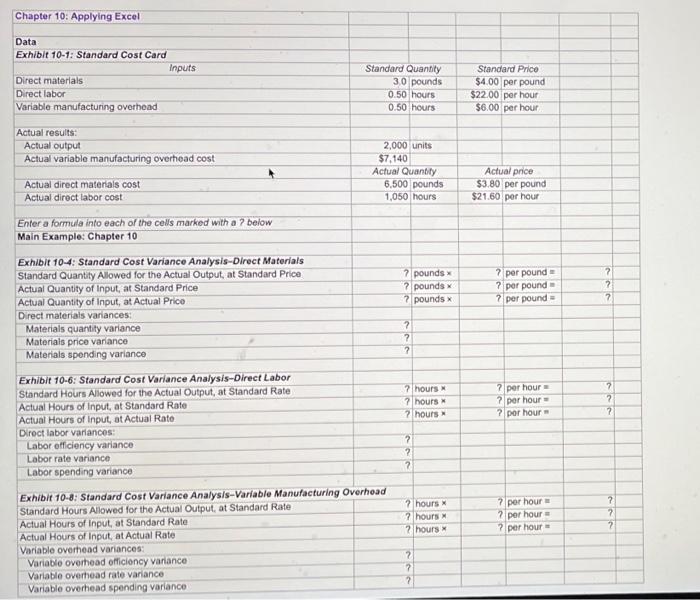
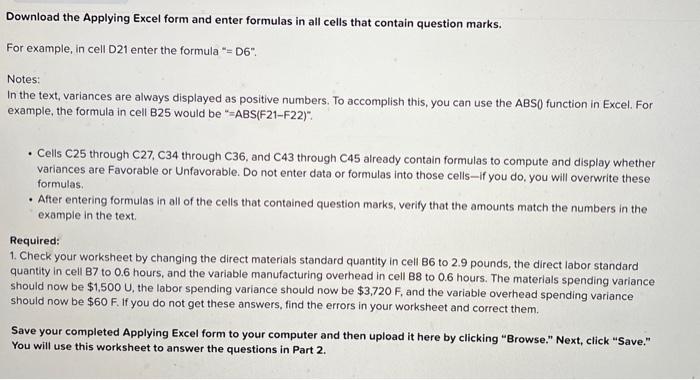
Chapter 10: Applying Excel Data Exhibit 10-1: Standard Cost Card Direct materlals Direct labor Variable manufacturing overhead inguts \begin{tabular}{|r|r|} \hline Standard Quantily & Standard Price \\ \hline 3.0 pounds & $4.00 per pound \\ \hline 0.50 hours & $22.00 per hour \\ \hline 0.50 hours & $6.00 per hour \\ \hline \end{tabular} Actual results: Actual output Actual variable manufacturing overhead cost Actual direct materials cost Actual direct labor cost. Enter a formula into each of the cells marked with a ? below Main Example: Chapter 10 Exhibit 10-4: Standard Cost Variance Analysis-Direct Materials Standard Quantity Alowed for the Actual Output, at Standard Price Actual Quantity of Input, at Standard Price Actual Quantity of Input, at Actual Prico Drect materials variances: Materials quantity variance Materials price variance Materials spending variance Exhibit 10-6: Standard Cost Variance Analysis-Direct Labor Standard Hours Alowed for the Actual Output, at Standard Rate Actual Hours of Input, at Standard Rate Actual Hours of input, at Actual Rate Dioct labor variancos: Labor officiency variance Labor rate variance Labor spending variance Exhibit 10-6: Standard Cost Variance Analysis-Variable Manufacturing Overhead Standard Hours Allowed for the Actual Output, at Standard Rate Actual Hours of Input, at Standard Rate Actual Hours of Input, at Actual Rate Variable overhead variances: Variable overhead officiency variance Variable overtead rate variance Variable oveitead spending variance Download the Applying Excel form and enter formulas in all cells that contain question marks. For example, in cell D21 enter the formula " = D6". Notes: In the text, variances are always displayed as positive numbers. To accomplish this, you can use the ABS0 function in Excel. For example, the formula in cell B25 would be "=ABS(F21-F22)". - Cells C25 through C27, C34 through C36, and C43 through C45 already contain formulas to compute and display whether variances are Favorable or Unfavorable. Do not enter data or formulas into those cells-if you do, you will overwrite these formulas. - After entering formulas in all of the cells that contained question marks, verify that the amounts match the numbers in the example in the text. Required: 1. Check your worksheet by changing the direct materials standard quantity in cell B6 to 2.9 pounds, the direct labor standard quantity in cell B7 to 0.6 hours, and the variable manufacturing overhead in cell B8 to 0.6 hours. The materials spending variance should now be $1,500U, the labor spending variance should now be $3,720F, and the variable overhead spending variance should now be $60F. If you do not get these answers, find the errors in your worksheet and correct them. Save your completed Applying Excel form to your computer and then upload it here by clicking "Browse." Next, click "Save." You will use this worksheet to answer the questions in Part 2. Chapter 10: Applying Excel Data Exhibit 10-1: Standard Cost Card Direct materlals Direct labor Variable manufacturing overhead inguts \begin{tabular}{|r|r|} \hline Standard Quantily & Standard Price \\ \hline 3.0 pounds & $4.00 per pound \\ \hline 0.50 hours & $22.00 per hour \\ \hline 0.50 hours & $6.00 per hour \\ \hline \end{tabular} Actual results: Actual output Actual variable manufacturing overhead cost Actual direct materials cost Actual direct labor cost. Enter a formula into each of the cells marked with a ? below Main Example: Chapter 10 Exhibit 10-4: Standard Cost Variance Analysis-Direct Materials Standard Quantity Alowed for the Actual Output, at Standard Price Actual Quantity of Input, at Standard Price Actual Quantity of Input, at Actual Prico Drect materials variances: Materials quantity variance Materials price variance Materials spending variance Exhibit 10-6: Standard Cost Variance Analysis-Direct Labor Standard Hours Alowed for the Actual Output, at Standard Rate Actual Hours of Input, at Standard Rate Actual Hours of input, at Actual Rate Dioct labor variancos: Labor officiency variance Labor rate variance Labor spending variance Exhibit 10-6: Standard Cost Variance Analysis-Variable Manufacturing Overhead Standard Hours Allowed for the Actual Output, at Standard Rate Actual Hours of Input, at Standard Rate Actual Hours of Input, at Actual Rate Variable overhead variances: Variable overhead officiency variance Variable overtead rate variance Variable oveitead spending variance Download the Applying Excel form and enter formulas in all cells that contain question marks. For example, in cell D21 enter the formula " = D6". Notes: In the text, variances are always displayed as positive numbers. To accomplish this, you can use the ABS0 function in Excel. For example, the formula in cell B25 would be "=ABS(F21-F22)". - Cells C25 through C27, C34 through C36, and C43 through C45 already contain formulas to compute and display whether variances are Favorable or Unfavorable. Do not enter data or formulas into those cells-if you do, you will overwrite these formulas. - After entering formulas in all of the cells that contained question marks, verify that the amounts match the numbers in the example in the text. Required: 1. Check your worksheet by changing the direct materials standard quantity in cell B6 to 2.9 pounds, the direct labor standard quantity in cell B7 to 0.6 hours, and the variable manufacturing overhead in cell B8 to 0.6 hours. The materials spending variance should now be $1,500U, the labor spending variance should now be $3,720F, and the variable overhead spending variance should now be $60F. If you do not get these answers, find the errors in your worksheet and correct them. Save your completed Applying Excel form to your computer and then upload it here by clicking "Browse." Next, click "Save." You will use this worksheet to answer the questions in Part 2
Step by Step Solution
There are 3 Steps involved in it

Get step-by-step solutions from verified subject matter experts
 Study Help