







Question: Please help with the questions below Create a general journal Create a general ledger Create a trial balance Create an income statement Create a Statement
Please help with the questions below
- Create a general journal
- Create a general ledger
- Create a trial balance
- Create an income statement
- Create a Statement of Retained earnings
- Create a balance sheet
- create a FS Impact
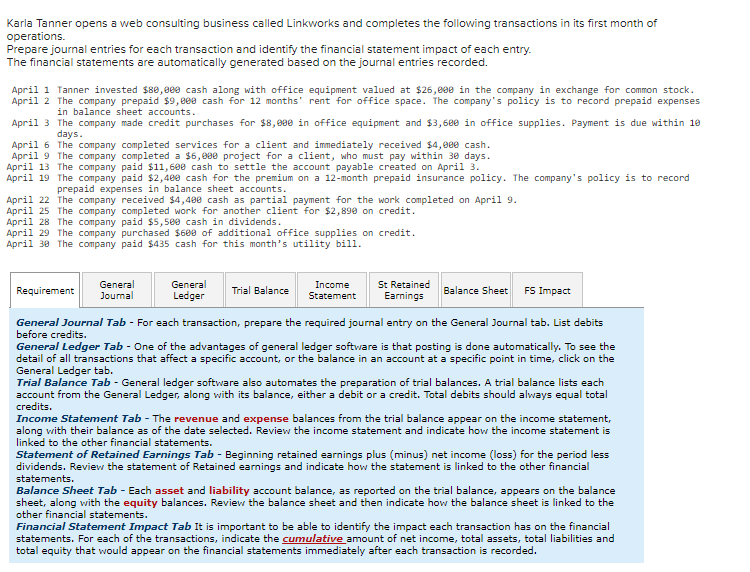
Karla Tanner opens a web consulting business called Linkworks and completes the following transactions in its first month of operations. Prepare journal entries for each transaction and identify the financial statement impact of each entry. The financial statements are automatically generated based on the journal entries recorded. April 1 Tanner invested $8,e cash along with office equipment valued at $26,00 in the company in exchange for common stock. April 2 The company prepaid $9,0 cash for 12 months' rent for office space. The company's policy is to record prepaid expenses in balance sheet accounts. April 3 The company made credit purchases for $8,0 in office equipment and $3,60 in office supplies. Payment is due within 19 days. April 6 The company completed services for a client and immediately received \$4, cash. April 9 The company completed a $6, project for a client, who must pay within 30 days. April 13 The company paid $11,69 cash to settle the account payable created on April 3. April 19 The company paid $2,400 cash for the premium on a 12 -month prepaid insurance policy. The company's policy is to record prepaid expenses in balance sheet accounts. April 22 The company received $4,40 cash as partial payment for the work completed on April 9. April 25 The company completed work for another client for $2,890 on credit. April 28 The company paid $5,500 cash in dividends. April 29 The company purchased $600 of additional office supplies on credit. April 39 The company paid $435 cash for this month's utility bill. General Journal Tab - For each transaction, prepare the required journal entry on the General Journal tab. List debits before credits. General Ledger Tab - One of the advantages of general ledger software is that posting is done automatically. To see the detail of all transactions that affect a specific account, or the balance in an account at a specific point in time, click on the General Ledger tab. Trial Balance Tab - General ledger software also automates the preparation of trial balances. A trial balance lists each account from the General Ledger, along with its balance, either a debit or a credit. Total debits should always equal total credits. Income Statement Tab - The revenue and expense balances from the trial balance appear on the income statement, along with their balance as of the date selected. Review the income statement and indicate hov the income statement is linked to the other financial statements. Statement of Retained Earnings Tab - Beginning retained earnings plus (minus) net income (loss) for the period less dividends. Review the statement of Retained earnings and indicate how the statement is linked to the other financial statements. Balance Sheet Tab - Each asset and liability account balance, as reported on the trial balance, appears on the balance sheet, along with the equity balances. Review the balance sheet and then indicate how the balance sheet is linked to the other financial statements. Financial Statement Impact Tab It is important to be able to identify the impact each transaction has on the financial statements. For each of the transactions, indicate the cumulative amount of net income, total assets, total liabilities and total equity that would appear on the financial statements immediately after each transaction is recorded
Step by Step Solution
There are 3 Steps involved in it

Get step-by-step solutions from verified subject matter experts
 Study Help