







Question: please help with this excel solver assignment. I'm not sure what formulas to put in the calculation section. PLEASE and THANK YOU.. the cells are
please help with this excel solver assignment. I'm not sure what formulas to put in the calculation section. PLEASE and THANK YOU.. the cells are A,B,C. Thanks!!!
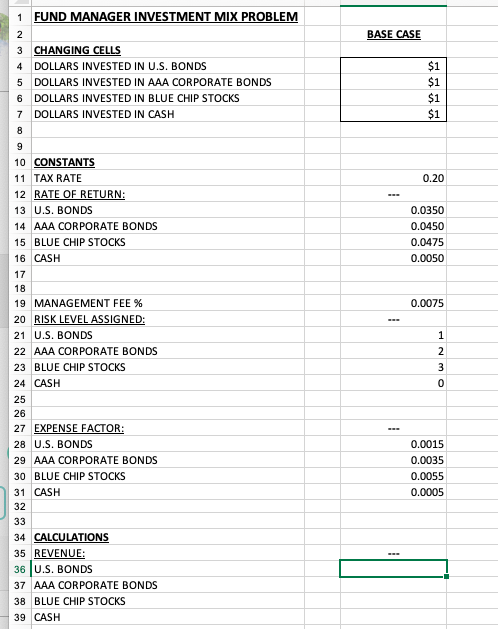
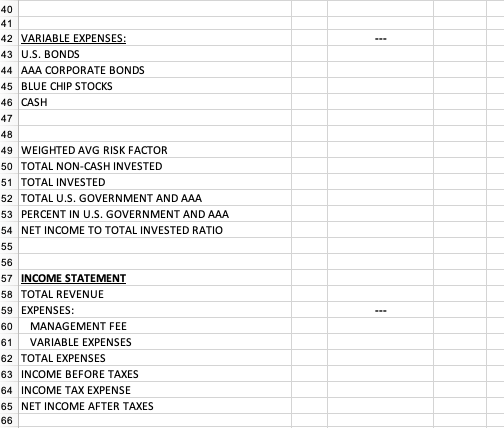
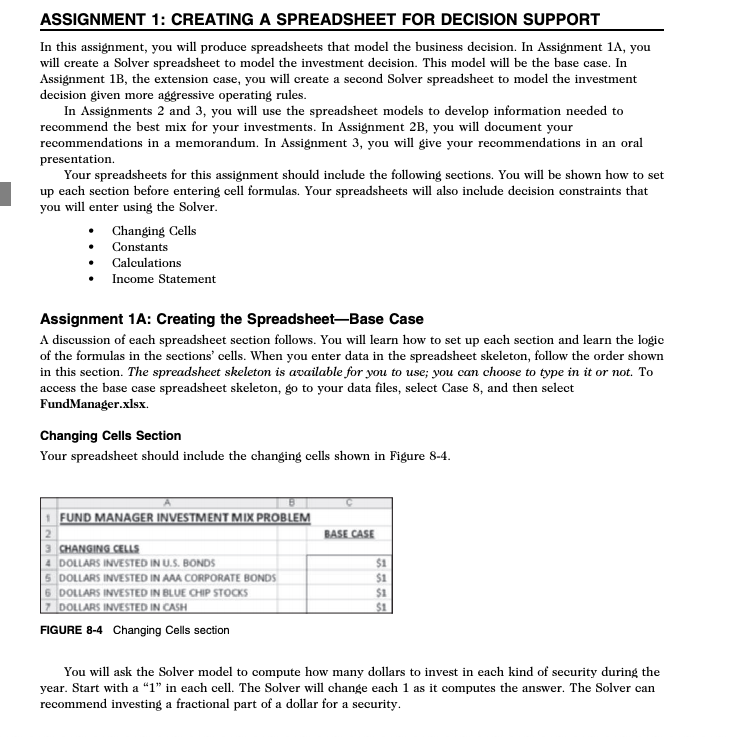
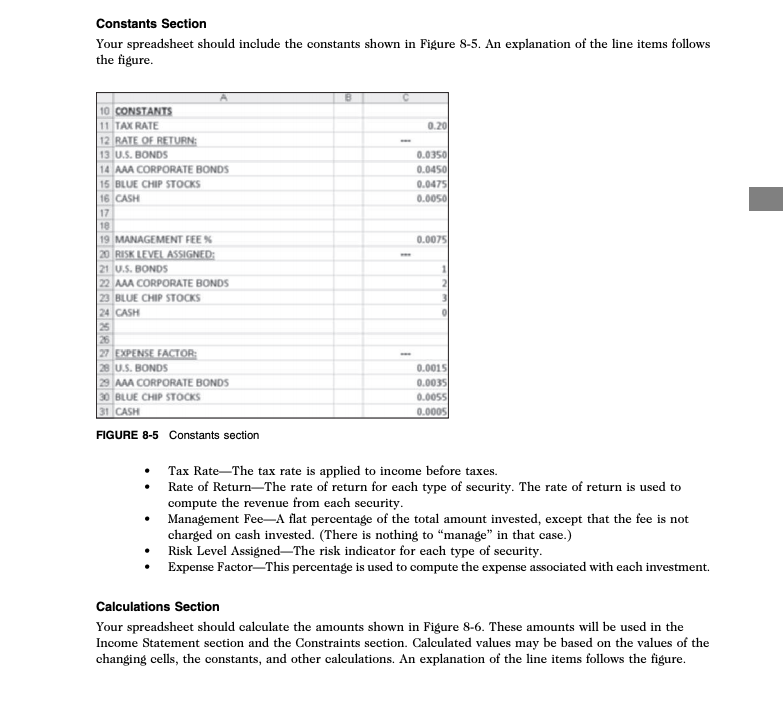
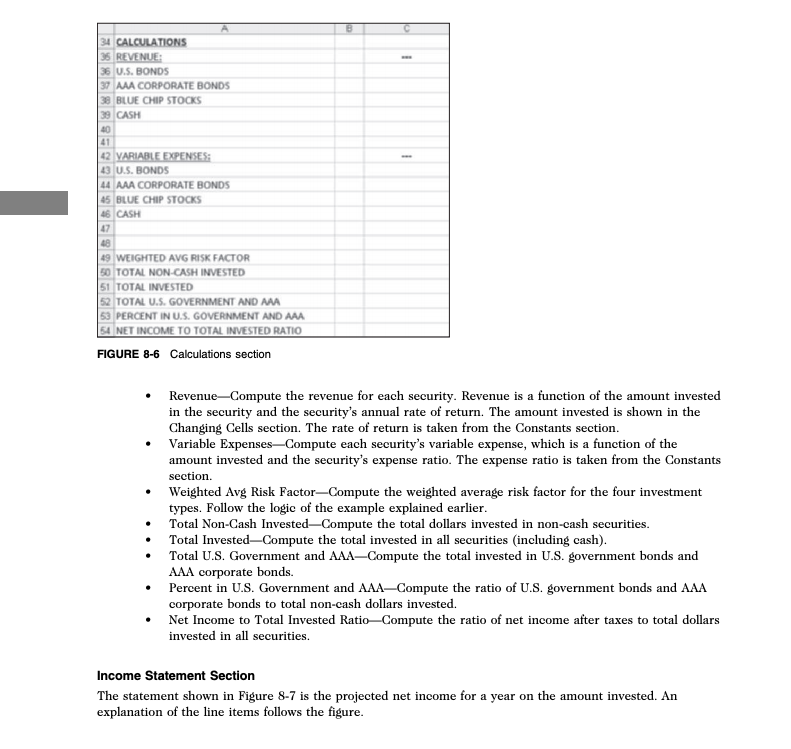
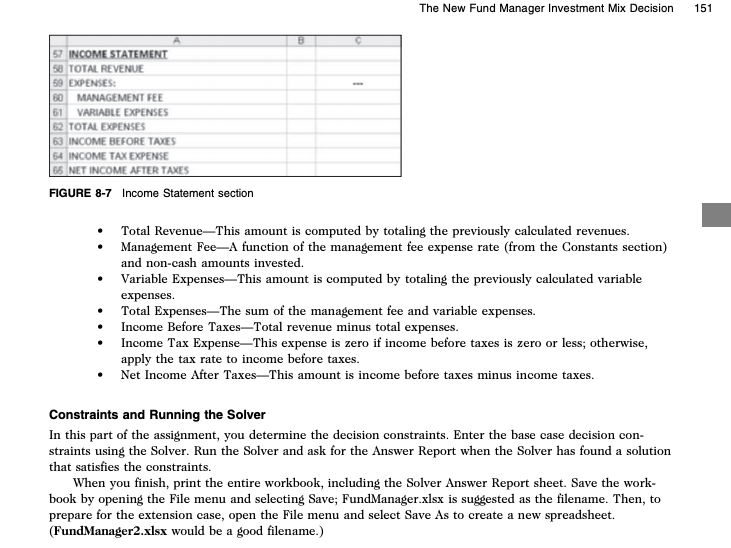
1 FUND MANAGER INVESTMENT MIX PROBLEM BASE CASE 3 CHANGING CELLS 4 DOLLARS INVESTED IN U.S. BONDS 5 DOLLARS INVESTED IN AAA CORPORATE BONDS 6 DOLLARS INVESTED IN BLUE CHIP STOCKS 7 DOLLARS INVESTED IN CASH 0.20 10 CONSTANTS 11 TAX RATE 12 RATE OF RETURN: 13 U.S. BONDS 14 AAA CORPORATE BONDS 15 BLUE CHIP STOCKS 16 CASH 0.0350 0.0450 0.0475 0.0050 18 0.0075 19 MANAGEMENT FEE % 20 RISK LEVEL ASSIGNED: 21 U.S. BONDS 22 AAA CORPORATE BONDS 23 BLUE CHIP STOCKS 24 CASH 27 EXPENSE FACTOR: 28 U.S. BONDS 29 AAA CORPORATE BONDS 30 BLUE CHIP STOCKS 31 CASH 0.0015 0.0035 0.0055 0.0005 34 CALCULATIONS 35 REVENUE: 36 U.S. BONDS 37 AAA CORPORATE BONDS 38 BLUE CHIP STOCKS 39 CASH 41 42 VARIABLE EXPENSES: 43 U.S. BONDS 44 AAA CORPORATE BONDS 45 BLUE CHIP STOCKS 46 CASH 48 49 WEIGHTED AVG RISK FACTOR 50 TOTAL NON-CASH INVESTED 51 TOTAL INVESTED 52 TOTAL U.S. GOVERNMENT AND AAA 53 PERCENT IN U.S. GOVERNMENT AND AAA 54 NET INCOME TO TOTAL INVESTED RATIO 57 INCOME STATEMENT 58 TOTAL REVENUE 59 EXPENSES: 60 MANAGEMENT FEE 61 VARIABLE EXPENSES 62 TOTAL EXPENSES 63 INCOME BEFORE TAXES 64 INCOME TAX EXPENSE 65 NET INCOME AFTER TAXES ASSIGNMENT 1: CREATING A SPREADSHEET FOR DECISION SUPPORT In this assignment, you will produce spreadsheets that model the business decision. In Assignment 1A, you will create a Solver spreadsheet to model the investment decision. This model will be the base case. In Assignment 1B, the extension case, you will create a second Solver spreadsheet to model the investment decision given more aggressive operating rules. In Assignments 2 and 3, you will use the spreadsheet models to develop information needed to recommend the best mix for your investments. In Assignment 2B, you will document your recommendations in a memorandum. In Assignment 3, you will give your recommendations in an oral presentation. Your spreadsheets for this assignment should include the following sections. You will be shown how to set up each section before entering cell formulas. Your spreadsheets will also include decision constraints that you will enter using the Solver. Changing Cells Constants Calculations Income Statement Assignment 1A: Creating the Spreadsheet-Base Case A discussion of each spreadsheet section follows. You will learn how to set up each section and learn the logic of the formulas in the sections' cells. When you enter data in the spreadsheet skeleton, follow the order shown in this section. The spreadsheet skeleton is available for you to use; you can choose to type in it or not. To access the base case spreadsheet skeleton, go to your data files, select Case 8, and then select Fund Manager.xlsx. Changing Cells Section Your spreadsheet should include the changing cells shown in Figure 8-4. 1 FUND MANAGER INVESTMENT MIX PROBLEM BASE CASE 3 CHANGING CELLS 4 DOLLARS INVESTED IN U.S. BONDS 5 DOLLARS INVESTED IN AAA CORPORATE BONDS 6 DOLLARS INVESTED IN BLUE CHIP STOCKS 7 DOLLARS INVESTED IN CASH FIGURE 8-4 Changing Cells section You will ask the Solver model to compute how many dollars to invest in each kind of security during the year. Start with a "1" in each cell. The Solver will change each 1 as it computes the answer. The Solver can recommend investing a fractional part of a dollar for a security. Constants Section Your spreadsheet should include the constants shown in Figure 8-5. An explanation of the line items follows the figure. 10 CONSTANTS 11 TAX RATE 12 RATE OF RETURN; 13 U.S. BONDS 14 AAA CORPORATE BONDS 15 BLUE CHIP STOCKS 16 CASH 0.0350 0.0450 0.0475 0.0050 0.0075 19 MANAGEMENT FEEX 20 RISK LEVEL ASSIGNED: 21 U.S. BONDS 22 MA CORPORATE BONDS 23 BLUE CHIP STOCKS 24 CASH 27 EXPENSE FACTOR: 28 U.S. BONDS 29 MAA CORPORATE BONDS 30 BLUE CHIP STOCKS 31 CASH 0.0015 0.0035 0.0055 0.0005 FIGURE 8-5 Constants section Tax Rate-The tax rate is applied to income before taxes. Rate of Return-The rate of return for each type of security. The rate of return is used to compute the revenue from each security. Management Fee-A flat percentage of the total amount invested, except that the fee is not charged on cash invested. (There is nothing to "manage" in that case.) Risk Level Assigned-The risk indicator for each type of security. Expense Factor-This percentage is used to compute the expense associated with each investment. Calculations Section Your spreadsheet should calculate the amounts shown in Figure 8-6. These amounts will be used in the Income Statement section and the Constraints section. Calculated values may be based on the values of the changing cells, the constants, and other calculations. An explanation of the line items follows the figure. 34 CALCULATIONS 35 REVENUE: 36 U.S. BONDS 37 AAA CORPORATE BONDS 30 BLUE CHIP STOCKS 39 CASH 42 VARIABLE EXPENSES: 13 U.S. BONDS 44 AAA CORPORATE BONDS 45 BLUE CHIP STOCKS 46 CASH 19 WEIGHTED AVG RISK FACTOR 50 TOTAL NON-CASH INVESTED 51 TOTAL INVESTED 52 TOTAL U.S. GOVERNMENT AND ANA 53 PERCENT IN U.S. GOVERNMENT AND AAA 54 NET INCOME TO TOTAL INVESTED RATIO FIGURE 8-6 Calculations section Revenue Compute the revenue for each security. Revenue is a function of the amount invested in the security and the security's annual rate of return. The amount invested is shown in the Changing Cells section. The rate of return is taken from the Constants Variable Expenses Compute each security's variable expense, which is a function of the amount invested and the security's expense ratio. The expense ratio is taken from the Constants section. Weighted Avg Risk Factor-Compute the weighted average risk factor for the four investment types. Follow the logic of the example explained earlier. Total Non-Cash Invested-Compute the total dollars invested in non-cash securities. Total Invested-Compute the total invested in all securities (including cash). Total U.S. Government and AAA-Compute the total invested in U.S. government bonds and AAA corporate bonds. Percent in U.S. Government and AAA-Compute the ratio of U.S. government bonds and AAA corporate bonds to total non-cash dollars invested. Net Income to Total Invested Ratio-Compute the ratio of net income after taxes to total dollars invested in all securities. Income Statement Section The statement shown in Figure 8-7 is the projected net income for a year on the amount invested. An explanation of the line items follows the figure. The New Fund Manager Investment Mix Decision 151 57 INCOME STATEMENT 58 TOTAL REVENUE 59 EXPENSES: B0 MANAGEMENT FEE 61 VARIABLE EXPENSES 62 TOTAL EXPENSES 63 INCOME BEFORE TAXES 54 INCOME TAX EXPENSE 65 NET INCOME AFTER TAXES FIGURE 8-7 Income Statement section Total RevenueThis amount is computed by totaling the previously calculated revenues. Management Fee-A function of the management fee expense rate (from the Constants section) and non-cash amounts invested. Variable ExpensesThis amount is computed by totaling the previously calculated variable expenses. Total Expenses-The sum of the management fee and variable expenses. Income Before Taxes-Total revenue minus total expenses. Income Tax ExpenseThis expense is zero if income before taxes is zero or less; otherwise, apply the tax rate to income before taxes. Net Income After Taxes-This amount is income before taxes minus income taxes. Constraints and Running the Solver In this part of the assignment, you determine the decision constraints. Enter the base case decision con- straints using the Solver. Run the Solver and ask for the Answer Report when the Solver has found a solution that satisfies the constraints. When you finish, print the entire workbook, including the Solver Answer Report sheet. Save the work- book by opening the File menu and selecting Save; FundManager.xlsx is suggested as the filename. Then, to prepare for the extension case, open the File menu and select Save As to create a new spreadsheet. (FundManager2.xlsx would be a good filename.) 1 FUND MANAGER INVESTMENT MIX PROBLEM BASE CASE 3 CHANGING CELLS 4 DOLLARS INVESTED IN U.S. BONDS 5 DOLLARS INVESTED IN AAA CORPORATE BONDS 6 DOLLARS INVESTED IN BLUE CHIP STOCKS 7 DOLLARS INVESTED IN CASH 0.20 10 CONSTANTS 11 TAX RATE 12 RATE OF RETURN: 13 U.S. BONDS 14 AAA CORPORATE BONDS 15 BLUE CHIP STOCKS 16 CASH 0.0350 0.0450 0.0475 0.0050 18 0.0075 19 MANAGEMENT FEE % 20 RISK LEVEL ASSIGNED: 21 U.S. BONDS 22 AAA CORPORATE BONDS 23 BLUE CHIP STOCKS 24 CASH 27 EXPENSE FACTOR: 28 U.S. BONDS 29 AAA CORPORATE BONDS 30 BLUE CHIP STOCKS 31 CASH 0.0015 0.0035 0.0055 0.0005 34 CALCULATIONS 35 REVENUE: 36 U.S. BONDS 37 AAA CORPORATE BONDS 38 BLUE CHIP STOCKS 39 CASH 41 42 VARIABLE EXPENSES: 43 U.S. BONDS 44 AAA CORPORATE BONDS 45 BLUE CHIP STOCKS 46 CASH 48 49 WEIGHTED AVG RISK FACTOR 50 TOTAL NON-CASH INVESTED 51 TOTAL INVESTED 52 TOTAL U.S. GOVERNMENT AND AAA 53 PERCENT IN U.S. GOVERNMENT AND AAA 54 NET INCOME TO TOTAL INVESTED RATIO 57 INCOME STATEMENT 58 TOTAL REVENUE 59 EXPENSES: 60 MANAGEMENT FEE 61 VARIABLE EXPENSES 62 TOTAL EXPENSES 63 INCOME BEFORE TAXES 64 INCOME TAX EXPENSE 65 NET INCOME AFTER TAXES ASSIGNMENT 1: CREATING A SPREADSHEET FOR DECISION SUPPORT In this assignment, you will produce spreadsheets that model the business decision. In Assignment 1A, you will create a Solver spreadsheet to model the investment decision. This model will be the base case. In Assignment 1B, the extension case, you will create a second Solver spreadsheet to model the investment decision given more aggressive operating rules. In Assignments 2 and 3, you will use the spreadsheet models to develop information needed to recommend the best mix for your investments. In Assignment 2B, you will document your recommendations in a memorandum. In Assignment 3, you will give your recommendations in an oral presentation. Your spreadsheets for this assignment should include the following sections. You will be shown how to set up each section before entering cell formulas. Your spreadsheets will also include decision constraints that you will enter using the Solver. Changing Cells Constants Calculations Income Statement Assignment 1A: Creating the Spreadsheet-Base Case A discussion of each spreadsheet section follows. You will learn how to set up each section and learn the logic of the formulas in the sections' cells. When you enter data in the spreadsheet skeleton, follow the order shown in this section. The spreadsheet skeleton is available for you to use; you can choose to type in it or not. To access the base case spreadsheet skeleton, go to your data files, select Case 8, and then select Fund Manager.xlsx. Changing Cells Section Your spreadsheet should include the changing cells shown in Figure 8-4. 1 FUND MANAGER INVESTMENT MIX PROBLEM BASE CASE 3 CHANGING CELLS 4 DOLLARS INVESTED IN U.S. BONDS 5 DOLLARS INVESTED IN AAA CORPORATE BONDS 6 DOLLARS INVESTED IN BLUE CHIP STOCKS 7 DOLLARS INVESTED IN CASH FIGURE 8-4 Changing Cells section You will ask the Solver model to compute how many dollars to invest in each kind of security during the year. Start with a "1" in each cell. The Solver will change each 1 as it computes the answer. The Solver can recommend investing a fractional part of a dollar for a security. Constants Section Your spreadsheet should include the constants shown in Figure 8-5. An explanation of the line items follows the figure. 10 CONSTANTS 11 TAX RATE 12 RATE OF RETURN; 13 U.S. BONDS 14 AAA CORPORATE BONDS 15 BLUE CHIP STOCKS 16 CASH 0.0350 0.0450 0.0475 0.0050 0.0075 19 MANAGEMENT FEEX 20 RISK LEVEL ASSIGNED: 21 U.S. BONDS 22 MA CORPORATE BONDS 23 BLUE CHIP STOCKS 24 CASH 27 EXPENSE FACTOR: 28 U.S. BONDS 29 MAA CORPORATE BONDS 30 BLUE CHIP STOCKS 31 CASH 0.0015 0.0035 0.0055 0.0005 FIGURE 8-5 Constants section Tax Rate-The tax rate is applied to income before taxes. Rate of Return-The rate of return for each type of security. The rate of return is used to compute the revenue from each security. Management Fee-A flat percentage of the total amount invested, except that the fee is not charged on cash invested. (There is nothing to "manage" in that case.) Risk Level Assigned-The risk indicator for each type of security. Expense Factor-This percentage is used to compute the expense associated with each investment. Calculations Section Your spreadsheet should calculate the amounts shown in Figure 8-6. These amounts will be used in the Income Statement section and the Constraints section. Calculated values may be based on the values of the changing cells, the constants, and other calculations. An explanation of the line items follows the figure. 34 CALCULATIONS 35 REVENUE: 36 U.S. BONDS 37 AAA CORPORATE BONDS 30 BLUE CHIP STOCKS 39 CASH 42 VARIABLE EXPENSES: 13 U.S. BONDS 44 AAA CORPORATE BONDS 45 BLUE CHIP STOCKS 46 CASH 19 WEIGHTED AVG RISK FACTOR 50 TOTAL NON-CASH INVESTED 51 TOTAL INVESTED 52 TOTAL U.S. GOVERNMENT AND ANA 53 PERCENT IN U.S. GOVERNMENT AND AAA 54 NET INCOME TO TOTAL INVESTED RATIO FIGURE 8-6 Calculations section Revenue Compute the revenue for each security. Revenue is a function of the amount invested in the security and the security's annual rate of return. The amount invested is shown in the Changing Cells section. The rate of return is taken from the Constants Variable Expenses Compute each security's variable expense, which is a function of the amount invested and the security's expense ratio. The expense ratio is taken from the Constants section. Weighted Avg Risk Factor-Compute the weighted average risk factor for the four investment types. Follow the logic of the example explained earlier. Total Non-Cash Invested-Compute the total dollars invested in non-cash securities. Total Invested-Compute the total invested in all securities (including cash). Total U.S. Government and AAA-Compute the total invested in U.S. government bonds and AAA corporate bonds. Percent in U.S. Government and AAA-Compute the ratio of U.S. government bonds and AAA corporate bonds to total non-cash dollars invested. Net Income to Total Invested Ratio-Compute the ratio of net income after taxes to total dollars invested in all securities. Income Statement Section The statement shown in Figure 8-7 is the projected net income for a year on the amount invested. An explanation of the line items follows the figure. The New Fund Manager Investment Mix Decision 151 57 INCOME STATEMENT 58 TOTAL REVENUE 59 EXPENSES: B0 MANAGEMENT FEE 61 VARIABLE EXPENSES 62 TOTAL EXPENSES 63 INCOME BEFORE TAXES 54 INCOME TAX EXPENSE 65 NET INCOME AFTER TAXES FIGURE 8-7 Income Statement section Total RevenueThis amount is computed by totaling the previously calculated revenues. Management Fee-A function of the management fee expense rate (from the Constants section) and non-cash amounts invested. Variable ExpensesThis amount is computed by totaling the previously calculated variable expenses. Total Expenses-The sum of the management fee and variable expenses. Income Before Taxes-Total revenue minus total expenses. Income Tax ExpenseThis expense is zero if income before taxes is zero or less; otherwise, apply the tax rate to income before taxes. Net Income After Taxes-This amount is income before taxes minus income taxes. Constraints and Running the Solver In this part of the assignment, you determine the decision constraints. Enter the base case decision con- straints using the Solver. Run the Solver and ask for the Answer Report when the Solver has found a solution that satisfies the constraints. When you finish, print the entire workbook, including the Solver Answer Report sheet. Save the work- book by opening the File menu and selecting Save; FundManager.xlsx is suggested as the filename. Then, to prepare for the extension case, open the File menu and select Save As to create a new spreadsheet. (FundManager2.xlsx would be a good filename.)
Step by Step Solution
There are 3 Steps involved in it

Get step-by-step solutions from verified subject matter experts
 Study Help