







Question: Please help with this Python code You will need to create four files: Book.py - file containing a class definition for a Book obiect Bookcollection.py
Please help with this Python code
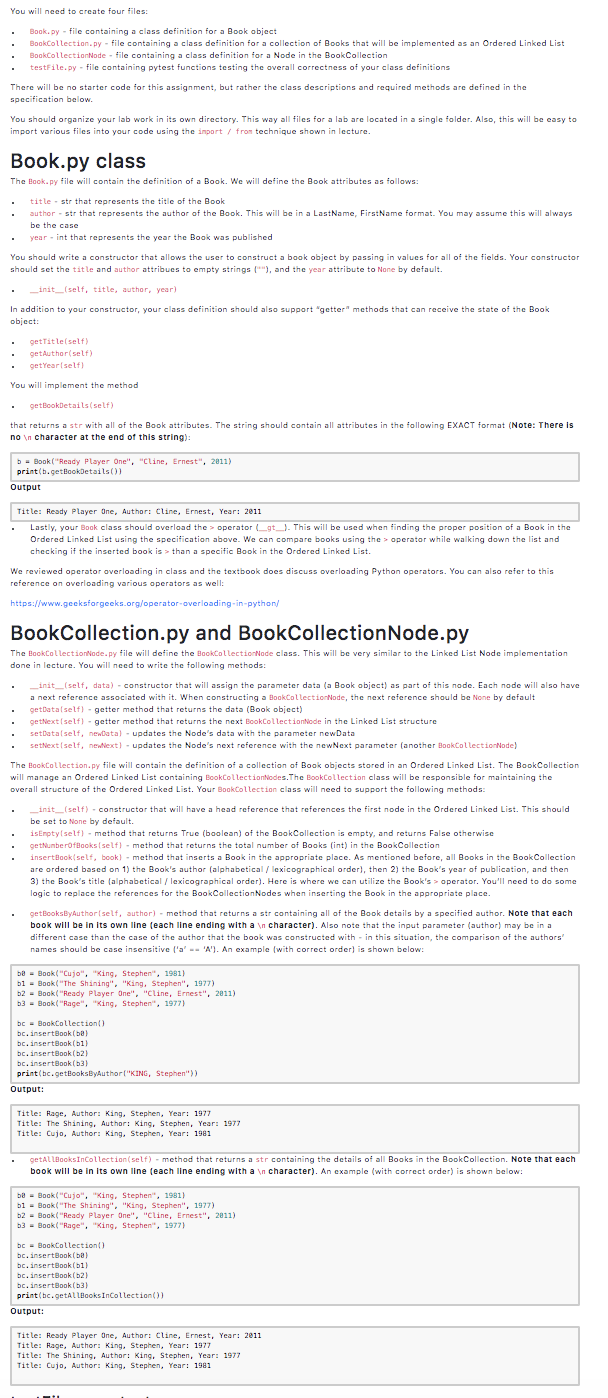
You will need to create four files: Book.py - file containing a class definition for a Book obiect Bookcollection.py - file containing a class definition for a collection of Books that will be implemented as an Ordered Linked List BookcollectionNode - file containing a class definition for a Node in the Book Collection testFile.py - file containing pytest functions testing the overall correctness of your class definitions There will be no starter code for this assignment, but rather the class descriptions and required methods are defined in the specification below. You should organize your lab work in its own directory. This way all files for a lab are located in a single folder. Also, this will be easy to import various files into your code using the import / from technique shown in lecture Book.py class The Book.py file will contain the definition of a Book. We will define the Book attributes as follows: . title - str that represents the title of the Book author - str that represents the author of the Book. This will be in a LastName, FirstName format. You may assume this will always be the case year - int that represents the year the Book was published You should write a constructor that allows the user to construct a book object by passing in values for all of the fields. Your constructor should set the title and author attribues to empty strings), and the year attribute to None by default. _init_(self, title, author, year) In addition to your constructor, your class definition should also support "getter" methods that can receive the state of the Book obiect: getTitle(self) getAuthor(self) getYear'self! You will implement the method getBookDetails(self) that returns a str with all of the Book attributes. The string should contain all attributes in the following EXACT format (Note: There is no in character at the end of this string): b = Book("Ready Player One", "cline, Ernest", 2011) print(b.getlookDetails Output Title: Ready Player One, Author: Cline, Ernest, Year: 2011 Lastly, your Book class should overload the operator_gt_). This will be used when finding the proper position of a Book in the Ordered Linked List using the specification above. We can compare books using the operator while walking down the list and checking if the inserted book is>than a specific Book in the Ordered Linked List. We reviewed operator overloading in class and the textbook does discuss overloading Python operators. You can also refer to this reference on overloading various operators as well: https://www.gecksforgeeks.org/operator-overloading-in-python/ Book Collection.py and Book CollectionNode.py The BookcollectionNode.py file will define the BookcollectionNode class. This will be very similar to the Linked List Node implementation done in lecture. You will need to write the following methods: _init_(self, data) - constructor that will assign the parameter data (a Book object) as part of this node. Each node will also have a next reference associated with it. When constructing a BookcollectionNode, the next reference should be None by default getData(self) - getter method that returns the data (Book obiect) getNext (self) - getter method that returns the next BookcollectionMode in the Linked List structure setData(self, newdata- updates the Node's data with the parameter newData setNext (self, newtext) - updates the Node's next reference with the newNext parameter (another BookcollectionNode) The Bookcollection.py file will contain the definition of a collection of Book objects stored in an Ordered Linked List. The BookCollection will manage an Ordered Linked List containing BookcollectionNodes. The Bookcollection class will be responsible for maintaining the overall structure of the Ordered Linked List. Your Bookcollection class will need to support the following methods: _init__(self) - constructor that will have a head reference that references the first node in the Ordered Linked List. This should be set to None by default. isEmpty(self) - method that returns True (boolean) of the Book Collection is empty, and returns False otherwise getuberoflooks self) - method that returns the total number of Books (int) in the Book Collection insertBook self, bookl - method that inserts a Book in the appropriate place. As mentioned before, all Books in the Book Collection are ordered based on 1) the Book's author (alphabetical/lexicographical order), then 2) the Book's year of publication, and then 3) the Book's title (alphabetical/lexicographical order). Here is where we can utilize the Book's operator. You'll need to do some logic to replace the references for the Book Collection Nodes when inserting the Book in the appropriate place. getBooksByAuthor(self, author) - method that returns a str containing all of the Book details by a specified author. Note that each book will be in its own line (each line ending with a n character). Also note that the input parameter (author) may be in a different case than the case of the author that the book was constructed within this situation, the comparison of the authors' names should be case insensitive l'a' -- 'A'). An example with correct order) is shown below: b - Book("Cujo", "King, Stephen", 1981) bi - Book("The Shining", "King, Stephen", 1977) b2 - Book("Ready Player One", "Cline, Emest", 2011) 63 - Book("Rage", "King, Stephen", 1977) bc - BookCollection bc.insertBook(ba) bc.insertBook (1) bc.insertBook(62) bc.insertBook (63) print(bc.getBooksByAuthor("KING, Stephen">) Output: Title: Rage, Author: King, Stephen, Year: 1977 Title: The Shining. Author: King, Stephen, Year: 1977 Title: Cujo, Author: King, Stephen, Year: 1981 getALlBooksInCollection(self) - method that returns a str containing the details of all Books in the Book Collection. Note that each book will be in its own line (each line ending with a n character). An example (with correct order) is shown below: ba - Book("Cujo", "King, Stephen", 1981) bi - Book("The Shining", "King, Stephen", 1977) b2 - Book("Ready Player One", "Cline, Emest", 2011) 63 - Book("Rage", "King, Stephen", 1977) bc = Book Collection bc.insertBook(ba) bc.insertBook(51) bc.insertBook (2) bc.insertBook (3) print(bc.getAllBooks Incollection()) Output: Title: Ready Player One, Author: Cline, Ernest, Year: 2011 Title: Rage, Author: King, Stephen, Year: 1977 Title: The Shining. Author: King, Stephen, Year: 1977 Title: Cujo, Author: King, Stephen, Year: 1981 You will need to create four files: Book.py - file containing a class definition for a Book obiect Bookcollection.py - file containing a class definition for a collection of Books that will be implemented as an Ordered Linked List BookcollectionNode - file containing a class definition for a Node in the Book Collection testFile.py - file containing pytest functions testing the overall correctness of your class definitions There will be no starter code for this assignment, but rather the class descriptions and required methods are defined in the specification below. You should organize your lab work in its own directory. This way all files for a lab are located in a single folder. Also, this will be easy to import various files into your code using the import / from technique shown in lecture Book.py class The Book.py file will contain the definition of a Book. We will define the Book attributes as follows: . title - str that represents the title of the Book author - str that represents the author of the Book. This will be in a LastName, FirstName format. You may assume this will always be the case year - int that represents the year the Book was published You should write a constructor that allows the user to construct a book object by passing in values for all of the fields. Your constructor should set the title and author attribues to empty strings), and the year attribute to None by default. _init_(self, title, author, year) In addition to your constructor, your class definition should also support "getter" methods that can receive the state of the Book obiect: getTitle(self) getAuthor(self) getYear'self! You will implement the method getBookDetails(self) that returns a str with all of the Book attributes. The string should contain all attributes in the following EXACT format (Note: There is no in character at the end of this string): b = Book("Ready Player One", "cline, Ernest", 2011) print(b.getlookDetails Output Title: Ready Player One, Author: Cline, Ernest, Year: 2011 Lastly, your Book class should overload the operator_gt_). This will be used when finding the proper position of a Book in the Ordered Linked List using the specification above. We can compare books using the operator while walking down the list and checking if the inserted book is>than a specific Book in the Ordered Linked List. We reviewed operator overloading in class and the textbook does discuss overloading Python operators. You can also refer to this reference on overloading various operators as well: https://www.gecksforgeeks.org/operator-overloading-in-python/ Book Collection.py and Book CollectionNode.py The BookcollectionNode.py file will define the BookcollectionNode class. This will be very similar to the Linked List Node implementation done in lecture. You will need to write the following methods: _init_(self, data) - constructor that will assign the parameter data (a Book object) as part of this node. Each node will also have a next reference associated with it. When constructing a BookcollectionNode, the next reference should be None by default getData(self) - getter method that returns the data (Book obiect) getNext (self) - getter method that returns the next BookcollectionMode in the Linked List structure setData(self, newdata- updates the Node's data with the parameter newData setNext (self, newtext) - updates the Node's next reference with the newNext parameter (another BookcollectionNode) The Bookcollection.py file will contain the definition of a collection of Book objects stored in an Ordered Linked List. The BookCollection will manage an Ordered Linked List containing BookcollectionNodes. The Bookcollection class will be responsible for maintaining the overall structure of the Ordered Linked List. Your Bookcollection class will need to support the following methods: _init__(self) - constructor that will have a head reference that references the first node in the Ordered Linked List. This should be set to None by default. isEmpty(self) - method that returns True (boolean) of the Book Collection is empty, and returns False otherwise getuberoflooks self) - method that returns the total number of Books (int) in the Book Collection insertBook self, bookl - method that inserts a Book in the appropriate place. As mentioned before, all Books in the Book Collection are ordered based on 1) the Book's author (alphabetical/lexicographical order), then 2) the Book's year of publication, and then 3) the Book's title (alphabetical/lexicographical order). Here is where we can utilize the Book's operator. You'll need to do some logic to replace the references for the Book Collection Nodes when inserting the Book in the appropriate place. getBooksByAuthor(self, author) - method that returns a str containing all of the Book details by a specified author. Note that each book will be in its own line (each line ending with a n character). Also note that the input parameter (author) may be in a different case than the case of the author that the book was constructed within this situation, the comparison of the authors' names should be case insensitive l'a' -- 'A'). An example with correct order) is shown below: b - Book("Cujo", "King, Stephen", 1981) bi - Book("The Shining", "King, Stephen", 1977) b2 - Book("Ready Player One", "Cline, Emest", 2011) 63 - Book("Rage", "King, Stephen", 1977) bc - BookCollection bc.insertBook(ba) bc.insertBook (1) bc.insertBook(62) bc.insertBook (63) print(bc.getBooksByAuthor("KING, Stephen">) Output: Title: Rage, Author: King, Stephen, Year: 1977 Title: The Shining. Author: King, Stephen, Year: 1977 Title: Cujo, Author: King, Stephen, Year: 1981 getALlBooksInCollection(self) - method that returns a str containing the details of all Books in the Book Collection. Note that each book will be in its own line (each line ending with a n character). An example (with correct order) is shown below: ba - Book("Cujo", "King, Stephen", 1981) bi - Book("The Shining", "King, Stephen", 1977) b2 - Book("Ready Player One", "Cline, Emest", 2011) 63 - Book("Rage", "King, Stephen", 1977) bc = Book Collection bc.insertBook(ba) bc.insertBook(51) bc.insertBook (2) bc.insertBook (3) print(bc.getAllBooks Incollection()) Output: Title: Ready Player One, Author: Cline, Ernest, Year: 2011 Title: Rage, Author: King, Stephen, Year: 1977 Title: The Shining. Author: King, Stephen, Year: 1977 Title: Cujo, Author: King, Stephen, Year: 1981
Step by Step Solution
There are 3 Steps involved in it

Get step-by-step solutions from verified subject matter experts
 Study Help