







Question: PLEASE I NEED HELP WITH MY EXCEL ASSIGNMENT . IF YOU CAN INCLUDE ALL THE FORMULAS YOU USED TO KEY IN THE EXCELL SHEET I
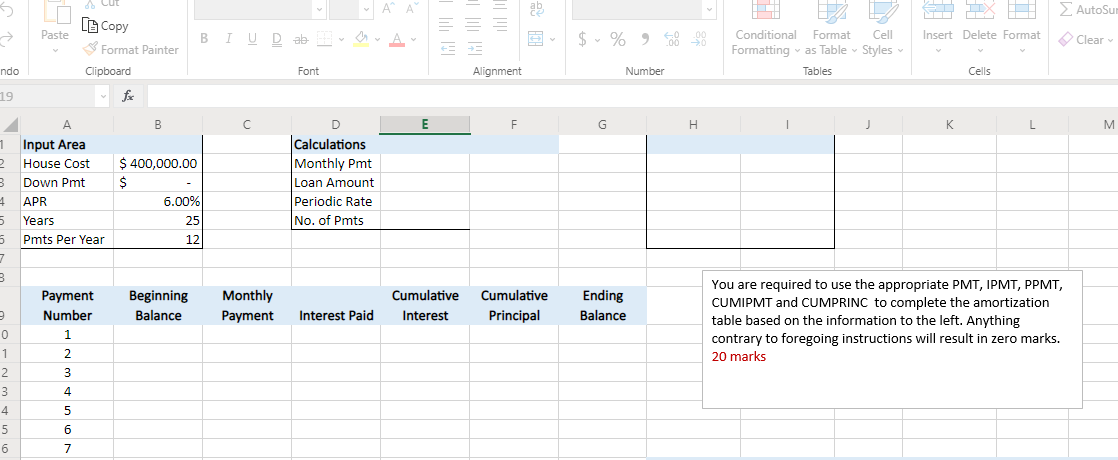
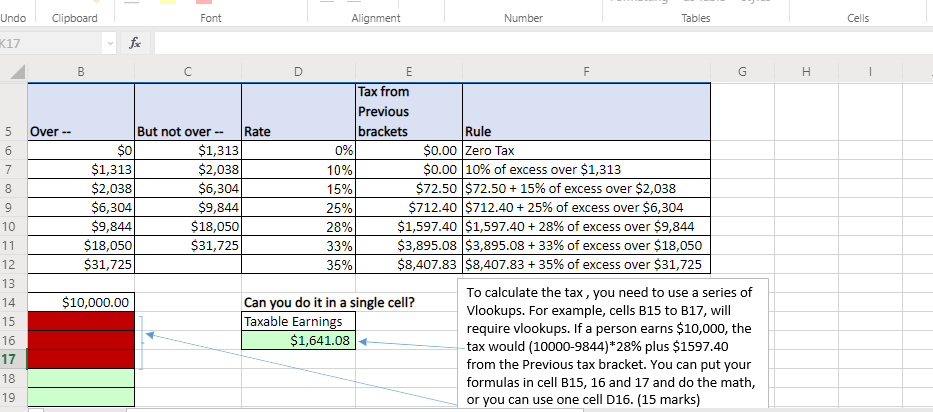
PLEASE I NEED HELP WITH MY EXCEL ASSIGNMENT . IF YOU CAN INCLUDE ALL THE FORMULAS YOU USED TO KEY IN THE EXCELL SHEET I WILL REALLY APPRECIATE. THANKS
APA TH AutoSur 5 > Cut LECopy Format Painter Paste 00 MA B IUD ab $ % 9 - Insert Delete Format Clear Conditional Format Cell Formatting vas Table Styles Tables ndo Clipboard Font Alignment Number Cells 19 B E F G H 1 K K L M $ 400,000.00 $ 6.00% 25 D Calculations Monthly Pmt Loan Amount Periodic Rate No. of Pmts 12 1 Input Area 2 House Cost 3 Down Pmt 4 APR 5 Years 5 Pmts Per Year 7 3 Payment Number 0 1 1 2 2 3 3 4 4 5 5 6 6 7 Beginning Balance Monthly Payment Cumulative Interest Cumulative Principal Ending Balance Interest Paid You are required to use the appropriate PMT, IPMT, PPMT, CUMIPMT and CUMPRINC to complete the amortization table based on the information to the left. Anything contrary to foregoing instructions will result in zero marks. 20 marks Undo Clipboard Font Alignment Number Tables Cells K17 fac F I 5 6 7 8 9 10 11 B D E G Tax from Previous Over But not over -- Rate brackets Rule $0 $1,313 0% $0.00 Zero Tax $1,313 $2,038 10% $0.00 10% of excess over $1,313 $2,038 $6,304 15% $72.50 $72.50 + 15% of excess over $2,038 $6,304 $9,844 25% $712.40 $712.40 + 25% of excess over $6,304 $9,844 $18,050 28% $1,597.40 $1,597.40 + 28% of excess over $9,844 $18,050 $31,725 33% $3,895.08 $3,895.08 + 33% of excess over $18,050 $31,725 35% $8,407.83 $8,407.83 + 35% of excess over $31,725 $10,000.00 Can you do it in a single cell? To calculate the tax, you need to use a series of Vlookups. For example, cells B15 to B17, will Taxable Earnings require vlookups. If a person earns $10,000, the $1,641.08 tax would (10000-9844)*28% plus $1597.40 from the Previous tax bracket. You can put your formulas in cell B15, 16 and 17 and do the math, or you can use one cell D16. (15 marks) 12 13 14 15 16 17 18 19
Step by Step Solution
There are 3 Steps involved in it

Get step-by-step solutions from verified subject matter experts
 Study Help