







Question: Please I need to choose two features and write code for each of them and the features I I want to do are drawEyeglasses and
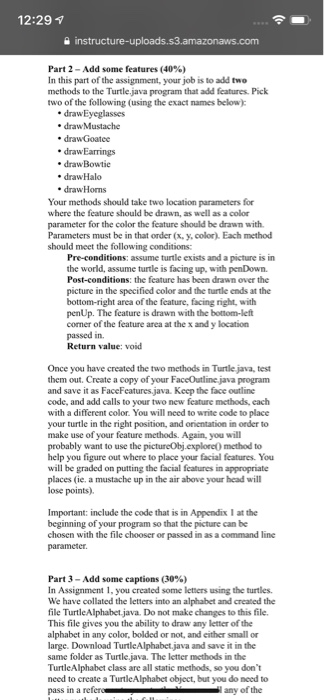
12:29 1 Part 2-Add some features (40%) In this part of the assignment, your job is to add two methods to the Turtle.java program that add features. Pick two of the following (using the exact names drawEyeglasses . drawMustache . drawBowtie e drawHalo drawHorns Your methods should take two location parameters for where the feature should be drawn, as well as a color parameter for the color the feature should be drawn with. Parameters must be in that order (x, ycolor). Each method should meet the following conditions: Pre-conditions: assume turtle exists and a picture is in the world, assume turtle is facing up, with penDown. Post-conditions: the feature has been drawn over the picture in the specified color and the turtle ends at the bottom-right area of the feature, facing right, with penUp. The feature is drawn with the bottom-left corner of the feature area at the x and y location passed in. Return value: void Once you have created the two methods in Turtle java, test hem out. Create a copy of your F and save it as FaceFeatures java. Keep the face outline code, and add calls to your two new feature methods, each with a different color. You will need to write code to place your turtle in the right position, and orientation in order to make use of your feature methods. Again, you will probably want to use the pictureObj.explore) method to help you figure out where to place your facial features. You will be graded on putting the facial features in appropriate places (ie. a mustache up in the air above your head will lose points) aceOutline java program Important: include the code that is in Appendix I at the beginning of your program so that the picture can be chosen with the file chooser or passed in as a command line Part 3-Add some captions (30%) In Assignment 1, you created some letters using the turtles. We have collated the letters into an alphabet and created the file TurtleAlphabet.java. Do not make changes to this file This file gives you the ability to draw any letter of the alphabet in any color, bolded or not, and either small or large. Download TurtleAlphabet.java and save it in the same folder as Turtle java. The letter methods in the TurtleAlphabet class are all static methods, so you don't need to create a TurtleAlphabet object, but you do need to pass in a any of the 12:29 1 Part 2-Add some features (40%) In this part of the assignment, your job is to add two methods to the Turtle.java program that add features. Pick two of the following (using the exact names drawEyeglasses . drawMustache . drawBowtie e drawHalo drawHorns Your methods should take two location parameters for where the feature should be drawn, as well as a color parameter for the color the feature should be drawn with. Parameters must be in that order (x, ycolor). Each method should meet the following conditions: Pre-conditions: assume turtle exists and a picture is in the world, assume turtle is facing up, with penDown. Post-conditions: the feature has been drawn over the picture in the specified color and the turtle ends at the bottom-right area of the feature, facing right, with penUp. The feature is drawn with the bottom-left corner of the feature area at the x and y location passed in. Return value: void Once you have created the two methods in Turtle java, test hem out. Create a copy of your F and save it as FaceFeatures java. Keep the face outline code, and add calls to your two new feature methods, each with a different color. You will need to write code to place your turtle in the right position, and orientation in order to make use of your feature methods. Again, you will probably want to use the pictureObj.explore) method to help you figure out where to place your facial features. You will be graded on putting the facial features in appropriate places (ie. a mustache up in the air above your head will lose points) aceOutline java program Important: include the code that is in Appendix I at the beginning of your program so that the picture can be chosen with the file chooser or passed in as a command line Part 3-Add some captions (30%) In Assignment 1, you created some letters using the turtles. We have collated the letters into an alphabet and created the file TurtleAlphabet.java. Do not make changes to this file This file gives you the ability to draw any letter of the alphabet in any color, bolded or not, and either small or large. Download TurtleAlphabet.java and save it in the same folder as Turtle java. The letter methods in the TurtleAlphabet class are all static methods, so you don't need to create a TurtleAlphabet object, but you do need to pass in a any of the
Step by Step Solution
There are 3 Steps involved in it

Get step-by-step solutions from verified subject matter experts
 Study Help