







Question: PLEASE IMPLEMENT THE FOLLOWING FUNCTION USING THIS GIVEN INFO AND SCREENSHOT OF FORMAT. FUNCTION IS CALLED void list _ galaxy ( char * galaxy _
PLEASE IMPLEMENT THE FOLLOWING FUNCTION USING THIS GIVEN INFO AND SCREENSHOT OF FORMAT. FUNCTION IS CALLED void listgalaxychar galaxypathname, int longlisting Subset
To complete subset you need to implement code that can
print a list of the contents of a galaxy, and
print a detailed list of the contents of a galaxy.
Subset : Print a list of the contents of a galaxy
Given the l commandline argument, space should print the path names of the filesdirectories in a galaxy.
For example:
List each item in the galaxy called textfile.galaxy, which is in the examples directory
space l examplestextfile.galaxy
hello.txt
List each item in the galaxy called files.galaxy, which is in the examples directory
space l examplesfiles.galaxy
bin
hello.txt
lastgoodbye.txt
thesedays.txt
List each item in the galaxy called helloworld.galaxy, which is in the examples directory
space l exampleshelloworld.galaxy
hello.c
hello.cpp
hello.d
hello.go
hello.hs
hello.java
hello.js
hello.pl
hello.py
hello.rs
hello.s
hello.sh
hello.sql
Subset : Print a detailed list of the contents of a galaxy
Given the L commandline argument, space should, for each file in the specified galaxy, print:
the filedirectory permissions,
the star format which will be one of or the default
the filedirectory size in bytes, and
the filedirectory path name.
space L examplestextfile.galaxy
rwrr hello.txt
List the details of each item in the galaxy called files.galaxy, which is in the examples directory
space L examplesfiles.galaxy
rwrrbin
rwrr hello.txt
rrr lastgoodbye.txt
rrwr thesedays.txt
List the details of each item in the galaxy called helloworld.galaxy, which is in the examples directory
space L exampleshelloworld.galaxy
rwrr hello.c
rwrr hello.cpp
rwrr hello.d
rwrr hello.go
rwrr hello.hs
rwrr hello.java
rwrr hello.js
rwxrxrx hello.pl
rwxrxrx hello.py
rwrr hello.rs
rwrr hello.s
rwxrxrx hello.sh
rwrr hello.sql
spacemain.c calls the function listgalaxy in space.c when either of the l or L options are specified on the command line.
Add code to listgalaxy in space.c
Use fopen to open the galaxy file.
Use fgetc to read bytes.
Make sure you understand the star format specification below
Use C bitwise operations such as & and to combine bytes into integers.
Think carefully about the functions you can construct to avoid repeated code.
Review printbytes.c from our week lab.
fseek can be used to skip over parts of the galaxy file, but you can also use a loop and fgetc
The order you list files is the order they appear in the galaxy.
galaxy files do not necessarily end with galaxy. This has been done with the provided example files purely as a convenience.
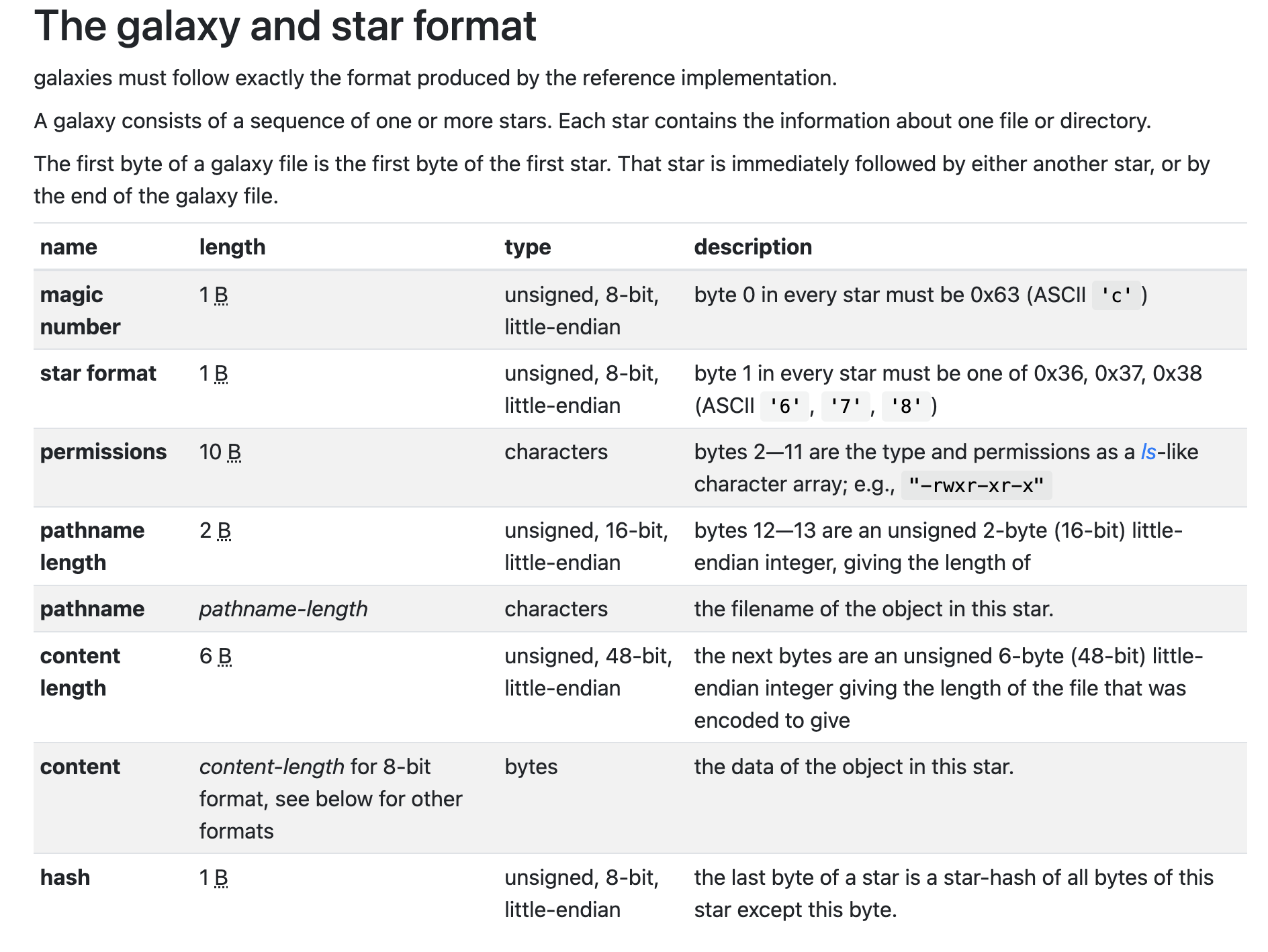
Hint: use a format like lu to print the file size. IMPLEMENT "void listgalaxychar galaxypathname, int longlisting don't use fgets but use fgetc.The galaxy and star format
galaxies must follow exactly the format produced by the reference implementation.
A galaxy consists of a sequence of one or more stars. Each star contains the information about one file or directory.
The first byte of a galaxy file is the first byte of the first star. That star is immediately followed by either another star, or by
the end of the galaxy file.
Step by Step Solution
There are 3 Steps involved in it
1 Expert Approved Answer
Step: 1 Unlock

Question Has Been Solved by an Expert!
Get step-by-step solutions from verified subject matter experts
Step: 2 Unlock
Step: 3 Unlock
 Study Help