







Question: Please implement the following hough transform function using Matlab! YOU MAY FIND THIS HELPFUL: 2) Write the function hough_transform that takes as input an edge
Please implement the following hough transform function using Matlab!
YOU MAY FIND THIS HELPFUL:
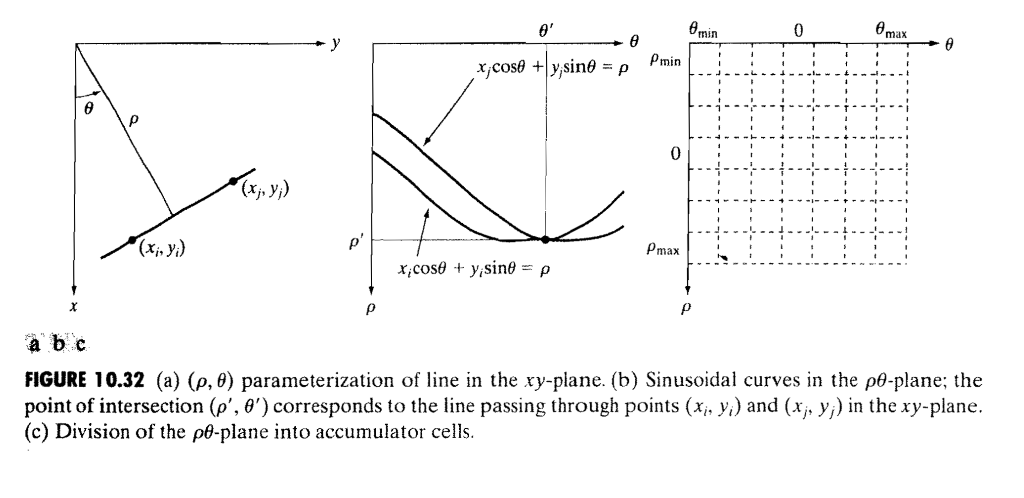
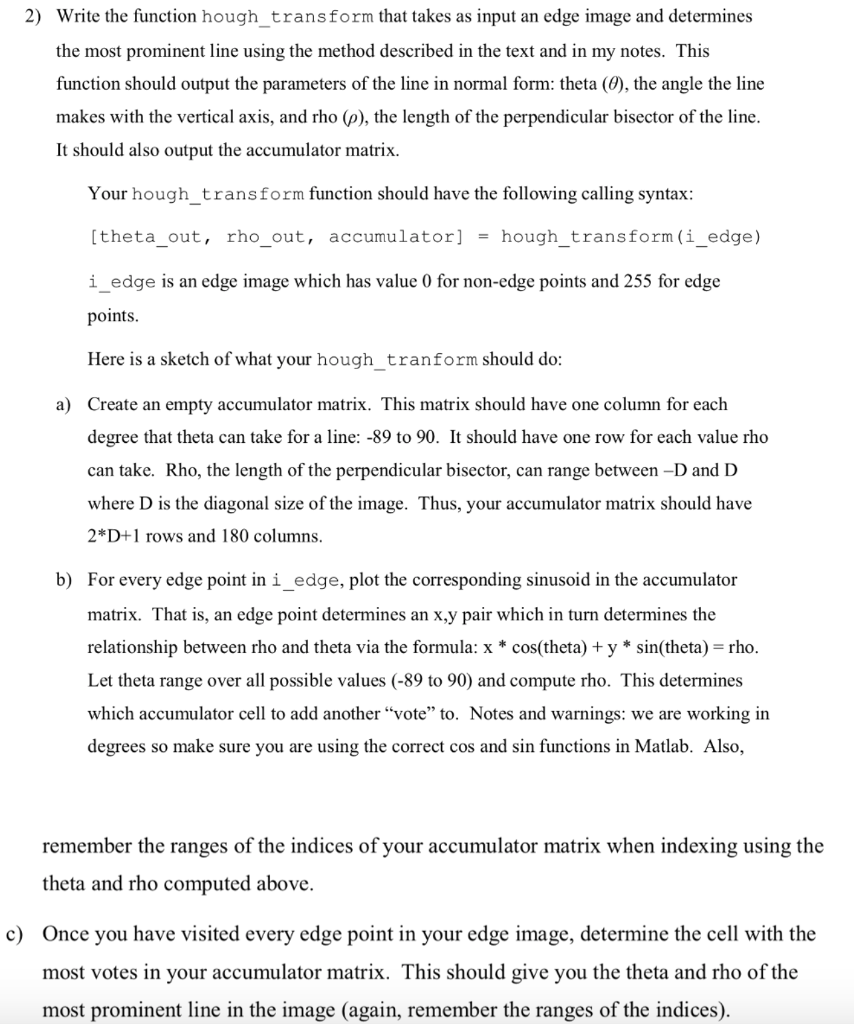
2) Write the function hough_transform that takes as input an edge image and determines the most prominent line using the method described in the text and in my notes. This function should output the parameters of the line in normal form. theta (), the angle the line makes with the vertical axis, and rho (p), the length of the perpendicular bisector of the line It should also output the accumulator matrix. Your hough_transform function should have the following calling syntax theta_out, rho_out, accumulator]-hough_transform (i_edge) i_edge is an edge image which has value 0 for non-edge points and 255 for edge points Here is a sketch of what your hough_tranform should do Create an empty accumulator matrix. This matrix should have one column for each degree that theta can take for a line: -89 to 90. It should have one row for each value rho can take. Rho, the length of the perpendicular bisector, can range between -D and D where D is the diagonal size of the image. Thus, your accumulator matrix should have 2*D+1 rows and 180 columns a) b) For every edge point in i_edge, plot the corresponding sinusoid in the accumulator matrix. That is, an edge point determines an x.y pair which in turn determines the relationship between rho and theta via the formula: x * cos(theta) + y * sin(theta)- rho Let theta range over all possible values (-89 to 90) and compute rho. This determines which accumulator cell to add another "vote" to. Notes and warnings: we are working in degrees so make sure you are using the correct cos and sin functions in Matlab. Also, remember the ranges of the indices of your accumulator matrix when indexing using the theta and rho computed above. Once you have visited every edge point in your edge image, determine the cell with the most votes in your accumulator matrix. This should give you the theta and rho of the most prominent line in the image (again, remember the ranges of the indices). 2) Write the function hough_transform that takes as input an edge image and determines the most prominent line using the method described in the text and in my notes. This function should output the parameters of the line in normal form. theta (), the angle the line makes with the vertical axis, and rho (p), the length of the perpendicular bisector of the line It should also output the accumulator matrix. Your hough_transform function should have the following calling syntax theta_out, rho_out, accumulator]-hough_transform (i_edge) i_edge is an edge image which has value 0 for non-edge points and 255 for edge points Here is a sketch of what your hough_tranform should do Create an empty accumulator matrix. This matrix should have one column for each degree that theta can take for a line: -89 to 90. It should have one row for each value rho can take. Rho, the length of the perpendicular bisector, can range between -D and D where D is the diagonal size of the image. Thus, your accumulator matrix should have 2*D+1 rows and 180 columns a) b) For every edge point in i_edge, plot the corresponding sinusoid in the accumulator matrix. That is, an edge point determines an x.y pair which in turn determines the relationship between rho and theta via the formula: x * cos(theta) + y * sin(theta)- rho Let theta range over all possible values (-89 to 90) and compute rho. This determines which accumulator cell to add another "vote" to. Notes and warnings: we are working in degrees so make sure you are using the correct cos and sin functions in Matlab. Also, remember the ranges of the indices of your accumulator matrix when indexing using the theta and rho computed above. Once you have visited every edge point in your edge image, determine the cell with the most votes in your accumulator matrix. This should give you the theta and rho of the most prominent line in the image (again, remember the ranges of the indices)
Step by Step Solution
There are 3 Steps involved in it

Get step-by-step solutions from verified subject matter experts
 Study Help