



Question: Please include any formulas Using the EA7-E1-Payroll file, finish the partially completed payroll register to enter earnings, deductions, and net pay data. (Chapter 7) Modify
Please include any formulas
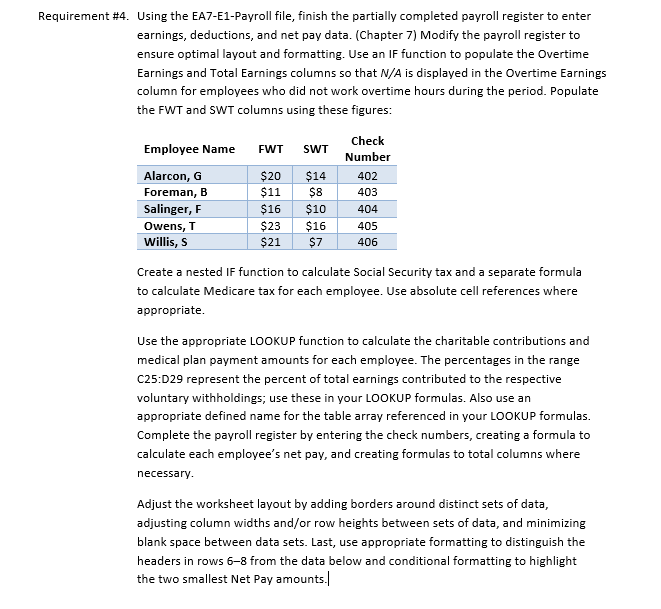
Using the EA7-E1-Payroll file, finish the partially completed payroll register to enter earnings, deductions, and net pay data. (Chapter 7) Modify the payroll register to ensure optimal layout and formatting. Use an IF function to populate the Overtime Earnings and Total Earnings columns so that N/A is displayed in the Overtime Earnings column for employees who did not work overtime hours during the period. Populate the FWT and SWT columns using these figures: Create a nested IF function to calculate Social Security tax and a separate formula to calculate Medicare tax for each employee. Use absolute cell references where appropriate. Use the appropriate LOOKUP function to calculate the charitable contributions and medical plan payment amounts for each employee. The percentages in the range C25:D29 represent the percent of total earnings contributed to the respective voluntary withholdings; use these in your LOOKUP formulas. Also use an appropriate defined name for the table array referenced in your LOOKUP formulas. Complete the payroll register by entering the check numbers, creating a formula to calculate each employee's net pay, and creating formulas to total columns where necessary. Adjust the worksheet layout by adding borders around distinct sets of data, adjusting column widths and/or row heights between sets of data, and minimizing blank space between data sets. Last, use appropriate formatting to distinguish the headers in rows 6-8 from the data below and conditional formatting to highlight the two smallest Net Pay amounts.|
Step by Step Solution
There are 3 Steps involved in it

Get step-by-step solutions from verified subject matter experts