





Question: Please include the source code 2. Install ns3 on your computer (you can choose any supported OSs. I recommend to install Ubuntu on VirtualBox if

Please include the source code
Please include the source code 2. Install ns3 on your computer (you

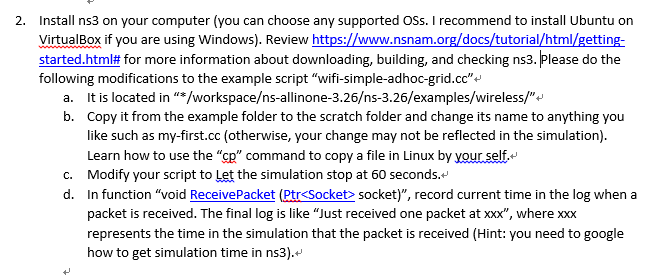
2. Install ns3 on your computer (you can choose any supported OSs. I recommend to install Ubuntu on VirtualBox if you are using Windows). Review started.html# for more information about downloading, building, and checking ns3. Please do the following modifications to the example script wifi-simple-adhoc-grid.cc"+' www.nsnam.org/docs/tutorial/html/gettin It is located in */workspaces-allinone-3.26s-3.26/examples/wireless/ Copy it from the example folder to the scratch folder and change its name to anything you like such as my-first.cc (otherwise, your change may not be reflected in the simulation) Learn how to use the "Cp" command to copy a file in Linux by your.self. b. c. Modify your script to Let the simulation stop at 60 seconds. d. In function "void ReceivePacket (Ptr socket)", record current time in the log when a packet is received. The final log is like "Just received one packet at xxx", where xxx represents the time in the simulation that the packet is received (Hint: you need to google how to get simulation time in ns3). 2. Install ns3 on your computer (you can choose any supported OSs. I recommend to install Ubuntu on VirtualBox if you are using Windows). Review started.html# for more information about downloading, building, and checking ns3. Please do the following modifications to the example script wifi-simple-adhoc-grid.cc"+' www.nsnam.org/docs/tutorial/html/gettin It is located in */workspaces-allinone-3.26s-3.26/examples/wireless/ Copy it from the example folder to the scratch folder and change its name to anything you like such as my-first.cc (otherwise, your change may not be reflected in the simulation) Learn how to use the "Cp" command to copy a file in Linux by your.self. b. c. Modify your script to Let the simulation stop at 60 seconds. d. In function "void ReceivePacket (Ptr socket)", record current time in the log when a packet is received. The final log is like "Just received one packet at xxx", where xxx represents the time in the simulation that the packet is received (Hint: you need to google how to get simulation time in ns3)

Step by Step Solution

There are 3 Steps involved in it

1 Expert Approved Answer
Step: 1 Unlock blur-text-image
Question Has Been Solved by an Expert!

Get step-by-step solutions from verified subject matter experts

Step: 2 Unlock
Step: 3 Unlock

Students Have Also Explored These Related Databases Questions!