







Question: Please include the steps taken to complete the assignment (and or download to finished document). Thank you. Word Application Assignment 50 points Word GENERAL DIRECTIONS:
Please include the steps taken to complete the assignment (and or download to finished document). Thank you.
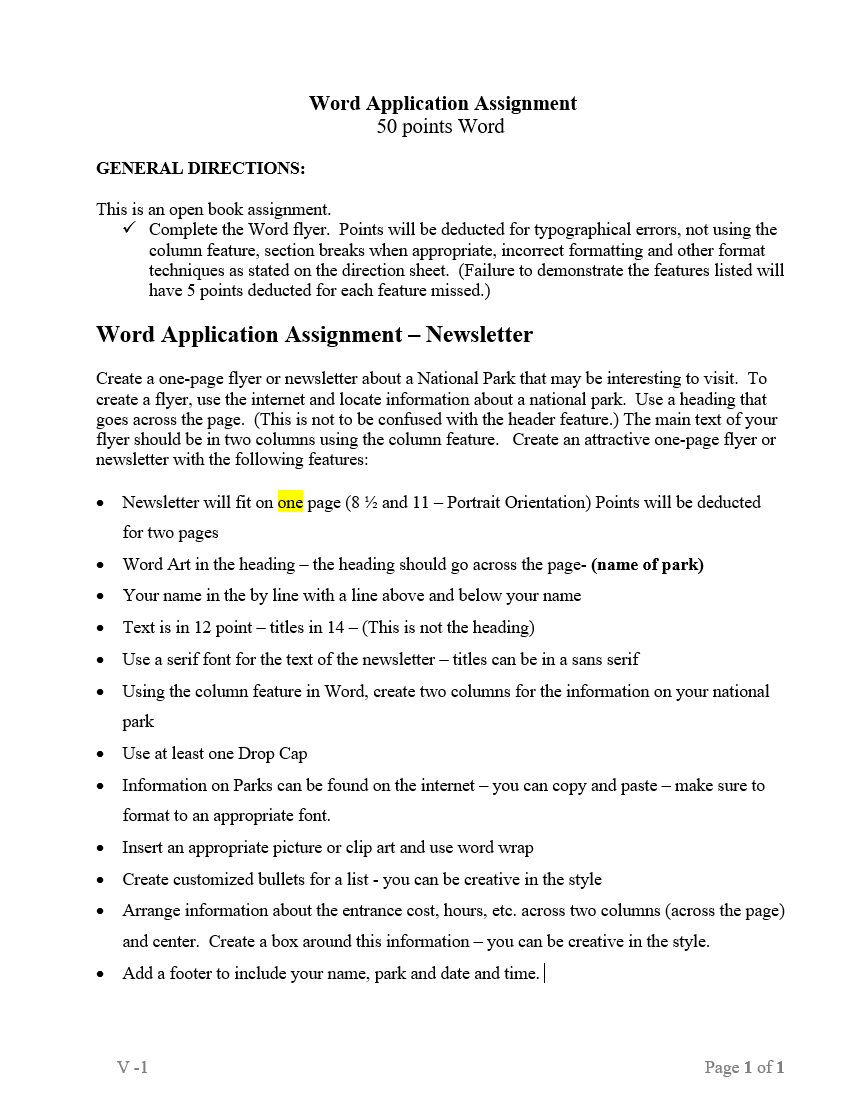
Word Application Assignment 50 points Word GENERAL DIRECTIONS: This is an open book assignment. Complete the Word flyer. Points will be deducted for typographical errors, not using the column feature, section breaks when appropriate, incorrect formatting and other format techniques as stated on the direction sheet. (Failure to demonstrate the features listed will have 5 points deducted for each feature missed.) Word Application Assignment - Newsletter Create a one-page flyer or newsletter about a National Park that may be interesting to visit. To create a flyer, use the internet and locate information about a national park. Use a heading that goes across the page. (This is not to be confused with the header feature.) The main text of your flyer should be in two columns using the column feature. Create an attractive one-page flyer or newsletter with the following features: Newsletter will fit on one page (8 42 and 11 - Portrait Orientation) Points will be deducted for two pages Word Art in the heading - the heading should go across the page-(name of park) Your name in the by line with a line above and below your name Text is in 12 point titles in 14 - (This is not the heading) Use a serif font for the text of the newsletter titles can be in a sans serif Using the column feature in Word, create two columns for the information on your national park Use at least one Drop Cap Information on Parks can be found on the internet - you can copy and paste - make sure to format to an appropriate font. Insert an appropriate picture or clip art and use word wrap Create customized bullets for a list - you can be creative in the style Arrange information about the entrance cost, hours, etc. across two columns across the page) and center. Create a box around this information - you can be creative in the style. Add a footer to include your name, park and date and time. | V-1 Page 1 of 1 Word Application Assignment 50 points Word GENERAL DIRECTIONS: This is an open book assignment. Complete the Word flyer. Points will be deducted for typographical errors, not using the column feature, section breaks when appropriate, incorrect formatting and other format techniques as stated on the direction sheet. (Failure to demonstrate the features listed will have 5 points deducted for each feature missed.) Word Application Assignment - Newsletter Create a one-page flyer or newsletter about a National Park that may be interesting to visit. To create a flyer, use the internet and locate information about a national park. Use a heading that goes across the page. (This is not to be confused with the header feature.) The main text of your flyer should be in two columns using the column feature. Create an attractive one-page flyer or newsletter with the following features: Newsletter will fit on one page (8 42 and 11 - Portrait Orientation) Points will be deducted for two pages Word Art in the heading - the heading should go across the page-(name of park) Your name in the by line with a line above and below your name Text is in 12 point titles in 14 - (This is not the heading) Use a serif font for the text of the newsletter titles can be in a sans serif Using the column feature in Word, create two columns for the information on your national park Use at least one Drop Cap Information on Parks can be found on the internet - you can copy and paste - make sure to format to an appropriate font. Insert an appropriate picture or clip art and use word wrap Create customized bullets for a list - you can be creative in the style Arrange information about the entrance cost, hours, etc. across two columns across the page) and center. Create a box around this information - you can be creative in the style. Add a footer to include your name, park and date and time. | V-1 Page 1 of 1
Step by Step Solution
There are 3 Steps involved in it

Get step-by-step solutions from verified subject matter experts
 Study Help