







Question: please list steps to complete and code needed in swift i will thumbs up on rating !!!! Create an Xcode project that is an iOS
please list steps to complete and code needed in swift
i will thumbs up on rating !!!!
Create an Xcode project that is an iOS Single View Application and choose Swift for the programming language and Universal for device
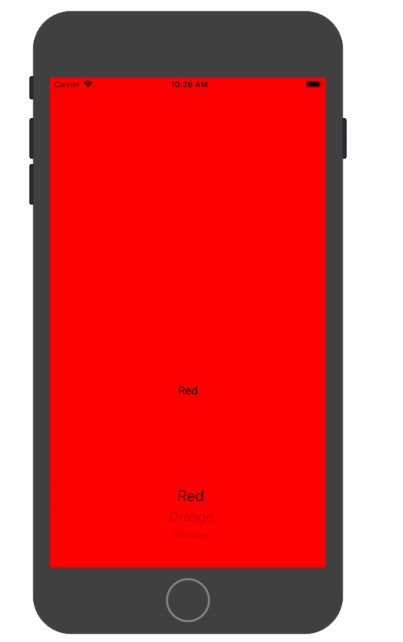
Create an iOS app that contains a Picker View that lists the colors Red, Orange, Yellow, Green, Blue and Purple. When the app launches, the picker is to be set to one of the colors, the background color of the view is to be the selected color and the label in the view is to display the name of the color. When the user selects another color using the picker, the background color is to be set to the selected color and the name of the color is to be displayed in the label. In the viewDidLoad, set the initial color to the first color (Red) in the array of colors. Make sure, though, that the initial color can be set to any of the colors in the array. Do not hard-code the initial background color or the initial string in the label. A variable should indicate the index of the initial color and the code should use the initial color to set the background color, string in the label, and the selection on the picker.
The picker is to be given auto layout constraints so that it is 0 points from the left, right, and bottom edges of the view. The label that displays the name of the color is to be centered horizontally and 40 points above the picker.
An array of colors is needed. Each item in the array is an instance of a struct that you create that contains a string that is the name of the color and an associated UIColor. For an example, the first struct instance in the array needs to contain "Red" and UIColor.red as the properties.
A variable in the view controller is to be set to indicate the index of the initial color. The initial color is to be used when the app launches to set the background color, the string in the label, and the picker row that is selected. The viewDidLoad is a good place to use the index of the initial color and set the initial background color, label text, and selected picker row.
Implementing a Picker View has a number of similarities to implementing a Table View. The picker view's contents are determined by methods implemented by the UIPickerViewDataSource and UIPickerViewDelegate like a Table View uses UITableViewDataSource and UITableViewDelegate. So, a Picker View needs to have a delegate and dataSource which is typically the View Controller for the view that contains the picker.
There are properties/methods on the Picker View that can also be used to configure the picker and set the selected item.
Picker Views can have multiple components (segments of the picker) like a Table View can have multiple sections. Each component in the picker has a number of rows like each section of a Table View has a number of rows.
Table Views utilize cells that define what each row in the table looks like. A Picker View can have views that define what rows look like or a title for a row (which is a string) can be specified.
For this project the picker has one component and titles can be used to define the contents of the rows.
Output
Step by Step Solution
There are 3 Steps involved in it

Get step-by-step solutions from verified subject matter experts
 Study Help